Porter allows developers to build customizable forms on top of Helm by adding an optional form.yaml file to any Helm chart. Currently, forms can write to any field specified in a chart's values.yaml. We are working to add support for user-defined applets that can directly perform CRUD operations on cluster resources.
The goal of Porter forms is to improve the UX of interacting with Helm and Kubernetes for both DevOps teams and developers less familiar with k8s. Below is an example of a simple form.yaml and the corresponding view from the Porter dashboard:
tabs:
- name: main
  label: Main Settings
  sections:
  - name: section_one
    contents:
    - type: heading
      label: 🍺 Hello Porter Settings
    - type: subtitle
      label: Update ports for Hello Porter with Porter
    - type: number-input
      variable: service.port
      label: Service Port
      settings:
        default: 80
    - type: number-input
      variable: service.targetPort
      label: Target Port
      settings:
        default: 8005
    - name: show-hidden
      type: checkbox
      label: Show hidden section
...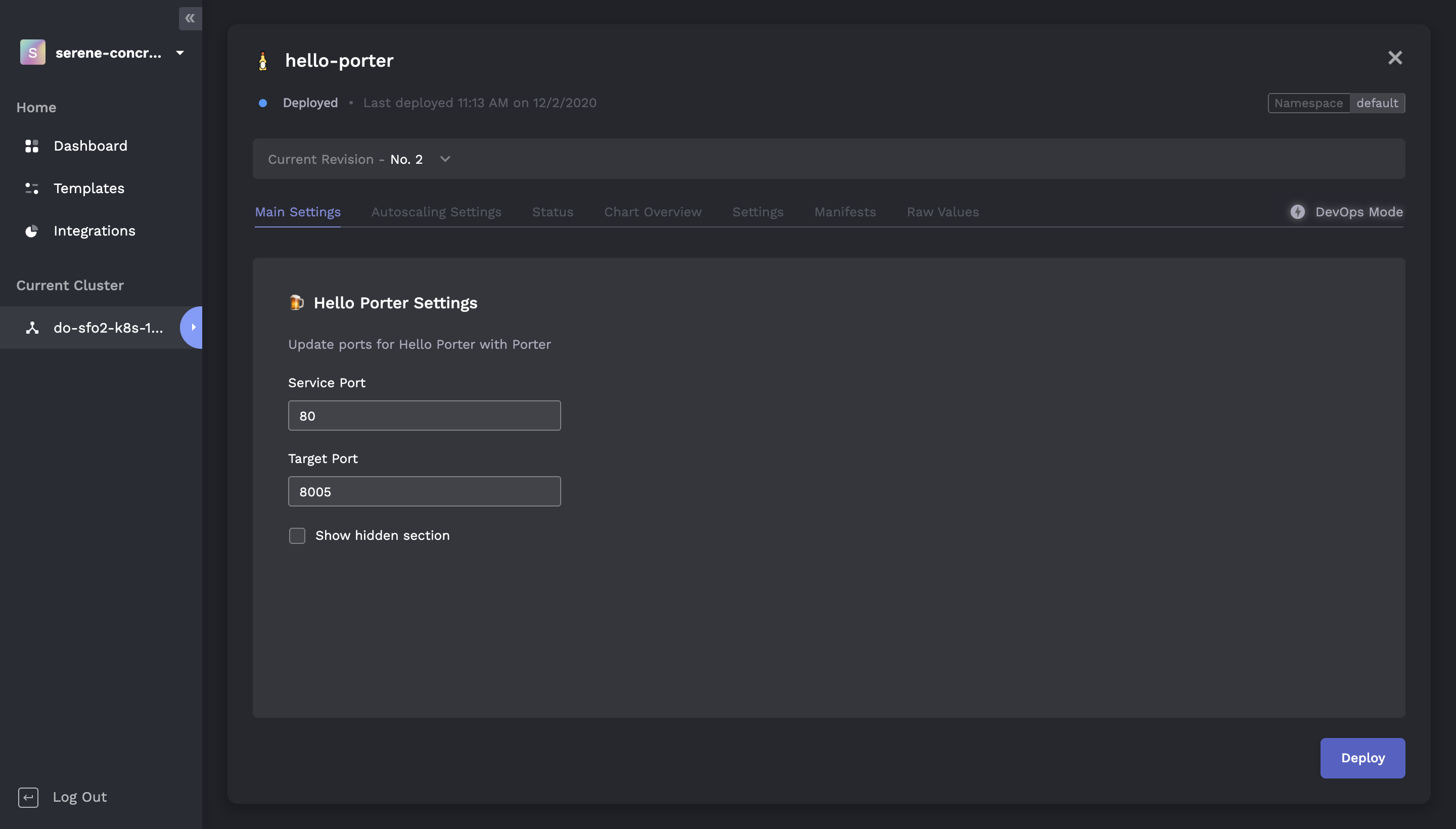
A key advantage of using forms is that developers can manage configuration for cluster resources in a structured fashion without having to directly deal with error-prone yaml.
To add a Porter form to an existing chart, simply add a form.yaml file to your chart source (where values.yaml is being stored) before packaging and redeploying your chart.
Forms can target any field in a chart's values.yaml and are automatically rendered by the Porter dashboard if a valid form.yaml file is detected in the source of an installed Helm chart. Clicking "Deploy" applies an upgrade to the target chart with the specified form values.
Note: Currently if you would like to use forms with a public Helm chart, you will need to copy the chart's source and host it in your own chart repo. A form.yaml can then be bundled prior to deploying the chart.
Here is the full form.yaml previously shown:
tabs:
- name: main
  label: Main Settings
  sections:
  - name: section_one
    contents:
    - type: heading
      label: 🍺 Hello Porter Settings
    - type: subtitle
      label: Update ports for Hello Porter with Porter
    - type: number-input
      variable: service.port
      label: Service Port
      settings:
        default: 80
    - type: number-input
      variable: service.targetPort
      label: Target Port
      settings:
        default: 8005
    - name: show-hidden
      type: checkbox
      label: Show hidden section
  - name: section_two
    show_if: show-hidden
    contents:
    - type: heading
      label: Collapsible
    - type: subtitle
      label: This is a collapsible section!
    - type: string-input
      variable: serviceAccount.name
      label: Service Account Name
- name: autoscaling
  label: Autoscaling Settings
  sections:
  - name: autoscaling
    contents:
    - type: heading
      label: 🚀 Autoscaling Settings
    - type: subtitle
      label: Set minimum and maximum replicas.
    - type: number-input
      variable: autoscaling.minReplicas
      label: Minimum Replicas
      settings:
        default: 0
    - type: number-input
      variable: autoscaling.maxReplicas
      label: Maximum Replicas
      settings:
        default: 2
Porter forms are organized at the top level as a list of tabs that are displayed when the relevant chart is expanded:
tabs:
# A Porter form consists of at least one tab
- name: main
  label: Main Settings
  sections:
    ...
- name: autoscaling
  label: Autoscaling Settings
  sections:
    ...
Each tab consists of a unique name, a label for rendering, and a list of sections. Each section has its own unique name and list of contents:
tabs:
- name: main
  label: Main Settings
  sections:
  - name: section_one
    contents:
    - type: heading
      label: 🍺 Hello Porter Settings
    - type: subtitle
      label: Update ports for Hello Porter with Porter
    - type: number-input
      variable: service.port
      label: Service Port
      settings:
        default: 80
    - type: number-input
      variable: service.targetPort
      label: Target Port
      settings:
        default: 8005
  ...
A section's contents contains a list of form units which can display information or accept user inputs to values.yaml. The different form units are catalogued below:
Required fields:
label- Label to render (string)
Required fields:
label- Label to render (string)
Required fields:
variable- Target variable invalues.yaml(string)label- Label to render (string)settingsdefault- Default value (number)unit- Input unit (string)
Required fields:
- variable - Target variable in values.yaml (string)
- label - Label to render (string)
- settings
- default - Default value (string)
- unit - Input unit (string)
- variable - Target variable in values.yaml (string)
- label - Label to render (string)
- settings
- default - Default value (boolean)
Required fields:
- variable - Target variable in values.yaml (string)
- label - Label to render (string)
- settings
- default - Default value (string)
- options - A list of options containing a value and label field
Checkboxes can also collapse or expand other sections located in the same tab. To create a collapsible section, specify a checkbox with a unique name and add the show_if field to the target section:
...
  sections:
  - name: section_one
    contents:
        ...
    - name: show-hidden
      type: checkbox
      label: Show hidden section
  - name: section_two
    show_if: show-hidden
    contents:
    ...
In the above example, section_two will only render if show-hidden is toggled on from the dashboard. Note that variable does not need to be set for this checkbox.
We are continuing to expand the range of input options as well as general capabilities of form.yaml. If you experience any issues with Porter forms or have any suggestions, you can reach us at contact@getporter.dev or via the embedded support widget.