-
按照你的具体情况输入服务器配置信息,确认无误后点击
Run/ Configure your server credentials and clickRun -
如果最后看到
Success对话框,请点击Exit退出程序,代理服务器将在后台继续运行 /Successdialog box will pop up if the proxy started without errors, you can clickExitto get rid of the program (proxy remains running in the background) -
Stop用于停止代理服务器的运行 / ClickStopto stop the proxy server (if you have configured your browser to use that proxy, please note that your browser will complain if you shutdown your proxy) -
Launch proxy at start up会在Windows启动时自动运行代理服务器,你不会看到任何窗口或提示,服务器后台进程名称为ssp.exe/ I recommend checkLaunch proxy at start up, so that you don't have to use this program to start proxy every time you need it -
接下来请配置你的浏览器或其它网络应用 / Now let's configure your browser to use the proxy
-
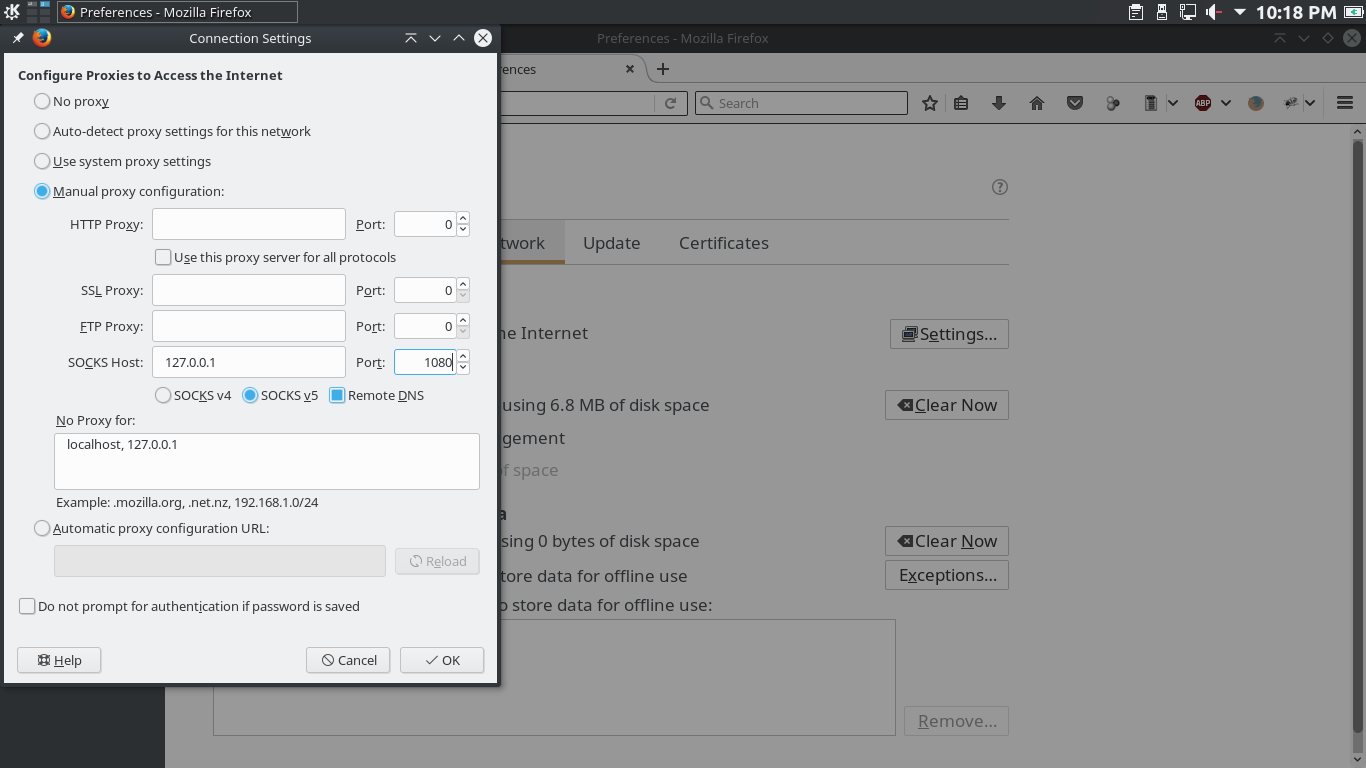
请选择
设置>高级>网络>代理/ OpenOptions, findAdvanced>Network -
如图,请选择SOCKS5代理,远程DNS解析,服务器地址
127.0.0.1,端口1088(如果你在主程序界面设置的Local port是其它值,请把这里的端口和它保持一致) / Fill in the blanks as the screenshot shown below (make sure you use the same config from what you entered in the Shadowsocks program)
如果你没有,请自行下载安装,天极网Chrome下载页面 / You can find a download link Here (Use it only if you don't have access to any other official download pages)
请拒绝任何基于Chrome的第三方浏览器,包括但不限于360,猎豹,QQ。如果你有安装那些浏览器,那么你的插件将由它们接管,Chrome将无法使用插件 / DO NOT use any Chrome-based browser as they will take over your plugins so you can't use any plugins in Chrome
注意:如果你使用下面的方法,请确保你在主程序界面把
Local port设置成了1088
-
在地址栏输入
chrome://extensions/打开插件管理页面 / chrome://extensions/ -
如图,请勾选开发者模式 / Check
Developer mode

-
然后把
SwitchyOmega.crx拖到页面上释放,并同意安装插件 / DragSwitchyOmega.crxto that page and release -
进入配置页面,选择从配置文件恢复,并选择
OmegaOptions.bak文件,如图 / Recover settings from file

- 如果没有意外,你应该可以看到这样的控制菜单

-
使用
proxy模式,则浏览器所有流量都会走代理通道,auto switch会根据GFWList的规则选择是否使用代理,direct connect是直连,一般无需使用system proxy系统代理 -
Now, 你的Chrome浏览器已经科学上网了
由于Shadowsocks属于SOCKS5代理,你的系统应该无法直接使用它,请使用privoxy