-
Install Edge version of rad CLI
-
Install kubectx (optional)
-
Install kind
-
You must have a container registry in order to store Bicep templates (optional if you want to use the example solution)
-
You must have a git repository in order to store Terraform configurations (optional if you want to use the example solution)
You can install Radius via rad init or rad install kubernetes. Since we are setting up a shared environment, we will use rad install kubernetes.
# Create a kind cluster
kind create cluster -n local
# Set the kube context to something easy to remember
kubectx local=kind-local

# Install Radius and configure a default resource group and environment named local
rad install kubernetes --kubecontext local
rad group create default
rad environment create local --group default
rad workspace create kubernetes local --context local --environment local --group default --forceA web service is a long-running HTTP-based service deployed as a container. You can view the example in webservice.yaml. This resource type has a few features:
- It wraps the Radius Applications.Core/containers resource type into something specific for CableCo
- It is designed in such a way to easily pass the properties from the web service to the container without having to map every property to other properties (the
containerblock has the same schema for CableCo.App/webServices and Applications.Core/containers) - It has a boolean property which controls whether the service is exposed outside of the cluster or is only intra-cluster
After understanding the webservice.yaml file, create the resource type:
rad resource-type create webServices -f types/webServices.yamlThe MySQL resource type is overly simple for this PoC. It only has a single property which enables developers to specify the storage size of the database. Create the resource type:
rad resource-type create mySQL -f types/mySQL.yamlIn order to deploy anything with Radius, the local Bicep tooling much have the correct extensions installed. Since we are creating new resource types, they need new Bicep extensions.
rad bicep publish-extension -f types/mySQL.yaml --target extensions/MyCompanyData.tgz
rad bicep publish-extension -f types/webServices.yaml --target extensions/MyCompanyApp.tgz
Then you'll need to edit your bicepconfig.json file. The file path must be the full path and not a relative path.
{
	"experimentalFeaturesEnabled": {
		"extensibility": true
	},
	"extensions": {
		"radius": "br:biceptypes.azurecr.io/radius:latest",
		"aws": "br:biceptypes.azurecr.io/aws:latest",
		"CableCoApp": "/THE/FULL/PATH/TO/YOUR/extensions/MyCompanyApp.tgz",
		"CableCoData": "/THE/FULL/PATH/TO/YOUR/extensions/MyCompanyData.tgz"
	}
}
The web service recipe will use multiple existing resource types. It has a container and a Gateway resource within it. We call this a composite type. Composite recipes can only be authored in Bicep today. The webservices.bicep file is the example solution recipe.
You can either publish the Bicep template to a container registry or use the example solution.
To publish the template:
rad bicep publish --file recipes/webservices/webservices.bicep --target br:<YOUR_CONTAINER_REGISTRY_URL>/recipes/webservices:latestFor example:
rad bicep publish --file recipes/webservices/webservices.bicep --target br:ghcr.io/zachcasper/recipes/webservices:latestOnce the Bicep template is published, you can register it as a recipe:
rad recipe register default --resource-type CableCo.App/webServices --template-kind bicep --template-path <YOUR_CONTAINER_REGISTRY_URL>/recipes/webservices:latest For example:
rad recipe register default --resource-type CableCo.App/webServices --template-kind bicep --template-path ghcr.io/zachcasper/recipes/webservices:latest If you opted to use the already published example, use the above command.
Most IaC users use Terraform. Since the MySQL resource type does not require a composite recipe, we can use Terraform. The mysql/main.tf file is Terraform configuration for deploying MySQL on Kubernetes.
Terraform configurations can be stored in many different ways, but Radius only supports storing them in a git repository.
You can either check in the Terraform configuration in a git repository or use the example solution.
Once the Terraform configuration is checked in, you can register it as a recipe:
rad recipe register default --environment local --resource-type MyCompany.Data/mySQL --template-kind terraform --template-path git::<GIT_REPO_URL>/<REPO_NAME>.git//<SUB-DIRECTORY>/<DIRECTORY_CONTAINING_MAIN.TF>For example:
rad recipe register default --environment local --resource-type MyCompany.Data/mySQL --template-kind terraform --template-path git::https://github.com/zachcasper/recipes.git//kubernetes/mysqlIf you opted to use the already published example, use the above command.
The wordpress.bicep file is the completed application definition.
Deploy the application:
rad deploy wordpress.bicepSince the application definition had the ingress boolean set to true, you will need to inspect the Gateway resource which got created to determine the application's URL.
rad resource show Applications.Core/gateways gateway -o json | grep urlYou should see something similar to:
rad resource show Applications.Core/gateways gateway -o json | grep url
    "url": "http://gateway.wordpress.172.18.0.3.nip.io"
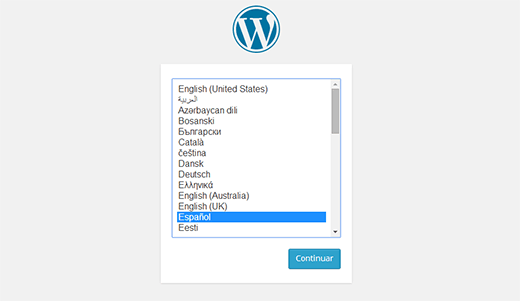
If successful, you should see the Wordpress language selection screen.