In-game configurable buff automation for Baldur's Gate: Enhanced Edition.
Cast all your pre-battle buffs with one click. BuffBot scans each character's spellbook, lets you configure which buffs to cast, in what order, on which targets — then executes the entire sequence automatically across all party members in parallel.
Alpha Release — fully functional but rough around the edges. Bug reports and feedback welcome.
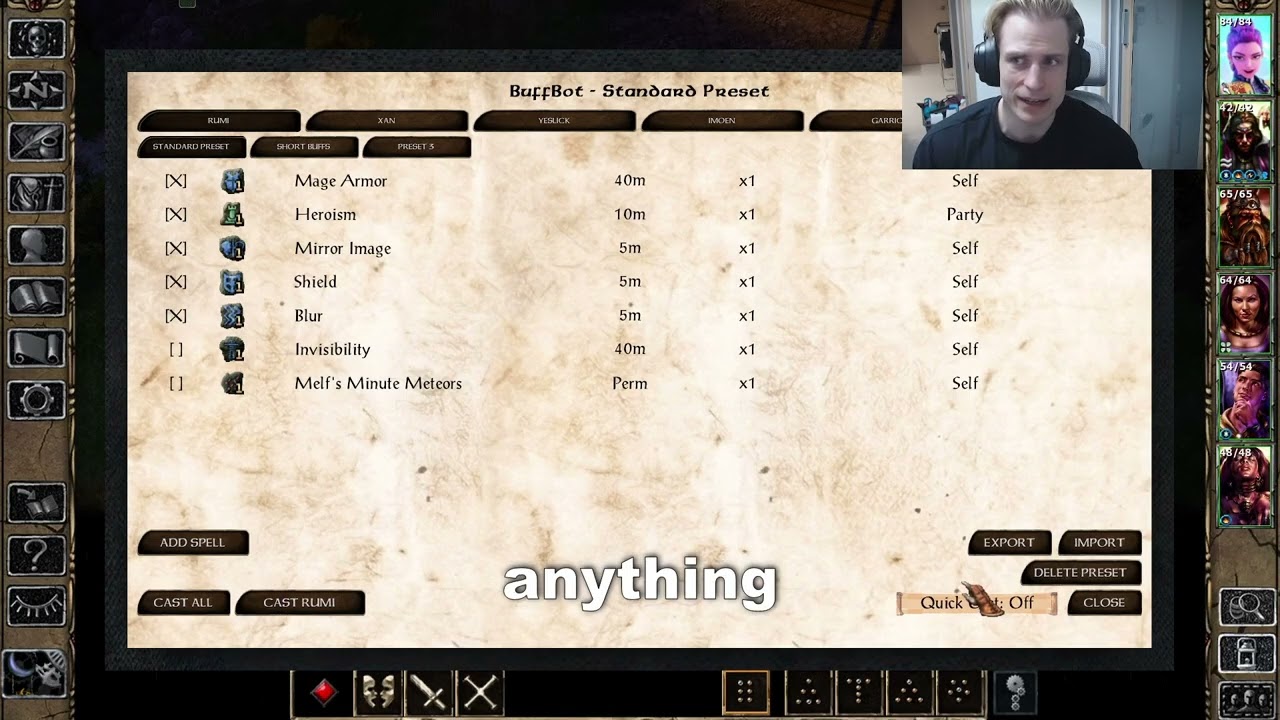
- Dynamic spellbook scanning — discovers buff spells from all sources (memorized, innate, HLAs, kit abilities) in real time. No hardcoded spell lists — works with modded spells automatically
- In-game config panel — per-character tabs, scrollable spell list with enable/disable, duration display, target assignment, and priority ordering
- Up to 8 presets — independent buff configurations per character (Long Buffs, Short Buffs, Boss Fight, Undead Prebuff, etc.) with create/rename/delete
- Quick Cast mode — per-preset 3-state toggle (Off / Long only / All) for instant casting via Improved Alacrity. Long mode fast-casts only long-duration buffs, then casts short buffs normally
- F12 innate abilities — each character gets one innate per preset in their special abilities, triggering buffing directly from gameplay without opening the panel
- Skip active buffs — detects already-active buffs via spell state + effect list checks and skips them. No wasted spell slots
- Manual spell override — "Add Spell" picker to include spells the classifier missed, "Remove" to exclude false positives
- Config export/import — export a character's full setup to a file, import onto any character across saves or between players
- Save game persistence — configuration saved per-character in EEex save games. Survives save/load automatically
- Subwindow selection spells — spells like Protection from Elemental Energy that normally open a selection popup are handled seamlessly. Pre-configure which variant to cast, and BuffBot bypasses the popup entirely
- Mod-friendly — tested with SCS, Spell Revisions, and kit mods. Reads spell data dynamically, so mod-added spells show up automatically
- BG:EE, BG2:EE, or EET
- EEex v0.10.0-alpha or later (with LuaJIT component recommended)
EEex is required for Lua access to engine internals (spell data, character state, save game persistence). The BuffBot installer automatically detects and installs the EEex LuaJIT component if it's not already active. Without LuaJIT, BuffBot runs in reduced mode (no F12 innates, Quick Cast, export/import, or log files).
- Download the latest release and extract it into your game directory
- Run
setup-buffbot.exe(or use your preferred WeiDU launcher) - Select "BuffBot: In-Game Buff Automation" when prompted
- Accept the "EEex LuaJIT Support" component if prompted (auto-skipped if already installed)
Uninstall: re-run the setup and choose uninstall. WeiDU removes all mod files and restores the TLK automatically.
Copy all files from buffbot/ to your game's override/ directory. Note: innate ability tooltip names require TLK patching — see Developer Setup below.
- Actionbar button — appears to the right of the action bar
- F11 — keyboard shortcut
- F12 innates — per-preset abilities in each character's special abilities
- Open the panel (F11 or actionbar button)
- Select a character tab at the top
- Select a preset tab (default: "Long Buffs" / "Short Buffs")
- Enable/disable spells with the checkbox column
- Set targets for each spell (Self, Party, or a specific character)
- Reorder spells with the Up/Down buttons
- Click Cast to start buffing — or use the F12 innate for that preset
- Quick Cast button cycles Off → Long → All for fast casting
- Default presets auto-populate from scanned spells: long/permanent buffs enabled in preset 1, short buffs in preset 2
- Create new presets for specific situations (up to 8 per character)
- Each preset is fully independent — own spell list, targets, priorities, quick cast setting
- Click Export to save a character's entire config (all presets + overrides) to a file
- Click Import to load a config from any exported file onto the current character
- Spells the target character doesn't have are silently skipped
- Files are saved in
override/bfbot_presets/— share them with other players or use across playthroughs
This is an alpha release. Everything works, but some things are unfinished:
- Placeholder innate icons — F12 abilities use the Stoneskin icon. Custom icons are planned
- Panel visuals — functional but unpolished. The layout works, the aesthetics don't win awards
- Spell Revisions sub-spells — some SR spells (Barkskin, Dispelling Screen) deliver effects via sub-spells, so the classifier may show them as ambiguous. Use "Add Spell" to manually include them
- Windows only for export/import listing — the file picker uses Windows
dir /bfor directory listing. The core export/import file I/O works on any platform, but the picker won't list files on macOS/Linux
BuffBot includes a built-in test suite. In the EEex Lua console:
BfBot.Test.RunAll()         -- full test suite (200+ tests)
BfBot.Test.ExportImport()   -- export/import tests
BfBot.UI.Toggle()           -- open/close config panel
Log files are written to the game directory: buffbot_test.log, buffbot_exec.log.
Reporting bugs: please open an issue at GitHub Issues with:
- Game version (BG:EE / BG2:EE / EET) and EEex version
- Steps to reproduce
- Mod list (especially SCS, Spell Revisions, kit mods)
- Output from
BfBot.Test.RunAll()if relevant
BuffBot was built with significant assistance from Claude Code (Anthropic's AI coding tool). The architecture, code, tests, and documentation were developed collaboratively between a human developer and AI.
The code is fully open source — judge it on its merits. If you have concerns about AI-assisted mods, that's understandable; the source is there for review.
Found a bug? Have a feature idea? Open an issue on GitHub.
For iterative development without running WeiDU each time:
# Set your game path (one-time setup)
echo 'BGEE_DIR="/path/to/your/game"' > tools/deploy.conf

# Deploy to game override
bash tools/deploy.sh
Requires Python 3 for TLK patching (innate ability tooltip names).
bg-eeex-buffbot/
├── buffbot/              # Mod source files (copied to override/)
│   ├── M_BfBot.lua       # Bootstrap (auto-loaded by EEex)
│   ├── BfBotCor.lua      # Core namespace, logging, field resolution, caches
│   ├── BfBotCls.lua      # Buff classifier (opcode scoring)
│   ├── BfBotScn.lua      # Spellbook scanner (known spells iterators)
│   ├── BfBotExe.lua      # Execution engine (parallel per-caster)
│   ├── BfBotPer.lua      # Persistence (marshal handlers, presets, export/import)
│   ├── BfBotInn.lua      # F12 innate abilities (runtime SPL generation)
│   ├── BfBotUI.lua       # Config panel logic
│   ├── BfBotTst.lua      # Test suite (200+ tests)
│   └── BuffBot.menu      # UI definitions (.menu DSL)
├── tools/                # Dev utilities
│   ├── deploy.sh         # Copy files to game override
│   └── patch_tlk.py      # TLK patcher for innate tooltips
├── docs/                 # Design docs and analysis
├── setup-buffbot.tp2     # WeiDU installer
└── README.md
- EEex by Bubb — makes this entire mod possible
- Bubble Buffs by factubsio — original inspiration (Pathfinder: WotR)
- Claude Code by Anthropic — AI development assistant