A modern, tileable, terminal-based file manager built with Python and Textual.


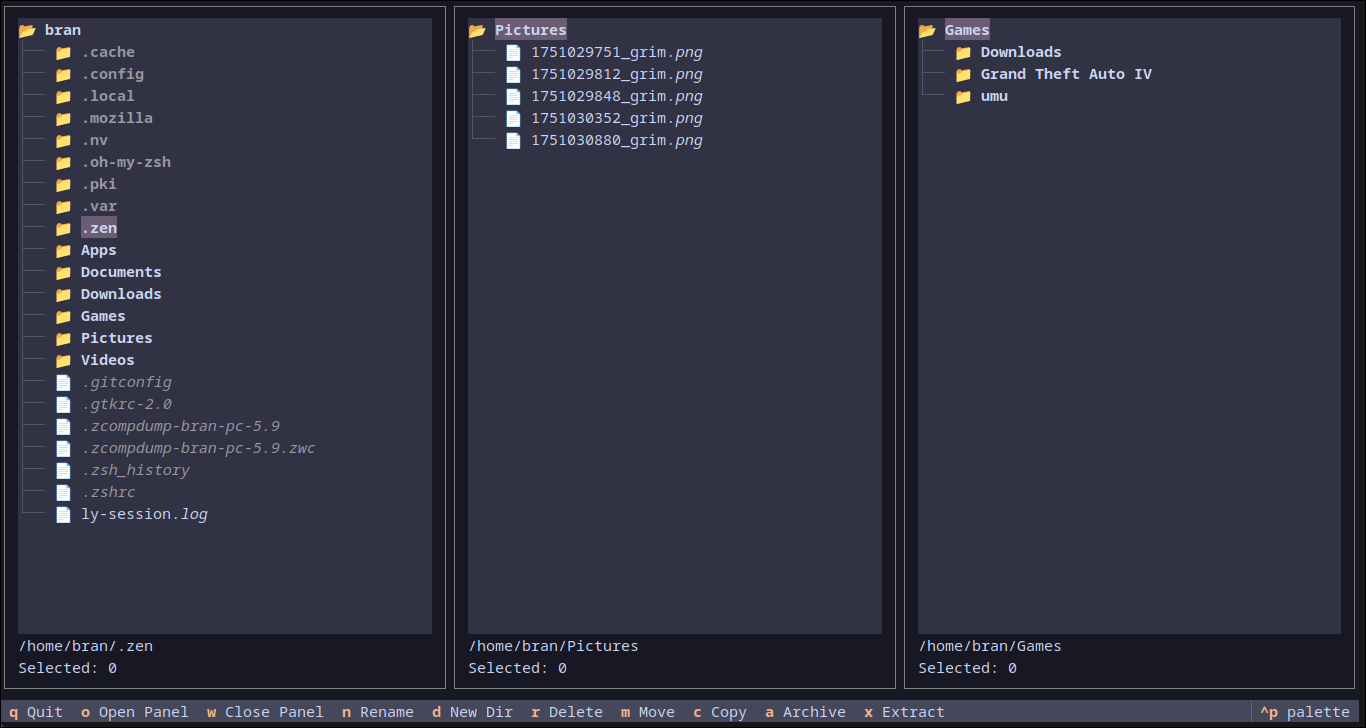
veld is a powerful, modern file manager that runs directly in your terminal. Inspired by classic TUIs like Ranger and Midnight Commander, veld offers a fresh take with an emphasis on simplicity, ease of use, and multi-panel navigation.
- 🗂️ Tileable Panels: Open multiple directory views side-by-side to streamline your workflow.
- 📂 Toggle-able File Previews: Automatically see a preview of the highlighted file—text, code, and even images. Press a key to hide it when you need more space.
- 🔍 Recursive File Search: Instantly find files and directories within the current panel.
- ⌨️ Intuitive Navigation: Navigate your filesystem and switch between panels with familiar, ergonomic keybindings.
- ⚙️ Powerful File Operations: Perform common operations like copy, move, delete, and rename in the active panel.
- ዚ Archive Management: Create and extract zip/tar archives directly within the file manager.
- 🎨 Customizable Keybindings: Don't like the defaults? Change every keybinding by editing a simple configuration file.
- 🐧 Cross-Platform: Built with Python and Textual,
veldruns on Linux, macOS, and Windows. - Vim Mode: Queue up file operations and execute them in a batch, Vim-style.
You need Python 3.9+ and pip installed.
Install the latest development version directly from GitHub:
pip install git+https://github.com/BranBushes/veld-fm.gitOr using uv:
uv pip install git+https://github.com/BranBushes/veld-fm.gitThis will install veld and make the veld command available in your terminal.
Once installed, you can run veld from anywhere in your terminal. You can also provide an optional starting directory for the first panel.
# Start in the default home directory
veld

# Start in the ~/Documents directory
veld ~/DocumentsUse Tab and Shift+Tab to cycle focus between open panels. The active panel is highlighted with a colored border.
Veld includes an optional Vim-style command mode for batching file operations.
- Enter Command Mode: Press
:to open the command input. :vim- Toggles Vim Mode on or off.:w- Executes (writes) all queued actions.:c- Clears all queued actions.
When Vim Mode is active, a list of queued actions will appear in the bottom-right corner.
Keybindings are organized by function and can be fully customized (see Configuration section).
| Key | Action |
|---|---|
| q | Quit the application |
| o | Open a new panel (prompts for path) |
| O (Shift+o) | Open panel at selected directory |
| w | Close the active panel |
| p | Toggle the preview panel |
| backspace | Close the search panel |
| : | Enter Command Mode |
| Key | Action |
|---|---|
| enter | Open file or directory (default app) |
| e | Open file with... (prompts for command) |
| space | Toggle file selection |
| f | Find files/directories |
| n | Rename a file |
| d | Create a directory |
| r | Delete selected files (queues in Vim Mode) |
| m | Move selected files |
| c | Copy selected files (queues in Vim Mode) |
| a | Archive selected items |
| x | Extract highlighted archive |
On the first run, a config file is created at ~/.config/veld-fm/config.toml. You can edit this file to change keybindings.
To set up a development environment:
git clone https://github.com/BranBushes/veld-fm.git
cd veld-fm
./setup.sh # This creates a venv and installs in editable mode
source .venv/bin/activate
Made with ❤️ from Bangladesh!

