Provides an efficient allocation free async/await integration for Unity.
- Struct based
UniTask<T>and custom AsyncMethodBuilder to achieve zero allocation - Makes all Unity AsyncOperations and Coroutines awaitable
- PlayerLoop based task(
UniTask.Yield,UniTask.Delay,UniTask.DelayFrame, etc..) that enable replacing all coroutine operations - MonoBehaviour Message Events
- Runs completely on Unity's PlayerLoop so doesn't use threads and runs on WebGL, wasm, etc.
- Asynchronous LINQ, with Channel and AsyncReactiveProperty
- TaskTracker window to prevent memory leaks
- Highly compatible behaviour with Task/ValueTask/IValueTaskSource
For technical details, see blog post: UniTask v2 — Zero Allocation async/await for Unity, with Asynchronous LINQ
For advanced tips, see blog post: Extends UnityWebRequest via async decorator pattern — Advanced Techniques of UniTask
- Carbon Usage (Plugins / Harmony / Extension)
- Getting started
- Basics of UniTask and AsyncOperation
- Cancellation and Exception handling
- Timeout handling
- PlayerLoop
- async void vs async UniTaskVoid
- AsyncEnumerable and Async LINQ
- Channel
- vs Awaitable
- ThreadPool limitation
- IEnumerator.ToUniTask limitation
- Compare with Standard Task API
- Pooling Configuration
- API References
- License
UniTask can be seamlessly integrated into Rust server environments through Carbon plugins, Harmony mods, or custom extensions. Carbon.UniTask automatically initializes itself within the Carbon framework on server startup, so no manual injection or configuration is required. This allows you to focus on writing asynchronous code while still benefiting from efficient async/await operations with zero allocation.
Warning
To use Carbon.UniTask, you must have a clear understanding of how the Unity PlayerLoop works and possess experience in asynchronous programming. Misuse or misunderstanding of these concepts may lead to unexpected behaviors.
Below are a couple of examples demonstrating how to use Carbon.UniTask in your plugins.
using Cysharp.Threading.Tasks;
using Carbon.Plugins;

namespace Carbon.Plugins
{
    [Info("SimpleAsyncPlugin", "YourName", "1.0.0")]
    [Description("A basic example plugin showcasing asynchronous operations using Carbon.UniTask.")]
    public class SimpleAsyncPlugin : CarbonPlugin
    {
        // Chat command that starts an asynchronous operation.
        [ChatCommand("simpleasync")]
        private void SimpleAsyncCommand(BasePlayer player, string command, string[] args)
        {
            // Start the asynchronous operation with .Forget() because we do not await its completion.
            DoSimpleAsyncOperation().Forget();
            player.ChatMessage("Simple async operation started.");
        }

        private async UniTaskVoid DoSimpleAsyncOperation()
        {
            UnityEngine.Debug.Log("Simple async operation started.");
            // Await a 3-second delay.
            await UniTask.Delay(3000);
            UnityEngine.Debug.Log("Simple async operation completed.");
        }
    }
}Below is an example of a Carbon plugin that performs an asynchronous HTTP GET request to a web endpoint (e.g., "https://example.com") using UnityWebRequest and UniTask, and then logs the result.
using System.Threading;
using Cysharp.Threading.Tasks;
using UnityEngine;
using UnityEngine.Networking;
using Carbon.Plugins;

namespace Carbon.Plugins
{
    [Info("RealWebRequestPlugin", "YourName", "1.0.0")]
    [Description("A realistic example plugin that performs an asynchronous web request using Carbon.UniTask.")]
    public class RealWebRequestPlugin : CarbonPlugin
    {
        // Chat command that triggers the web request.
        [ChatCommand("realreq")]
        private void RealRequestCommand(BasePlayer player, string command, string[] args)
        {
            // Start the asynchronous web request operation.
            FetchWebData("https://example.com").Forget();
            player.ChatMessage("Web request initiated. Check logs for details.");
        }

        // Asynchronous web request method using UnityWebRequest and UniTask.
        private async UniTaskVoid FetchWebData(string url)
        {
            Debug.Log("Starting web request to: " + url);

            using (UnityWebRequest request = UnityWebRequest.Get(url))
            {
                // Await the web request's completion.
                await request.SendWebRequest();

                if (request.result == UnityWebRequest.Result.ConnectionError || request.result == UnityWebRequest.Result.ProtocolError)
                {
                    Debug.LogError("Web request error: " + request.error);
                }
                else
                {
                    string responseText = request.downloadHandler.text;
                    Debug.Log("Web request completed successfully. Response length: " + responseText.Length);
                }
            }
        }
    }
}
This example demonstrates a realistic use case where the plugin makes an HTTP GET request to the specified URL. The plugin logs the start and completion (or error) of the web request and notifies the player via chat that the operation has been initiated.
- Automatic Initialization:
Carbon.UniTask automatically injects itself into the Unity PlayerLoop at server startup, eliminating the need for manual initialization. - Efficient Asynchronous Operations:
Enjoy zero-allocation async/await operations that are optimized for Unity, ensuring high performance even in resource-critical server environments. - Advanced Async Programming:
The Carbon.UniTask library truly elevates asynchronous programming in your plugins to a new level, offering zero-allocation async/await operations without impacting server performance. - Seamless Unity Integration:
Carbon.UniTask integrates flawlessly with Unity's asynchronous APIs (such as AsyncOperation, UnityWebRequest, and even coroutines), allowing you to write modern async code using familiar async/await syntax.
For full details on all key features and instructions, please refer to the original description by the UniTask library author below.
// extension awaiter/methods can be used by this namespace
using Cysharp.Threading.Tasks;

// You can return type as struct UniTask<T>(or UniTask), it is unity specialized lightweight alternative of Task<T>
// zero allocation and fast excution for zero overhead async/await integrate with Unity
async UniTask<string> DemoAsync()
{
    // You can await Unity's AsyncObject
    var asset = await Resources.LoadAsync<TextAsset>("foo");
    var txt = (await UnityWebRequest.Get("https://...").SendWebRequest()).downloadHandler.text;
    await SceneManager.LoadSceneAsync("scene2");

    // .WithCancellation enables Cancel, GetCancellationTokenOnDestroy synchornizes with lifetime of GameObject
    // after Unity 2022.2, you can use `destroyCancellationToken` in MonoBehaviour
    var asset2 = await Resources.LoadAsync<TextAsset>("bar").WithCancellation(this.GetCancellationTokenOnDestroy());

    // .ToUniTask accepts progress callback(and all options), Progress.Create is a lightweight alternative of IProgress<T>
    var asset3 = await Resources.LoadAsync<TextAsset>("baz").ToUniTask(Progress.Create<float>(x => Debug.Log(x)));

    // await frame-based operation like a coroutine
    await UniTask.DelayFrame(100);

    // replacement of yield return new WaitForSeconds/WaitForSecondsRealtime
    await UniTask.Delay(TimeSpan.FromSeconds(10), ignoreTimeScale: false);

    // yield any playerloop timing(PreUpdate, Update, LateUpdate, etc...)
    await UniTask.Yield(PlayerLoopTiming.PreLateUpdate);

    // replacement of yield return null
    await UniTask.Yield();
    await UniTask.NextFrame();

    // replacement of WaitForEndOfFrame
#if UNITY_2023_1_OR_NEWER
    await UniTask.WaitForEndOfFrame();
#else
    // requires MonoBehaviour(CoroutineRunner))
    await UniTask.WaitForEndOfFrame(this); // this is MonoBehaviour
#endif

    // replacement of yield return new WaitForFixedUpdate(same as UniTask.Yield(PlayerLoopTiming.FixedUpdate))
    await UniTask.WaitForFixedUpdate();

    // replacement of yield return WaitUntil
    await UniTask.WaitUntil(() => isActive == false);

    // special helper of WaitUntil
    await UniTask.WaitUntilValueChanged(this, x => x.isActive);

    // You can await IEnumerator coroutines
    await FooCoroutineEnumerator();

    // You can await a standard task
    await Task.Run(() => 100);

    // Multithreading, run on ThreadPool under this code
    await UniTask.SwitchToThreadPool();

    /* work on ThreadPool */

    // return to MainThread(same as `ObserveOnMainThread` in UniRx)
    await UniTask.SwitchToMainThread();

    // get async webrequest
    async UniTask<string> GetTextAsync(UnityWebRequest req)
    {
        var op = await req.SendWebRequest();
        return op.downloadHandler.text;
    }

    var task1 = GetTextAsync(UnityWebRequest.Get("http://google.com"));
    var task2 = GetTextAsync(UnityWebRequest.Get("http://bing.com"));
    var task3 = GetTextAsync(UnityWebRequest.Get("http://yahoo.com"));

    // concurrent async-wait and get results easily by tuple syntax
    var (google, bing, yahoo) = await UniTask.WhenAll(task1, task2, task3);

    // shorthand of WhenAll, tuple can await directly
    var (google2, bing2, yahoo2) = await (task1, task2, task3);

    // return async-value.(or you can use `UniTask`(no result), `UniTaskVoid`(fire and forget)).
    return (asset as TextAsset)?.text ?? throw new InvalidOperationException("Asset not found");
}UniTask features rely on C# 7.0(task-like custom async method builder feature) so the required Unity version is after Unity 2018.3, the official lowest version supported is Unity 2018.4.13f1.
Why is UniTask(custom task-like object) required? Because Task is too heavy and not matched to Unity threading (single-thread). UniTask does not use threads and SynchronizationContext/ExecutionContext because Unity's asynchronous object is automaticaly dispatched by Unity's engine layer. It achieves faster and lower allocation, and is completely integrated with Unity.
You can await AsyncOperation, ResourceRequest, AssetBundleRequest, AssetBundleCreateRequest, UnityWebRequestAsyncOperation, AsyncGPUReadbackRequest, IEnumerator and others when using Cysharp.Threading.Tasks;.
UniTask provides three pattern of extension methods.
* await asyncOperation;
* .WithCancellation(CancellationToken);
* .ToUniTask(IProgress, PlayerLoopTiming, CancellationToken);
WithCancellation is a simple version of ToUniTask, both return UniTask. For details of cancellation, see: Cancellation and Exception handling section.
Note: await directly is returned from native timing of PlayerLoop but WithCancellation and ToUniTask are returned from specified PlayerLoopTiming. For details of timing, see: PlayerLoop section.
Note: AssetBundleRequest has
assetandallAssets, default await returnsasset. If you want to getallAssets, you can useAwaitForAllAssets()method.
The type of UniTask can use utilities like UniTask.WhenAll, UniTask.WhenAny, UniTask.WhenEach. They are like Task.WhenAll/Task.WhenAny but the return type is more useful. They return value tuples so you can deconstruct each result and pass multiple types.
public async UniTaskVoid LoadManyAsync()
{
    // parallel load.
    var (a, b, c) = await UniTask.WhenAll(
        LoadAsSprite("foo"),
        LoadAsSprite("bar"),
        LoadAsSprite("baz"));
}

async UniTask<Sprite> LoadAsSprite(string path)
{
    var resource = await Resources.LoadAsync<Sprite>(path);
    return (resource as Sprite);
}
If you want to convert a callback to UniTask, you can use UniTaskCompletionSource<T> which is a lightweight edition of TaskCompletionSource<T>.
public UniTask<int> WrapByUniTaskCompletionSource()
{
    var utcs = new UniTaskCompletionSource<int>();

    // when complete, call utcs.TrySetResult();
    // when failed, call utcs.TrySetException();
    // when cancel, call utcs.TrySetCanceled();

    return utcs.Task; //return UniTask<int>
}
You can convert Task -> UniTask: AsUniTask, UniTask -> UniTask<AsyncUnit>: AsAsyncUnitUniTask, UniTask<T> -> UniTask: AsUniTask. UniTask<T> -> UniTask's conversion cost is free.
If you want to convert async to coroutine, you can use .ToCoroutine(), this is useful if you want to only allow using the coroutine system.
UniTask can not await twice. This is a similar constraint to the ValueTask/IValueTaskSource introduced in .NET Standard 2.1.
The following operations should never be performed on a ValueTask instance:
- Awaiting the instance multiple times.
- Calling AsTask multiple times.
- Using .Result or .GetAwaiter().GetResult() when the operation hasn't yet completed, or using them multiple times.
- Using more than one of these techniques to consume the instance.
If you do any of the above, the results are undefined.
var task = UniTask.DelayFrame(10);
await task;
await task; // NG, throws Exception
Store to the class field, you can use UniTask.Lazy that supports calling multiple times. .Preserve() allows for multiple calls (internally cached results). This is useful when there are multiple calls in a function scope.
Also UniTaskCompletionSource can await multiple times and await from many callers.
Some UniTask factory methods have a CancellationToken cancellationToken = default parameter. Also some async operations for Unity have WithCancellation(CancellationToken) and ToUniTask(..., CancellationToken cancellation = default) extension methods.
You can pass CancellationToken to parameter by standard CancellationTokenSource.
var cts = new CancellationTokenSource();

cancelButton.onClick.AddListener(() =>
{
    cts.Cancel();
});

await UnityWebRequest.Get("http://google.co.jp").SendWebRequest().WithCancellation(cts.Token);

await UniTask.DelayFrame(1000, cancellationToken: cts.Token);
CancellationToken can be created by CancellationTokenSource or MonoBehaviour's extension method GetCancellationTokenOnDestroy.
// this CancellationToken lifecycle is same as GameObject.
await UniTask.DelayFrame(1000, cancellationToken: this.GetCancellationTokenOnDestroy());
For propagate Cancellation, all async method recommend to accept CancellationToken cancellationToken at last argument, and pass CancellationToken from root to end.
await FooAsync(this.GetCancellationTokenOnDestroy());

// ---

async UniTask FooAsync(CancellationToken cancellationToken)
{
    await BarAsync(cancellationToken);
}

async UniTask BarAsync(CancellationToken cancellationToken)
{
    await UniTask.Delay(TimeSpan.FromSeconds(3), cancellationToken);
}
CancellationToken means lifecycle of async. You can hold your own lifecycle insteadof default CancellationTokenOnDestroy.
public class MyBehaviour : MonoBehaviour
{
    CancellationTokenSource disableCancellation = new CancellationTokenSource();
    CancellationTokenSource destroyCancellation = new CancellationTokenSource();

    private void OnEnable()
    {
        if (disableCancellation != null)
        {
            disableCancellation.Dispose();
        }
        disableCancellation = new CancellationTokenSource();
    }

    private void OnDisable()
    {
        disableCancellation.Cancel();
    }

    private void OnDestroy()
    {
        destroyCancellation.Cancel();
        destroyCancellation.Dispose();
    }
}
After Unity 2022.2, Unity adds CancellationToken in MonoBehaviour.destroyCancellationToken and Application.exitCancellationToken.
When cancellation is detected, all methods throw OperationCanceledException and propagate upstream. When exception(not limited to OperationCanceledException) is not handled in async method, it is propagated finally to UniTaskScheduler.UnobservedTaskException. The default behaviour of received unhandled exception is to write log as exception. Log level can be changed using UniTaskScheduler.UnobservedExceptionWriteLogType. If you want to use custom behaviour, set an action to UniTaskScheduler.UnobservedTaskException.
And also OperationCanceledException is a special exception, this is silently ignored at UnobservedTaskException.
If you want to cancel behaviour in an async UniTask method, throw OperationCanceledException manually.
public async UniTask<int> FooAsync()
{
    await UniTask.Yield();
    throw new OperationCanceledException();
}
If you handle an exception but want to ignore(propagate to global cancellation handling), use an exception filter.
public async UniTask<int> BarAsync()
{
    try
    {
        var x = await FooAsync();
        return x * 2;
    }
    catch (Exception ex) when (!(ex is OperationCanceledException)) // when (ex is not OperationCanceledException) at C# 9.0
    {
        return -1;
    }
}
throws/catch OperationCanceledException is slightly heavy, so if performance is a concern, use UniTask.SuppressCancellationThrow to avoid OperationCanceledException throw. It returns (bool IsCanceled, T Result) instead of throwing.
var (isCanceled, _) = await UniTask.DelayFrame(10, cancellationToken: cts.Token).SuppressCancellationThrow();
if (isCanceled)
{
    // ...
}
Note: Only suppress throws if you call directly into the most source method. Otherwise, the return value will be converted, but the entire pipeline will not suppress throws.
Some features that use Unity's player loop, such as UniTask.Yield and UniTask.Delay etc, determines CancellationToken state on the player loop.
This means it does not cancel immediately upon CancellationToken fired.
If you want to change this behaviour, the cancellation to be immediate, set the cancelImmediately flag as an argument.
await UniTask.Yield(cancellationToken, cancelImmediately: true);Note: Setting cancelImmediately to true and detecting an immediate cancellation is more costly than the default behavior.
This is because it uses CancellationToken.Register; it is heavier than checking CancellationToken on the player loop.
Timeout is a variation of cancellation. You can set timeout by CancellationTokenSouce.CancelAfterSlim(TimeSpan) and pass CancellationToken to async methods.
var cts = new CancellationTokenSource();
cts.CancelAfterSlim(TimeSpan.FromSeconds(5)); // 5sec timeout.

try
{
    await UnityWebRequest.Get("http://foo").SendWebRequest().WithCancellation(cts.Token);
}
catch (OperationCanceledException ex)
{
    if (ex.CancellationToken == cts.Token)
    {
        UnityEngine.Debug.Log("Timeout");
    }
}
CancellationTokenSouce.CancelAfteris a standard api. However in Unity you should not use it because it depends threading timer.CancelAfterSlimis UniTask's extension methods, it uses PlayerLoop instead.
If you want to use timeout with other source of cancellation, use CancellationTokenSource.CreateLinkedTokenSource.
var cancelToken = new CancellationTokenSource();
cancelButton.onClick.AddListener(() =>
{
    cancelToken.Cancel(); // cancel from button click.
});

var timeoutToken = new CancellationTokenSource();
timeoutToken.CancelAfterSlim(TimeSpan.FromSeconds(5)); // 5sec timeout.

try
{
    // combine token
    var linkedTokenSource = CancellationTokenSource.CreateLinkedTokenSource(cancelToken.Token, timeoutToken.Token);

    await UnityWebRequest.Get("http://foo").SendWebRequest().WithCancellation(linkedTokenSource.Token);
}
catch (OperationCanceledException ex)
{
    if (timeoutToken.IsCancellationRequested)
    {
        UnityEngine.Debug.Log("Timeout.");
    }
    else if (cancelToken.IsCancellationRequested)
    {
        UnityEngine.Debug.Log("Cancel clicked.");
    }
}
Optimize for reduce allocation of CancellationTokenSource for timeout per call async method, you can use UniTask's TimeoutController.
TimeoutController timeoutController = new TimeoutController(); // setup to field for reuse.

async UniTask FooAsync()
{
    try
    {
        // you can pass timeoutController.Timeout(TimeSpan) to cancellationToken.
        await UnityWebRequest.Get("http://foo").SendWebRequest()
            .WithCancellation(timeoutController.Timeout(TimeSpan.FromSeconds(5)));
        timeoutController.Reset(); // call Reset(Stop timeout timer and ready for reuse) when succeed.
    }
    catch (OperationCanceledException ex)
    {
        if (timeoutController.IsTimeout())
        {
            UnityEngine.Debug.Log("timeout");
        }
    }
}
If you want to use timeout with other source of cancellation, use new TimeoutController(CancellationToken).
TimeoutController timeoutController;
CancellationTokenSource clickCancelSource;

void Start()
{
    this.clickCancelSource = new CancellationTokenSource();
    this.timeoutController = new TimeoutController(clickCancelSource);
}
Note: UniTask has .Timeout, .TimeoutWithoutException methods however, if possible, do not use these, please pass CancellationToken. Because .Timeout work from external of task, can not stop timeoutted task. .Timeout means ignore result when timeout. If you pass a CancellationToken to the method, it will act from inside of the task, so it is possible to stop a running task.
UniTask is run on a custom PlayerLoop. UniTask's playerloop based methods (such as Delay, DelayFrame, asyncOperation.ToUniTask, etc...) accept this PlayerLoopTiming.
public enum PlayerLoopTiming
{
    Initialization = 0,
    LastInitialization = 1,

    EarlyUpdate = 2,
    LastEarlyUpdate = 3,

    FixedUpdate = 4,
    LastFixedUpdate = 5,

    PreUpdate = 6,
    LastPreUpdate = 7,

    Update = 8,
    LastUpdate = 9,

    PreLateUpdate = 10,
    LastPreLateUpdate = 11,

    PostLateUpdate = 12,
    LastPostLateUpdate = 13

#if UNITY_2020_2_OR_NEWER
    TimeUpdate = 14,
    LastTimeUpdate = 15,
#endif
}
It indicates when to run, you can check PlayerLoopList.md to Unity's default playerloop and injected UniTask's custom loop.
PlayerLoopTiming.Update is similar to yield return null in a coroutine, but it is called before Update(Update and uGUI events(button.onClick, etc...) are called on ScriptRunBehaviourUpdate, yield return null is called on ScriptRunDelayedDynamicFrameRate). PlayerLoopTiming.FixedUpdate is similar to WaitForFixedUpdate.
PlayerLoopTiming.LastPostLateUpdateis not equivalent to coroutine'syield return new WaitForEndOfFrame(). Coroutine's WaitForEndOfFrame seems to run after the PlayerLoop is done. Some methods that require coroutine's end of frame(Texture2D.ReadPixels,ScreenCapture.CaptureScreenshotAsTexture,CommandBuffer, etc) do not work correctly when replaced with async/await. In these cases, pass MonoBehaviour(coroutine runnner) toUniTask.WaitForEndOfFrame. For example,await UniTask.WaitForEndOfFrame(this);is lightweight allocation free alternative ofyield return new WaitForEndOfFrame().Note: In Unity 2023.1 or newer,
await UniTask.WaitForEndOfFrame();no longer requires MonoBehaviour. It usesUnityEngine.Awaitable.EndOfFrameAsync.
yield return null and UniTask.Yield are similar but different. yield return null always returns next frame but UniTask.Yield returns next called. That is, call UniTask.Yield(PlayerLoopTiming.Update) on PreUpdate, it returns same frame. UniTask.NextFrame() guarantees return next frame, you can expect this to behave exactly the same as yield return null.
UniTask.Yield(without CancellationToken) is a special type, returns
YieldAwaitableand runs on YieldRunner. It is the most lightweight and fastest.
AsyncOperation is returned from native timing. For example, await SceneManager.LoadSceneAsync is returned from EarlyUpdate.UpdatePreloading and after being called, the loaded scene's Start is called from EarlyUpdate.ScriptRunDelayedStartupFrame. Also await UnityWebRequest is returned from EarlyUpdate.ExecuteMainThreadJobs.
In UniTask, await directly uses native timing, while WithCancellation and ToUniTask use specified timing. This is usually not a particular problem, but with LoadSceneAsync, it causes a different order of Start and continuation after await. So it is recommended not to use LoadSceneAsync.ToUniTask.
Note: When using Unity 2023.1 or newer, ensure you have
using UnityEngine;in the using statements of your file when working with newUnityEngine.Awaitablemethods likeSceneManager.LoadSceneAsync. This prevents compilation errors by avoiding the use of theUnityEngine.AsyncOperationversion.
In the stacktrace, you can check where it is running in playerloop.
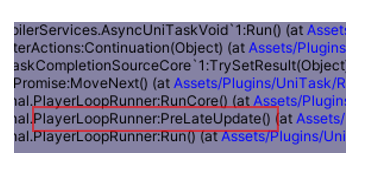
By default, UniTask's PlayerLoop is initialized at [RuntimeInitializeOnLoadMethod(RuntimeInitializeLoadType.BeforeSceneLoad)].
The order in which methods are called in BeforeSceneLoad is nondeterministic, so if you want to use UniTask in other BeforeSceneLoad methods, you should try to initialize it before this.
// AfterAssembliesLoaded is called before BeforeSceneLoad
[RuntimeInitializeOnLoadMethod(RuntimeInitializeLoadType.AfterAssembliesLoaded)]
public static void InitUniTaskLoop()
{
    var loop = PlayerLoop.GetCurrentPlayerLoop();
    Cysharp.Threading.Tasks.PlayerLoopHelper.Initialize(ref loop);
}
If you import Unity's Entities package, that resets the custom player loop to default at BeforeSceneLoad and injects ECS's loop. When Unity calls ECS's inject method after UniTask's initialize method, UniTask will no longer work.
To solve this issue, you can re-initialize the UniTask PlayerLoop after ECS is initialized.
// Get ECS Loop.
var playerLoop = ScriptBehaviourUpdateOrder.CurrentPlayerLoop;

// Setup UniTask's PlayerLoop.
PlayerLoopHelper.Initialize(ref playerLoop);
You can diagnose whether UniTask's player loop is ready by calling PlayerLoopHelper.IsInjectedUniTaskPlayerLoop(). And also PlayerLoopHelper.DumpCurrentPlayerLoop logs all current playerloops to console.
void Start()
{
    UnityEngine.Debug.Log("UniTaskPlayerLoop ready? " + PlayerLoopHelper.IsInjectedUniTaskPlayerLoop());
    PlayerLoopHelper.DumpCurrentPlayerLoop();
}
You can optimize loop cost slightly by remove unuse PlayerLoopTiming injection. You can call PlayerLoopHelper.Initialize(InjectPlayerLoopTimings) on initialize.
var loop = PlayerLoop.GetCurrentPlayerLoop();
PlayerLoopHelper.Initialize(ref loop, InjectPlayerLoopTimings.Minimum); // minimum is Update | FixedUpdate | LastPostLateUpdate
InjectPlayerLoopTimings has three preset, All and Standard(All without last except LastPostLateUpdate), Minimum(Update | FixedUpdate | LastPostLateUpdate). Default is All and you can combine custom inject timings like InjectPlayerLoopTimings.Update | InjectPlayerLoopTimings.FixedUpdate | InjectPlayerLoopTimings.PreLateUpdate.
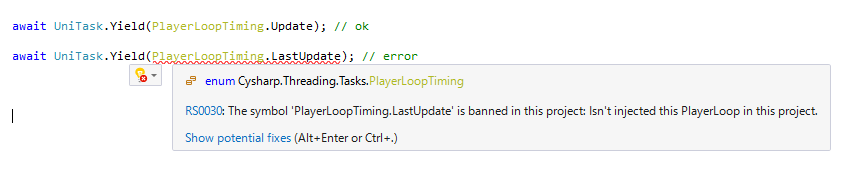
You can make error to use uninjected PlayerLoopTiming by Microsoft.CodeAnalysis.BannedApiAnalyzers. For example, you can setup BannedSymbols.txt like this for InjectPlayerLoopTimings.Minimum.
F:Cysharp.Threading.Tasks.PlayerLoopTiming.Initialization; Isn't injected this PlayerLoop in this project.
F:Cysharp.Threading.Tasks.PlayerLoopTiming.LastInitialization; Isn't injected this PlayerLoop in this project.
F:Cysharp.Threading.Tasks.PlayerLoopTiming.EarlyUpdate; Isn't injected this PlayerLoop in this project.
F:Cysharp.Threading.Tasks.PlayerLoopTiming.LastEarlyUpdate; Isn't injected this PlayerLoop in this project.d
F:Cysharp.Threading.Tasks.PlayerLoopTiming.LastFixedUpdate; Isn't injected this PlayerLoop in this project.
F:Cysharp.Threading.Tasks.PlayerLoopTiming.PreUpdate; Isn't injected this PlayerLoop in this project.
F:Cysharp.Threading.Tasks.PlayerLoopTiming.LastPreUpdate; Isn't injected this PlayerLoop in this project.
F:Cysharp.Threading.Tasks.PlayerLoopTiming.LastUpdate; Isn't injected this PlayerLoop in this project.
F:Cysharp.Threading.Tasks.PlayerLoopTiming.PreLateUpdate; Isn't injected this PlayerLoop in this project.
F:Cysharp.Threading.Tasks.PlayerLoopTiming.LastPreLateUpdate; Isn't injected this PlayerLoop in this project.
F:Cysharp.Threading.Tasks.PlayerLoopTiming.PostLateUpdate; Isn't injected this PlayerLoop in this project.
F:Cysharp.Threading.Tasks.PlayerLoopTiming.TimeUpdate; Isn't injected this PlayerLoop in this project.
F:Cysharp.Threading.Tasks.PlayerLoopTiming.LastTimeUpdate; Isn't injected this PlayerLoop in this project.
You can configure RS0030 severity to error.
async void is a standard C# task system so it does not run on UniTask systems. It is better not to use it. async UniTaskVoid is a lightweight version of async UniTask because it does not have awaitable completion and reports errors immediately to UniTaskScheduler.UnobservedTaskException. If you don't require awaiting (fire and forget), using UniTaskVoid is better. Unfortunately to dismiss warning, you're required to call Forget().
public async UniTaskVoid FireAndForgetMethod()
{
    // do anything...
    await UniTask.Yield();
}

public void Caller()
{
    FireAndForgetMethod().Forget();
}
Also UniTask has the Forget method, it is similar to UniTaskVoid and has the same effects. However UniTaskVoid is more efficient if you completely don't use await。
public async UniTask DoAsync()
{
    // do anything...
    await UniTask.Yield();
}

public void Caller()
{
    DoAsync().Forget();
}
To use an async lambda registered to an event, don't use async void. Instead you can use UniTask.Action or UniTask.UnityAction, both of which create a delegate via async UniTaskVoid lambda.
Action actEvent;
UnityAction unityEvent; // especially used in uGUI

// Bad: async void
actEvent += async () => { };
unityEvent += async () => { };

// Ok: create Action delegate by lambda
actEvent += UniTask.Action(async () => { await UniTask.Yield(); });
unityEvent += UniTask.UnityAction(async () => { await UniTask.Yield(); });
UniTaskVoid can also be used in MonoBehaviour's Start method.
class Sample : MonoBehaviour
{
    async UniTaskVoid Start()
    {
        // async init code.
    }
}Unity 2020.2 supports C# 8.0 so you can use await foreach. This is the new Update notation in the async era.
// Unity 2020.2, C# 8.0
await foreach (var _ in UniTaskAsyncEnumerable.EveryUpdate().WithCancellation(token))
{
    Debug.Log("Update() " + Time.frameCount);
}
In a C# 7.3 environment, you can use the ForEachAsync method to work in almost the same way.
// C# 7.3(Unity 2018.3~)
await UniTaskAsyncEnumerable.EveryUpdate().ForEachAsync(_ =>
{
    Debug.Log("Update() " + Time.frameCount);
}, token);
UniTask.WhenEach that is similar to .NET 9's Task.WhenEach can consume new way for await multiple tasks.
await foreach (var result in UniTask.WhenEach(task1, task2, task3))
{
    // The result is of type WhenEachResult<T>.
    // It contains either `T Result` or `Exception Exception`.
    // You can check `IsCompletedSuccessfully` or `IsFaulted` to determine whether to access `.Result` or `.Exception`.
    // If you want to throw an exception when `IsFaulted` and retrieve the result when successful, use `GetResult()`.
    Debug.Log(result.GetResult());
}
UniTaskAsyncEnumerable implements asynchronous LINQ, similar to LINQ in IEnumerable<T> or Rx in IObservable<T>. All standard LINQ query operators can be applied to asynchronous streams. For example, the following code shows how to apply a Where filter to a button-click asynchronous stream that runs once every two clicks.
await okButton.OnClickAsAsyncEnumerable().Where((x, i) => i % 2 == 0).ForEachAsync(_ =>
{
});
Fire and Forget style(for example, event handling), you can also use Subscribe.
okButton.OnClickAsAsyncEnumerable().Where((x, i) => i % 2 == 0).Subscribe(_ =>
{
});
Async LINQ is enabled when using Cysharp.Threading.Tasks.Linq;, and UniTaskAsyncEnumerable is defined in UniTask.Linq asmdef.
It's closer to UniRx (Reactive Extensions), but UniTaskAsyncEnumerable is a pull-based asynchronous stream, whereas Rx was a push-based asynchronous stream. Note that although similar, the characteristics are different and the details behave differently along with them.
UniTaskAsyncEnumerable is the entry point like Enumerable. In addition to the standard query operators, there are other generators for Unity such as EveryUpdate, Timer, TimerFrame, Interval, IntervalFrame, and EveryValueChanged. And also added additional UniTask original query operators like Append, Prepend, DistinctUntilChanged, ToHashSet, Buffer, CombineLatest,Merge Do, Never, ForEachAsync, Pairwise, Publish, Queue, Return, SkipUntil, TakeUntil, SkipUntilCanceled, TakeUntilCanceled, TakeLast, Subscribe.
The method with Func as an argument has three additional overloads, ***Await, ***AwaitWithCancellation.
Select(Func<T, TR> selector)
SelectAwait(Func<T, UniTask<TR>> selector)
SelectAwaitWithCancellation(Func<T, CancellationToken, UniTask<TR>> selector)
If you want to use the async method inside the func, use the ***Await or ***AwaitWithCancellation.
How to create an async iterator: C# 8.0 supports async iterator(async yield return) but it only allows IAsyncEnumerable<T> and of course requires C# 8.0. UniTask supports UniTaskAsyncEnumerable.Create method to create custom async iterator.
// IAsyncEnumerable, C# 8.0 version of async iterator. ( do not use this style, IAsyncEnumerable is not controled in UniTask).
public async IAsyncEnumerable<int> MyEveryUpdate([EnumeratorCancellation]CancellationToken cancelationToken = default)
{
    var frameCount = 0;
    await UniTask.Yield();
    while (!token.IsCancellationRequested)
    {
        yield return frameCount++;
        await UniTask.Yield();
    }
}

// UniTaskAsyncEnumerable.Create and use `await writer.YieldAsync` instead of `yield return`.
public IUniTaskAsyncEnumerable<int> MyEveryUpdate()
{
    // writer(IAsyncWriter<T>) has `YieldAsync(value)` method.
    return UniTaskAsyncEnumerable.Create<int>(async (writer, token) =>
    {
        var frameCount = 0;
        await UniTask.Yield();
        while (!token.IsCancellationRequested)
        {
            await writer.YieldAsync(frameCount++); // instead of `yield return`
            await UniTask.Yield();
        }
    });
}
Channel is the same as System.Threading.Tasks.Channels which is similar to a GoLang Channel.
Currently it only supports multiple-producer, single-consumer unbounded channels. It can create by Channel.CreateSingleConsumerUnbounded<T>().
For producer(.Writer), use TryWrite to push value and TryComplete to complete channel. For consumer(.Reader), use TryRead, WaitToReadAsync, ReadAsync, Completion and ReadAllAsync to read queued messages.
ReadAllAsync returns IUniTaskAsyncEnumerable<T> so query LINQ operators. Reader only allows single-consumer but uses .Publish() query operator to enable multicast message. For example, make pub/sub utility.
public class AsyncMessageBroker<T> : IDisposable
{
    Channel<T> channel;

    IConnectableUniTaskAsyncEnumerable<T> multicastSource;
    IDisposable connection;

    public AsyncMessageBroker()
    {
        channel = Channel.CreateSingleConsumerUnbounded<T>();
        multicastSource = channel.Reader.ReadAllAsync().Publish();
        connection = multicastSource.Connect(); // Publish returns IConnectableUniTaskAsyncEnumerable.
    }

    public void Publish(T value)
    {
        channel.Writer.TryWrite(value);
    }

    public IUniTaskAsyncEnumerable<T> Subscribe()
    {
        return multicastSource;
    }

    public void Dispose()
    {
        channel.Writer.TryComplete();
        connection.Dispose();
    }
}Unity 6 introduces the awaitable type, Awaitable. To put it simply, Awaitable can be considered a subset of UniTask, and in fact, Awaitable's design was influenced by UniTask. It should be able to handle PlayerLoop-based awaits, pooled Tasks, and support for cancellation with CancellationToken in a similar way. With its inclusion in the standard library, you may wonder whether to continue using UniTask or migrate to Awaitable. Here's a brief guide.
First, the functionality provided by Awaitable is equivalent to what coroutines offer. Instead of yield return, you use await; await NextFrameAsync() replaces yield return null; and there are equivalents for WaitForSeconds and EndOfFrame. However, that's the extent of it. Being coroutine-based in terms of functionality, it lacks Task-based features. In practical application development using async/await, operations like WhenAll are essential. Additionally, UniTask enables many frame-based operations (such as DelayFrame) and more flexible PlayerLoopTiming control, which are not available in Awaitable. Of course, there's no Tracker Window either.
Therefore, I recommend using UniTask for application development. UniTask is a superset of Awaitable and includes many essential features. For library development, where you want to avoid external dependencies, using Awaitable as a return type for methods would be appropriate. Awaitable can be converted to UniTask using AsUniTask, so there's no issue in handling Awaitable-based functionality within the UniTask library. Of course, if you don't need to worry about dependencies, using UniTask would be the best choice even for library development.
Most UniTask methods run on a single thread (PlayerLoop), with only UniTask.Run(Task.Run equivalent) and UniTask.SwitchToThreadPool running on a thread pool. If you use a thread pool, it won't work with WebGL and so on.
UniTask.Run is now deprecated. You can use UniTask.RunOnThreadPool instead. And also consider whether you can use UniTask.Create or UniTask.Void.
You can convert coroutine(IEnumerator) to UniTask(or await directly) but it has some limitations.
WaitForEndOfFrame/WaitForFixedUpdate/Coroutineis not supported.- Consuming loop timing is not the same as
StartCoroutine, it uses the specifiedPlayerLoopTimingand the defaultPlayerLoopTiming.Updateis run before MonoBehaviour'sUpdateandStartCoroutine's loop.
If you want fully compatible conversion from coroutine to async, use the IEnumerator.ToUniTask(MonoBehaviour coroutineRunner) overload. It executes StartCoroutine on an instance of the argument MonoBehaviour and waits for it to complete in UniTask.
UniTask has many standard Task-like APIs. This table shows what the alternative apis are.
Use standard type.
| .NET Type | UniTask Type |
|---|---|
IProgress<T> |
--- |
CancellationToken |
--- |
CancellationTokenSource |
--- |
Use UniTask type.
| .NET Type | UniTask Type |
|---|---|
Task/ValueTask |
UniTask |
Task<T>/ValueTask<T> |
UniTask<T> |
async void |
async UniTaskVoid |
+= async () => { } |
UniTask.Void, UniTask.Action, UniTask.UnityAction |
| --- | UniTaskCompletionSource |
TaskCompletionSource<T> |
UniTaskCompletionSource<T>/AutoResetUniTaskCompletionSource<T> |
ManualResetValueTaskSourceCore<T> |
UniTaskCompletionSourceCore<T> |
IValueTaskSource |
IUniTaskSource |
IValueTaskSource<T> |
IUniTaskSource<T> |
ValueTask.IsCompleted |
UniTask.Status.IsCompleted() |
ValueTask<T>.IsCompleted |
UniTask<T>.Status.IsCompleted() |
new Progress<T> |
Progress.Create<T> |
CancellationToken.Register(UnsafeRegister) |
CancellationToken.RegisterWithoutCaptureExecutionContext |
CancellationTokenSource.CancelAfter |
CancellationTokenSource.CancelAfterSlim |
Channel.CreateUnbounded<T>(false){ SingleReader = true } |
Channel.CreateSingleConsumerUnbounded<T> |
IAsyncEnumerable<T> |
IUniTaskAsyncEnumerable<T> |
IAsyncEnumerator<T> |
IUniTaskAsyncEnumerator<T> |
IAsyncDisposable |
IUniTaskAsyncDisposable |
Task.Delay |
UniTask.Delay |
Task.Yield |
UniTask.Yield |
Task.Run |
UniTask.RunOnThreadPool |
Task.WhenAll |
UniTask.WhenAll |
Task.WhenAny |
UniTask.WhenAny |
Task.WhenEach |
UniTask.WhenEach |
Task.CompletedTask |
UniTask.CompletedTask |
Task.FromException |
UniTask.FromException |
Task.FromResult |
UniTask.FromResult |
Task.FromCanceled |
UniTask.FromCanceled |
Task.ContinueWith |
UniTask.ContinueWith |
TaskScheduler.UnobservedTaskException |
UniTaskScheduler.UnobservedTaskException |
UniTask aggressively caches async promise objects to achieve zero allocation (for technical details, see blog post UniTask v2 — Zero Allocation async/await for Unity, with Asynchronous LINQ). By default, it caches all promises but you can configure TaskPool.SetMaxPoolSize to your value, the value indicates cache size per type. TaskPool.GetCacheSizeInfo returns currently cached objects in pool.
foreach (var (type, size) in TaskPool.GetCacheSizeInfo())
{
    Debug.Log(type + ":" + size);
}UniTask's API References are hosted at cysharp.github.io/UniTask by DocFX and Cysharp/DocfXTemplate.
For example, UniTask's factory methods can be seen at UniTask#methods. UniTaskAsyncEnumerable's factory/extension methods can be seen at UniTaskAsyncEnumerable#methods.
This library is under the MIT License.