A project for easy-ish API creation and configuration.





Parent_Folder/ (Name NOT important)
   ├── dffrnt.api/ (Project-Root; any no-spaced Name will do)
   │   ├── config/ (Reference only; no need to create these!)
   │   └── ...
   └── REDIS/ (Name important! Don't change this name!!)
In this document,
./, refers to the project root; while,../, refers to the parent folder
-
Ensure the folder structure is setup.
-
Ensure the prequisites are installed.
- If the
install methodyou chose forREDISinstalls the files in a default location, be sure tosymlinkthat location to the../REDIS/directory.
- If the
-
In the
MySQLdatabase, create auser@%for yourself.- Be sure to give yourself appropriate permissions.
-
Configure the
redis.conffile in the../REDIS/folder:# ../REDIS/redis.conf ################################## SECURITY ################################### # Require clients to issue AUTH <PASSWORD> before processing any other # ... # use a very strong password otherwise it will be very easy to break. # requirepass p@ssw0rd_h3r3!
-
In your command line,
cdinto the project root location. -
Install some packages at the
globallevel:-
Run
chmod +x ./.docs/npm_global.shto make it excutable. -
Run
sudo ./.docs/npm_global.shto install some important, *global packages.These can be utilized across ANY or your projects:
Package Description babel-cli A next-gen ( ES6) JavaScript compiler.bower A package-manager for Browser plugins.cors A middlewareforCross-Origin Resource Sharing.depcheck A tool for analyzing the dependenciesin a projectexpress A fast, unopinionated, minimalist web framework for NodeJS.gulp A toolkit that helps automate development workflow tasks.less The dynamic stylesheetlanguage.less-plugin-clean-css A gulpplugin forLESS -> CSSusingclean-css.nodemon Will watch for files changes and restartyour application.
-
-
Run
npm link gulp && gulp setupto:- Install the
npm packages. - Install the
bower components. - Initialize the
config files. - Link the
framework modules.
- Install the
-
In the
./config/folder, configure thesettings.jsfile:// ./config/settings.js export default { Debug: true, // Debug‑Mode will display verbose Logs Port: 3001, // This is the Server's listening Port Public: { // Cache‑Age for Browser files Age: 365*86400, // ... }, Session: { // This should be something hard to guess, like a phrase Secret: '¿mYd0GiS!nmYeyE&shEs4yS@uE?', Age: (((3600*1000)*4)*1), // TTL for User Sessions REDIS: { Host: 'localhost', // Or whereever you keep it Port: 6379, // Listening Port // The password you configured earlier Password: 'p@ssw0rd!', }, Auth: { /* ... */ } } };
-
Still in the
./config/folder, configure thedatabase.jsfile:// ./config/database.js export default { Config: { user: 'user', // The one you created in MySQL database: 'mydatabase', // The DB // ... }, Pool: { HeadEx1: { host: 'XXX.XXX.XXX.XXX', // The eVectr IP // The one you created in MySQL password: 'p@ssw0rd_h3r3!' }, } };
-
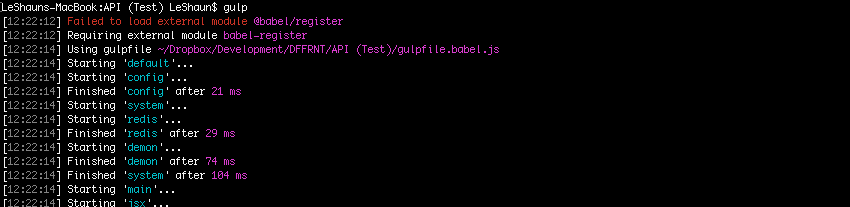
Lastly, still in the project root, type
gulpand hit ENTER to run, and watch thelogsas theserverstarts up:Initial
gulptasks being completed.File monitoring, courtesy of
nodemon.The
nodeserver starting up.- If there are no glaring
errors, you're done! - Otherwise... Sh!t..? ¯\_(ツ)_/¯
- If there are no glaring
-
In your
browser, navigate to localhost:3001/api-explorer (or whateverportyou chose) and you'll see the API Exploration UI. Use this to test yourendpointsand/orsignle sign-onfunctionality. -
Hit CTRL+C to
stopthe server.


Initial default Configs used within the DFFRNT.API Framework.
A collection of SQL Utilities & MySQL connector.
An Express/Passport/MySQL-based API Router.
A collection of useful API Utilities & PolyFills.
