


An immersive 3D portfolio experience that combines the elegance of a MacBook Pro interface with the power of a terminal-based navigation system. This project showcases my journey as a Robotics Engineer through an interactive, git-inspired browsing experience.
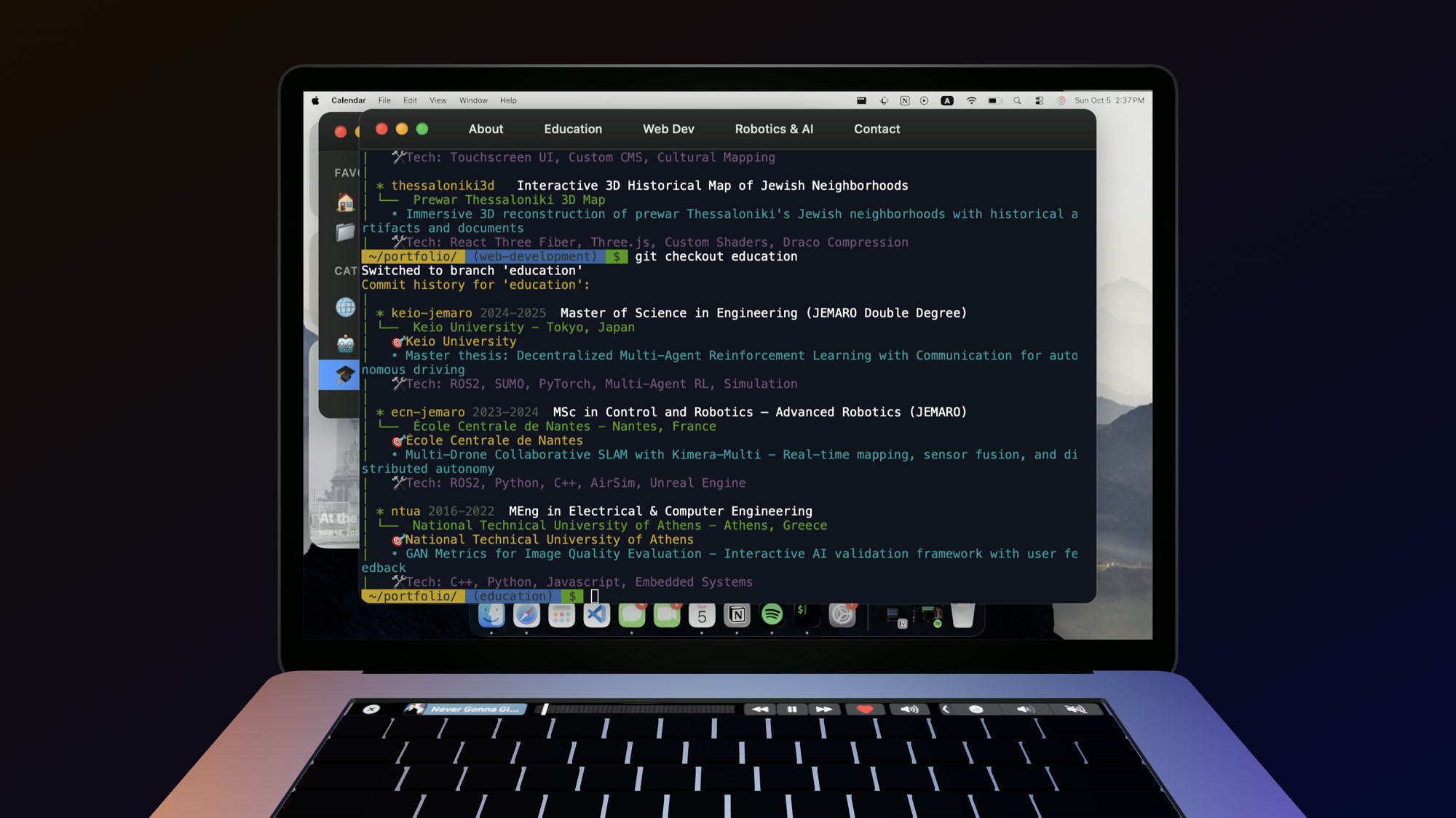
Interactive 3D MacBook interface with terminal-based navigation
I'm Dimitrios Gkegkas, a passionate Robotics Engineer with expertise in:
- 🤖 Autonomous Systems - Multi-robot coordination and SLAM
- 🧠 AI/ML - Reinforcement Learning, Computer Vision, GANs
- 🌐 Full-Stack Development - React, Three.js, Node.js
- 🎓 Academic Background - JEMARO Double Degree (France & Japan), NTUA
My work bridges the gap between cutting-edge research and real-world applications, from autonomous driving systems to cultural heritage digitization projects that serve 250k+ users.
This portfolio reimagines the traditional CV as an interactive 3D experience where users explore my work through a familiar yet engaging interface - a MacBook Pro with a functional terminal and Finder-like file browser.
- Realistic MacBook Pro 3D model with interactive screen
- Smooth animations and camera movements
- Responsive design that adapts to all screen sizes
- Touch-optimized controls for mobile devices
- Full-featured terminal with command history
- Navigate through projects using
gitcommands - Browse directories with
ls,cd, andcat - Interactive help system with
helpcommand - Clickable links and file paths
- ANSI color support for beautiful output
Available Commands:
git checkout education        # View academic background
git checkout web-development  # Browse web projects
git checkout robotics-ai      # Explore robotics projects
ls                           # List files in current directory
cd [path]                    # Change directory
cat [file]                   # Read file contents
help                         # Show all commands
clear # Clear terminal- macOS-inspired file browser
- Category-based project organization
- Project thumbnails and descriptions
- Hover tooltips with tech stack details
- Smooth navigation between categories
- Desktop, tablet, and mobile support
- Touch gestures for mobile devices
- Adaptive UI that scales beautifully
- Performance-optimized 3D rendering
- React 18 - UI library with hooks
- TypeScript - Type-safe development
- Vite - Lightning-fast build tool
- Three.js - WebGL rendering engine
- React Three Fiber - React renderer for Three.js
- @react-three/drei - Useful helpers for R3F
- GLTF/GLB Models - Optimized 3D assets with Draco compression
- xterm.js - Full-featured terminal emulator
- xterm-addon-fit - Responsive terminal sizing
- xterm-addon-web-links - Clickable link detection
- Custom command parser and execution engine
- CSS3 - Modern styling with custom properties
- CSS Grid & Flexbox - Responsive layouts
- Custom Animations - Smooth transitions and effects
- ESLint - Code linting
- Git - Version control
- GitHub Pages - Deployment
portfolio/
├── src/
│   ├── Components/
│   │   ├── ContentManager/      # Dynamic content display system
│   │   │   ├── Content/          # Individual project content components
│   │   │   │   ├── Education/    # Educational background components
│   │   │   │   ├── WebDev/       # Web development projects
│   │   │   │   └── RoboticsAI/   # Robotics & AI projects
│   │   │   ├── ContentManager.tsx
│   │   │   ├── Item.tsx          # Project item renderer
│   │   │   └── StaticItemDiv.tsx # Static content container
│   │   │
│   │   ├── Laptop/              # 3D MacBook model & scene
│   │   │   ├── Laptop.tsx       # Main 3D scene component
│   │   │   └── Laptop.css
│   │   │
│   │   ├── Menu/                # Navigation menu system
│   │   │   ├── EnterButton/     # Entry point button
│   │   │   ├── MenuBar/         # Top menu bar
│   │   │   └── ReturnButton/    # Back navigation
│   │   │
│   │   ├── SceneManager/        # 3D scene orchestration
│   │   │   ├── SceneManager.tsx # Scene state management
│   │   │   ├── animations.times.tsx
│   │   │   ├── ImageFadeMaterialDisplacementCover.tsx
│   │   │   └── PaperScreen.tsx  # Screen texture renderer
│   │   │
│   │   ├── UIManager/           # UI state & overlay management
│   │   │   ├── UIManager.tsx
│   │   │   └── UIManager.css
│   │   │
│   │   ├── Windows/             # Window components
│   │   │   ├── DraggableWindow/ # Base draggable window
│   │   │   ├── FinderWindow/    # macOS-style file browser
│   │   │   ├── Terminal/        # Terminal emulator
│   │   │   │   ├── Terminal.tsx
│   │   │   │   └── parts/
│   │   │   │       ├── commands/      # Command implementations
│   │   │   │       │   ├── cat.ts     # File reading
│   │   │   │       │   ├── cd.ts      # Directory navigation
│   │   │   │       │   ├── clear.ts   # Clear screen
│   │   │   │       │   ├── git.ts     # Git-like commands
│   │   │   │       │   ├── help.ts    # Help system
│   │   │   │       │   └── ls.ts      # List directory
│   │   │   │       ├── links/         # Link detection
│   │   │   │       ├── constants.tsx  # Terminal constants
│   │   │   │       └── welcome.ts     # Welcome message
│   │   │   ├── VimeoVideo/      # Video player window
│   │   │   └── ProjectTooltip/  # Project hover tooltips
│   │   │
│   │   └── Light.tsx            # Scene lighting
│   │
│   ├── Data/
│   │   └── portfolioData.ts     # Centralized data store
│   │                            # - Projects (single source of truth)
│   │                            # - Branches (categories)
│   │                            # - File system structure
│   │
│   ├── utils/
│   │   └── asset.ts             # Asset loading utilities
│   │
│   ├── App.tsx                  # Main application component
│   ├── main.tsx                 # Application entry point
│   └── index.css                # Global styles
│
├── public/                      # Static assets
│   ├── macbook.glb              # 3D MacBook model
│   ├── projects/                # Project images
│   ├── CV.pdf                   # Resume
│   └── ...
│
├── dist/                        # Production build
├── package.json                 # Dependencies & scripts
├── vite.config.ts              # Vite configuration
├── tsconfig.json               # TypeScript configuration
└── README.md                   # This file
The portfolio uses a centralized data store pattern to eliminate redundancy:
// Single source of truth for all projects
projects: {
  projectId: {
    id: "projectId",
    name: "Project Name",
    description: "...",
    techStack: ["React", "Three.js"],
    category: "web-development",
    // ... other fields
  }
}

// Branches reference projects by ID
branches: {
  "web-development": {
    projectIds: ["project1", "project2", ...]
  }
}
Benefits:
- ✅ Single source of truth - update once, reflect everywhere
- ✅ Easy maintenance and consistency
- ✅ Type-safe with TypeScript interfaces
- ✅ Efficient data access through helper functions
App
├── SceneManager (3D scene state)
│   └── Laptop (3D MacBook)
│       └── PaperScreen (Screen content)
├── UIManager (UI state)
│   ├── Menu (Navigation)
│   ├── Windows
│   │   ├── Terminal
│   │   └── FinderWindow
│   └── ContentManager (Project display)
└── Light (3D lighting)
The terminal uses a command pattern with individual modules:
// Each command is a self-contained module
export const executeCommand = (
  cmd: string,
  args: string[],
  context: TerminalContext
) => {
  switch (cmd) {
    case 'git':
      return gitCommand(args, context);
    case 'ls':
      return lsCommand(args, context);
    // ... other commands
  }
};The portfolio simulates a Unix-like file system:
fileSystem: {
  "~/portfolio/": [
    { name: "education", isDir: true },
    { name: "web-development", isDir: true },
    { name: "README.md", isDir: false, content: "..." }
  ]
}- Node.js 18+ and yarn
- Modern browser with WebGL support
-
Clone the repository
git clone https://github.com/dimitriosgkegkas/portfolio.git cd portfolio -
Install dependencies
yarn install
-
Run development server
yarn dev
-
Open in browser
http://localhost:5173
yarn buildThe optimized production build will be in the dist/ directory.
-
Define the project in
src/Data/portfolioData.ts:projects: { myProject: { id: "myProject", name: "My Awesome Project", title: "Short Title", description: "Project description", techStack: ["React", "Node.js"], tags: ["Web", "AI"], category: "web-development", hash: "my-project", component: "MyProject", icon: "🚀", thumbnails: ["/projects/my-project/1.jpg"] } }
-
Add to a branch:
branches: {
  "web-development": {
    projectIds: [..., "myProject"]
  }
}
-
Create content component in
src/Components/ContentManager/Content/MyProject.tsx -
Add file system entry:
"~/portfolio/web-development/": [
  { name: "myProject.md", isDir: false, content: "..." }
]
- Global styles:
src/index.css - Component styles: Colocated
.cssfiles - CSS variables: Defined in
index.cssfor easy theming
- ✅ Chrome/Edge (latest)
- ✅ Firefox (latest)
- ✅ Safari (latest)
- ✅ Mobile browsers (iOS Safari, Chrome Mobile)
Note: Requires WebGL support for 3D rendering.
- Draco Compression - 3D models compressed up to 90%
- Code Splitting - Dynamic imports for faster initial load
- Lazy Loading - Components loaded on demand
- Optimized Assets - Compressed images and models
- Responsive 3D - Adjusted quality based on device capabilities
This project is open source and available under the MIT License.
Dimitrios Gkegkas
- 📧 Email: dimitrisgegas01@gmail.com
- 💼 LinkedIn: dimitris-gkegkas
- 🌐 Portfolio: https://dimitriosgkegkas.github.io/portfolio/
- 3D MacBook model inspired by Apple's design language
- Terminal emulation powered by xterm.js
- 3D rendering with Three.js and React Three Fiber
Made with ❤️ and lots of ☕
⭐ Star this repo if you like it!