Transform any USB keyboard into a Bluetooth wireless keyboard using ESP32-S3's native USB-OTG hardware.
┌─────────────┐     USB-C OTG     ┌────────────┐     Bluetooth     ┌──────────────┐
│ USB Keyboard│ ◄──────────────►  │ ESP32-S3   │ ◄───────────────► │ PC / Phone   │
└─────────────┘                   └────────────┘                   └──────────────┘
Plug a USB keyboard into ESP32-S3's USB-C port and it becomes a Bluetooth keyboard that can connect to any BLE-compatible device (Windows, macOS, Linux, iOS, Android).
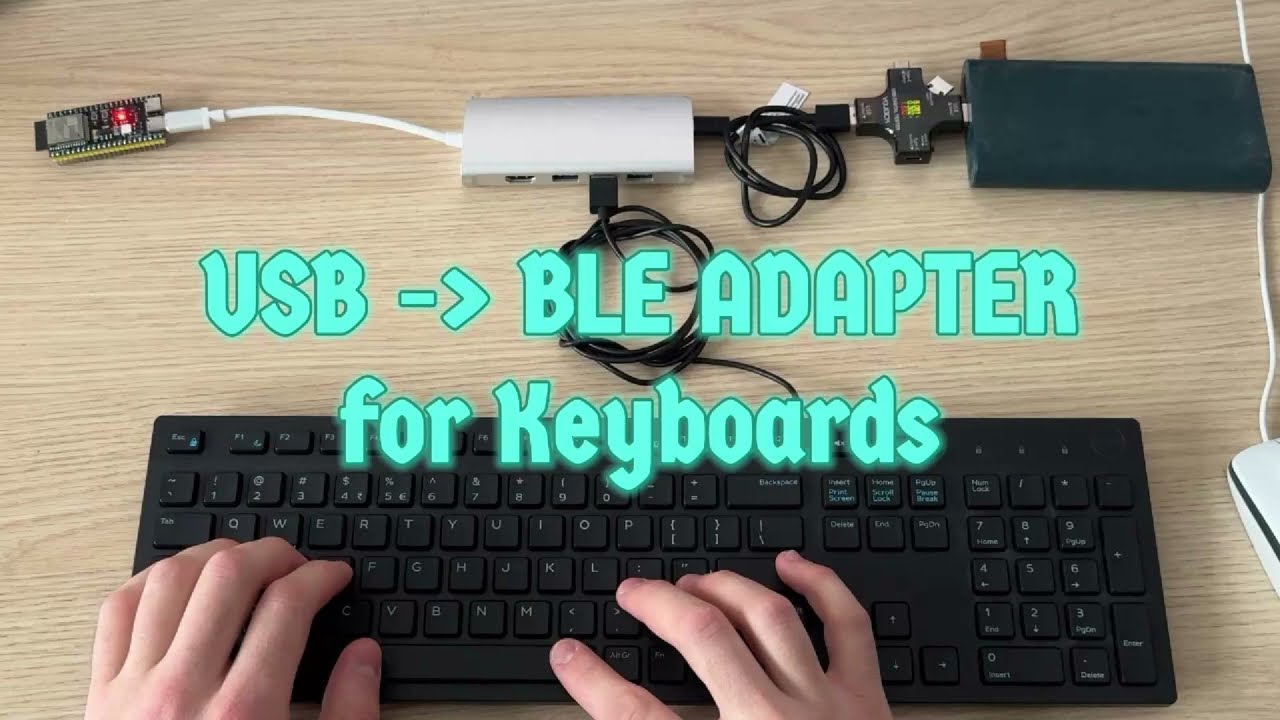
- Native USB Host - Uses ESP32-S3's hardware USB-OTG (no software emulation)
- Multi-Device Support - Switch between 3 paired devices with a key combo
- Low Latency - Direct HID report forwarding
- Universal Compatibility - Works with Windows, macOS, Linux, iOS, Android, Smart TVs
You can pair with up to 3 different devices (e.g., PC, Laptop, Tablet) and switch between them using your keyboard.
| Key Combo | Action | Device Name |
|---|---|---|
| Scroll Lock + 1 | Switch to Device 1 | USB-BLE Dev 1 |
| Scroll Lock + 2 | Switch to Device 2 | USB-BLE Dev 2 |
| Scroll Lock + 3 | Switch to Device 3 | USB-BLE Dev 3 |
How it works:
- Press
Scroll Lock + 1. Pair "USB-BLE Dev 1" with your first computer. - Press
Scroll Lock + 2. The connection drops. Pair "USB-BLE Dev 2" with your second device. - Switch back and forth instantly using the key combos!
- The active slot is saved and restored on reboot.
- The LED on GPIO 2 blinks to indicate the current slot (1, 2, or 3 blinks).
The USB-C port on most ESP32-S3 boards does NOT output 5V!
Even if you power the ESP32-S3 from the 5V pin, that power is NOT routed to the USB-C VBUS line.
Use a powered USB hub between ESP32-S3 and keyboard:
ESP32-S3 USB-C ──► [Powered USB Hub] ──► USB Keyboard
                         ▲
                    External 5V
Power the keyboard directly, use USB-C only for data:
                      ┌──────────────┐
    5V Power ─────────┤ USB Breakout ├──── USB Keyboard
    Supply    GND ────┤    Board     │
                      └──────┬───────┘
                             │ D+/D- only (data)
                      ┌──────┴───────┐
                      │   ESP32-S3   │
                      │   USB-C port │
                      └──────────────┘
Steps:
- Cut a USB cable or get a USB breakout board
- Connect 5V and GND from your power supply directly to keyboard's USB power
- Connect only D+ and D- (data lines) through the ESP32-S3 USB-C port
The ESP32-S3-USB-OTG development board has a dedicated USB-A host port with proper 5V output - no modifications needed.
Some boards have solder pads to enable 5V on USB-C. Check your board's schematic for pads labeled "USB_OTG" or similar.
git clone https://github.com/KoStard/ESP32S3-USB-Keyboard-To-BLE
cd ESP32S3-USB-Keyboard-To-BLE

# Build with PlatformIO
pio run

# Upload to ESP32-S3
pio run -t uploadEdit src/Config.h:
#define DEVICE_NAME_1 "USB-BLE Dev 1"
#define DEVICE_MANUFACTURER "Custom"The project is configured for esp32-s3-devkitc-1. For other boards, edit platformio.ini:
board = esp32-s3-devkitc-1 ; Change to your boardYour board needs to have USB-OTG.
The ESP32-S3 has a hardware limitation on the number of USB Host channels (pipes).
Consequence: If you connect a complex hub with multiple devices (e.g., a "Gaming" keyboard that shows up as 3-4 different HID interfaces + a mouse + a hub), you may run out of hardware channels.
- Symptoms: You will see
No more HCD channels availablein the Serial logs, and some devices or interfaces will fail to initialize. - Recommendation: Use a simple USB hub and avoid devices that present too many virtual interfaces if you plan to use them simultaneously.