


This project provides a custom integration for WlanThermo with Home Assistant. If you have struggled to get WlanThermo working with existing solutions, this package offers a structured, ready-to-use approach.
This code is based on the work of others. Special thanks to:
For questions, visit the WlanThermo Forum.
- Integrates WlanThermo data into Home Assistant
- Pre-configured sensors, numbers, and templates
- Example dashboard layout and MQTT setup
Add the following to your Home Assistant configuration.yaml:
homeassistant:
packages: !include_dir_named packagesCreate the following folders and upload the files as organized in this repository: (DO NOT UPLOAD FOLDER old)
/homeassistant/packages/
/homeassistant/packages/wlanthermo/
/homeassistant/packages/wlanthermo/template/
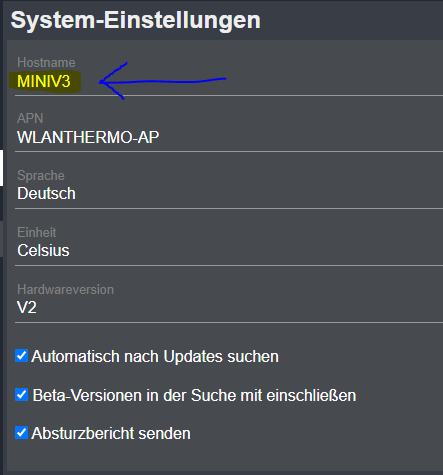
Within the wlanthermo folder, there is a secrets.yaml file containing the MQTT topic settings used for communication with your WlanThermo device. Update these topics if your device uses different MQTT topics or a different device name. The default topics are:
wlanthermo_data_topic: WLanThermo/MINI-V3/status/data
wlanthermo_settings_topic: WLanThermo/MINI-V3/status/settings
wlanthermo_set_topic: WLanThermo/MINI-V3/set/channels
Adjust these values to match your WlanThermo's MQTT configuration if necessary. Then copy these secrets to your Home Assistant secrets file at /homeassistant/secrets.yaml
To use the provided dashboard layout (see bbq.yaml), install these custom components via HACS:
- lovelace-badge-card
- lovelace-layout-card
- config-template-card
- button-card
- kiosk-mode
- vertical-stack-in-card
- apexcharts-card
Refer to the documentation in each repository for installation instructions. For editing files, the easiest way is to use the "File editor" add-on from the Home Assistant Add-on Store. Create files with the same names, add the content, and save.
For bbq.yaml, create a new dashboard, open the menu (three dots at the top right), select "Edit dashboard," then "Edit raw configuration," and paste the content.
To receive data from WlanThermo, you need an MQTT broker. Mosquitto broker is recommended. Set up WlanThermo to use your Home Assistant IP address:
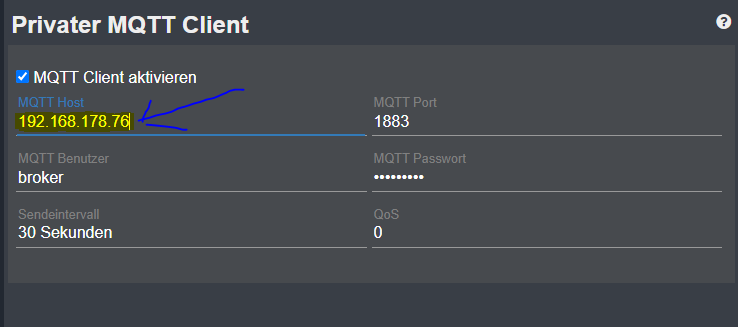
Important: Set your host to MINI-V3 for the files to work without changes. Otherwise, update secrets.yaml to match your device name.
# with the secrets file we have a variable to change relative path:
"WLanThermo/${wlanthermo_model}/status/data"After adding all files, updating configuration.yaml, setting up MQTT, and installing the required add-ons, you should see a dashboard like this:
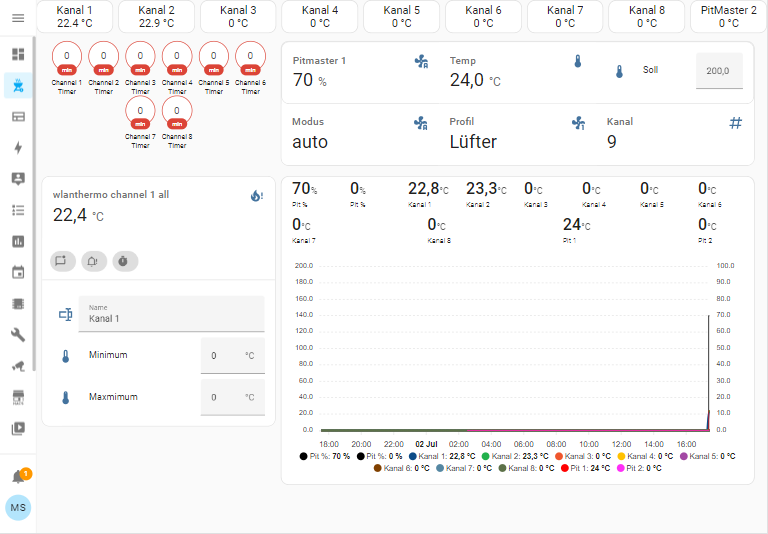
- Top row: Temperatures of all 8 channels. Click a channel for a detailed view (third row).
- Second row: Timer (left) shows estimated BBQ readiness. Pitmaster1 settings (right) allow you to set temperature, mode, and profile. It is recommended to keep the channel set to 9.
- Third row: Left shows the selected channel (from top row). Adjust temperature and alarms for each channel or Pitmaster 2. Right shows a graph of all temperature history.