Skip to content

Changed colors for outlined button#1873

Merged
Keboo merged 3 commits intoMaterialDesignInXAML:masterfrom
greuelpirat:outline-button-colors
Jun 3, 2020
Merged

Changed colors for outlined button#1873
Keboo merged 3 commits intoMaterialDesignInXAML:masterfrom
greuelpirat:outline-button-colors

Conversation

@greuelpirat
Copy link
Copy Markdown
Contributor

Changed outlined button to match https://material.io/components/buttons#outlined-button:

  • Grey border
  • Brighter hover background

I also removed a redundant property.

Resolves #1863

@jizc
Copy link
Copy Markdown
Contributor

jizc commented Jun 1, 2020

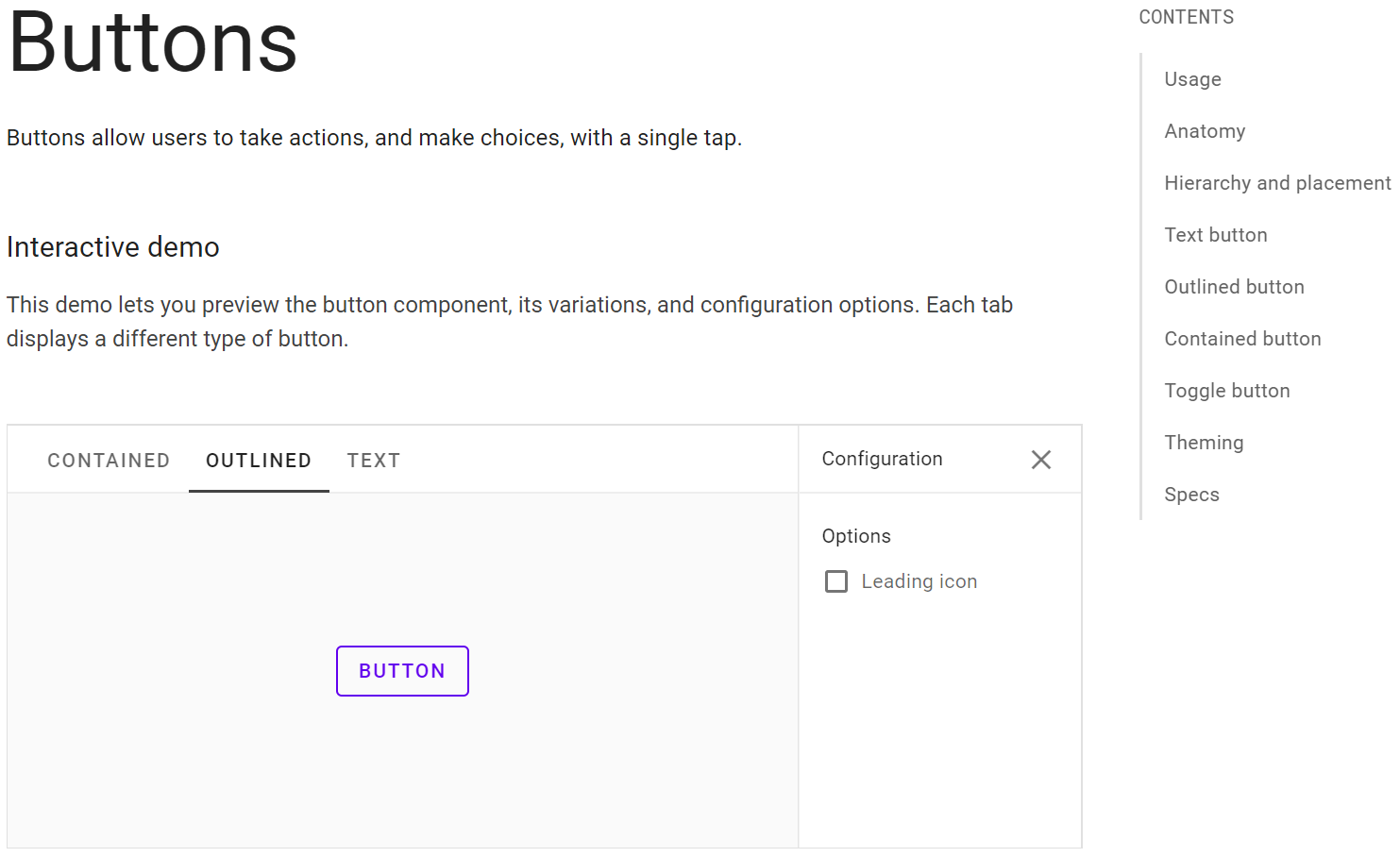
A curious wrinkle to this, is that in the interactive demo at the top of the Button definition page, the outline is not grey. But it appears to be the only instance of it, everywhere else I can find it's grey.

@greuelpirat
Copy link
Copy Markdown
Contributor Author

A curious wrinkle to this, is that in the interactive demo at the top of the Button definition page, the outline is not grey. But it appears to be the only instance of it, everywhere else I can find it's grey.

I can not find it. Can you post a screenshot?

@jizc
Copy link
Copy Markdown
Contributor

jizc commented Jun 1, 2020

Sure thing 👍

image

To find it just follow the link you posted to material.io, then scroll all the way to the top of the page, then click the OUTLINED tab of the interactive demo.

@jizc
Copy link
Copy Markdown
Contributor

jizc commented Jun 1, 2020

My guess is that the outline previously used the primary color, and they forgot to update the interactive demo when they changed it to grey.

@greuelpirat
Copy link
Copy Markdown
Contributor Author

Oh, I have overlooked this. Hm, but I would agree to say that they changed that. MDIX also uses primary color so may be that is the reason. Personally I find the grey border better, but that can decide should decide the reviewers.

@Keboo Keboo added enhancement visual breaking change Items here have affected the visual look of controls. labels Jun 3, 2020
@Keboo
Copy link
Copy Markdown
Member

Keboo commented Jun 3, 2020

Yea I agree, I think the gray outline is the intended color from the spec with their demo simply being out of date.

@Keboo Keboo added this to the 3.2.0 milestone Jun 3, 2020
@Keboo Keboo merged commit b9b34a0 into MaterialDesignInXAML:master Jun 3, 2020
@greuelpirat greuelpirat deleted the outline-button-colors branch June 3, 2020 14:53
@midasw
Copy link
Copy Markdown
Contributor

midasw commented Jun 3, 2020

@greuelpirat I believe there is another (cosmetic) issue with this button which is visible when changing from mouseover state to pressed state. When the button is pressed the existing background color disappears completely before the ripple appears. This doesn't seem to happen with any of the other button styles.

Sign up for free to join this conversation on GitHub. Already have an account? Sign in to comment

Labels

enhancement visual breaking change Items here have affected the visual look of controls.

Projects

None yet

Development

Successfully merging this pull request may close these issues.

Buttons have different appearance from demo app

4 participants