Natural language processing on a Drupal web site
The PLA web site allows users to type in their legal problem in their own words. It processes those words using machine learning and provides a list of hyperlinks that are responsive to those words. The web site is trained on the words that users use. The hyperlinks can be links on the PLA web site or links on other web sites.
The natural language classifier uses the K-nearest-neighbors algorithm available in the pattern Python package.
- User visits https://philalegal.org/getlegalhelp
- User types a phrase into a
TEXTAREAbox and clicks "Get Help" - The "Get Help" button triggers a function in
nlp.jsthat makes an Ajax request to/proxycgi/website_client.pl. - The
/proxycgi/website_client.plCGI Perl script takes the phrase and writes it to a socket on port 6693. - The
website_data.pyPython module, which is running constantly in the background, listens on port 6693 and processes requests. It returns some JSON to the/proxycgi/website_client.plCGI Perl script. - The
/proxycgi/website_client.plCGI Perl script returns the JSON to the browser. - The
nlp.jstakes the JSON and creates a yellow box on the screen containing the results.
This is probably more complicated than it needs to be, but it was easy to set up and it is easy to maintain. It would probably be more elegant to simply install Python on the main web server and write a thread-safe Python web app.
- Using a web browser, an advocate visits the
review_queries.plCGI script on an internal network. - The advocate looks at the queries users are typing in and presses buttons, or types in hyperlinks.
- Some queries are flagged as "ignore," which causes the entries to be deleted. For example, when a user provides personally identifying information, the entry should be deleted. Also, if training the classifier on the query would not add any additional information, the query should be ignored. If the user types "divorce" and the "Divorce" page was the only hyperlink shown to the user, there is no point training the classfier further.
- The
review_queries.plCGI script writes data to a local SQL database and sends a message to port 6693 to re-train the natural language classifier.
In our case, our web server runs IIS 7, but we wanted to run the CGI script on a Linux box, so we used the URL Rewrite module to direct requests to a different server.
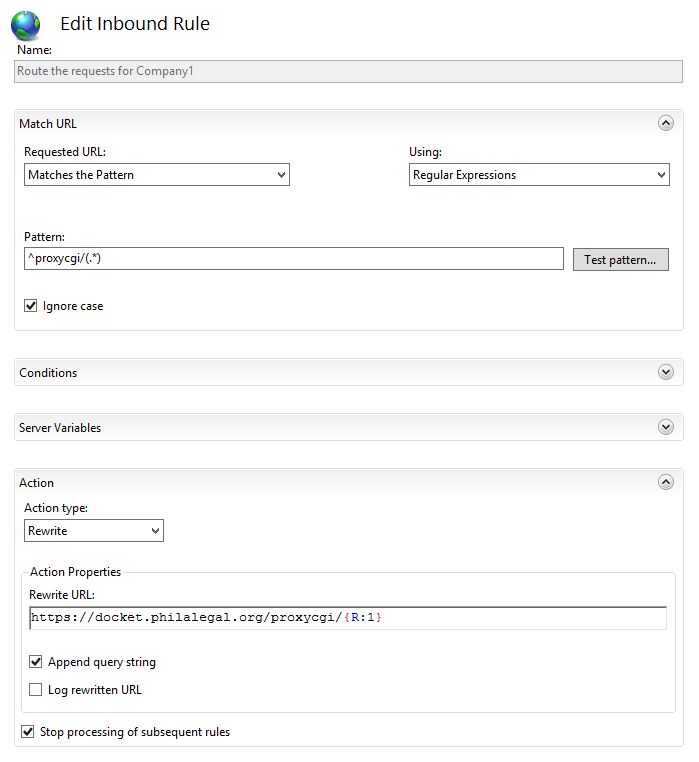
Thus, when the JavaScript function in nlp.js makes an Ajax request to website_client.pl, IIS 7 acts as a proxy for the request, transparently returning the response that is actually being provided by a different server.
The queries are stored in a SQL database. In our case, we use a PostgreSQL database. In the code, the database is called nlpdatabase and it resides on the same server that runs the Perl and Python code.
The database has one database table, which needs to be set up in advance with appropriate permissions:
create table website_queries (indexno serial, datetime timestamp default now(), query text, target text, orig_sub text)
grant all on website_queries to "www-data";
You will need to edit the code files to point to the right database with the right permissions.
Separately, the code accesses the MySQL server behind the Drupal web site. You will need to edit the code so that it can access the Drupal SQL server.
The website_data.py daemon trains the natural classifier on the text of taxonomy term pages and legal resource pages of the web site. This is helpful so that at the very least, the natural language classifier will act like a search engine for the site. The training data from user queries will improve upon the "search engine" aspect by using vocabulary that is not found on the pages.
Keeping the website_data.py daemon running will take some vigilance. We run it in a screen session.
The Python 2.7 script requires some packages:
pip install pattern psycopg2 beautifulsoup4 lxml
The HTML requires some files to be installed in the Drupal theme.
First, download jquery.scrollintoview.min.js. Then copy nlp.css, nlp.js, and jquery.scrollintoview.min.js to the custom folder of your Drupal theme (in our case, sites/all/themes/skeletontheme).
Add the following lines to your theme's .info file (in our case, sites/all/themes/skeletontheme/skeletontheme.info):
stylesheets[all][] = custom/nlp.css
scripts[] = custom/nlp.js
scripts[] = custom/jquery.scrollintoview.min.js
In your Drupal site, create a block containing the following text as Verbatim HTML.
<div id="freetextblock" style="position: relative;">
<h2>What is your legal problem?</h2>
<p>Describe your legal problem in your own words, then click Get Help.  Then you will see a list of pages on this web site and the web sites of our partner organizations that may be helpful.  Please <strong>do not</strong> include your name, phone number, or e-mail; if you wish to apply for assistance, please use our on-line intake system instead.</p>
<div><textarea class="freetextarea" id="freetextquery" maxlength="400"></textarea></div>
<p><button id="freetextsubmit">Get Help</button></p>
</div>
<div id="freetextresponsesection" style="display:none;" class="freetextresponsesection">
<h2 id="freetextresultheader">Pages that might help</h2>
<p>You described your problem this way: <span class="userfreetext" id="userfreetext"></span></p>
<p>Based on your description of your problem, the following web pages may help you.</p>
<ul id="freetextlinks">
</ul>
<div id="freetextend"></div>
</div>
On our site, we configured this block so that it only appears on the /getlegalhelp page.
If you have any questions, contact Jonathan Pyle at Philadelphia Legal Assistance.