Unhandled exception in the target app shows a .NET host error #23

Description

Version
ver 2.0.3
Details
Hi!
First of all I am not really sure if this should be a bug report or a feature request!
In my app I am using this exception handler event: AppDomain.CurrentDomain.UnhandledException to show a MessageBox and try to create a backup in case of an unhandled exception.
But with DotnetRuntimeBootstrapper this event doesn't get called, instead it's showing this MessageBox:
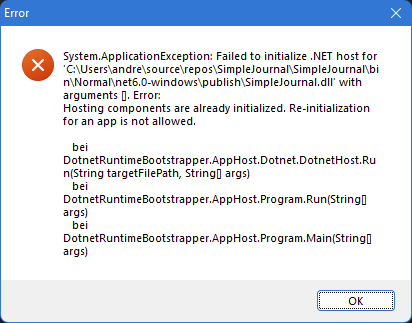
AppHost_Error_20220125131642.txt
I've tested Dispatcher.UnhandledException instead and it works fine though, but it only catches Exceptions from the UI-Thread. So is there a way to make this other exception handler working?
The thing is that the text from this default MessageBox isn't really helpful, because it hides the exception that actually occurs.
So is there a way to disable this MessageBox and this logfile somehow (or at least for unhandled exceptions inside the application)?
I think it could be useful if the user can implement his own MessageBox instead (showing two MessageBoxes is not really useful)
Steps to reproduce
- throw an exception and don't catch it inside a project where
DotnetRuntimeBootstrapperis used (WPF)