CopyFrom and AddPage both cause AddText to be written upside down #614

Description

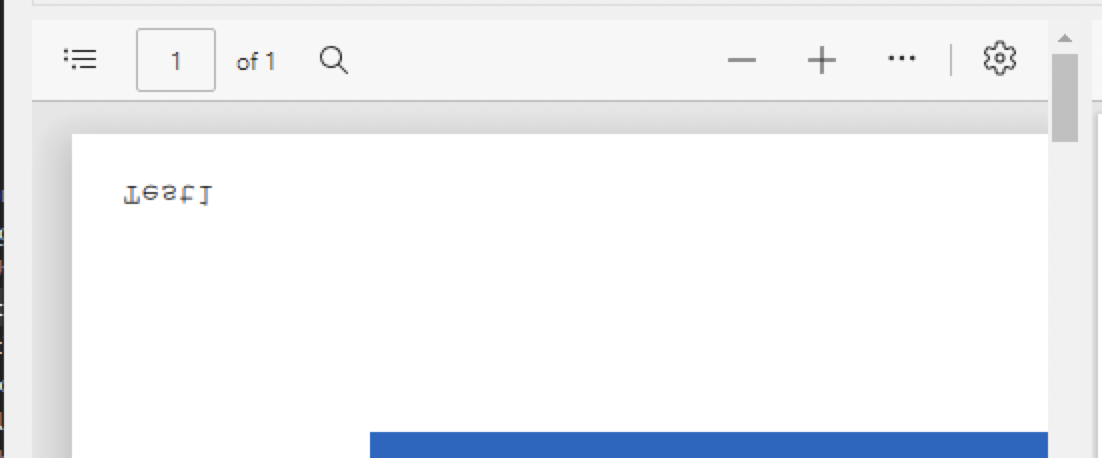
I am trying to load an existing PDF into my program and write simple text (just the page number) to each page. I have come across a bug where if I use AddPage or CopyFrom to copy a page from the existing PDF into a newly created PDF, the text gets created upside down. If I just create a new blank page and write the text to it, it works fine.
My guess is that the rotation is not preserved or something, because it also writes it to a different corner (top-left) than the non-copied page (bottom-left). The text is also much smaller if I do the copy from the existing document. I cannot find any way to get the text to be displayed the correct orientation after copying a page into the new PDF.
Is there a way I can write directly onto the existing PDF without having to create a new PdfDocumentBuilder?
Using CopyFrom or AddPage:
Just writing text, no copy:

using (var document = PdfDocument.Open(pdfPath))
{
    var b1 = new PdfDocumentBuilder();
    var f1 = b1.AddStandard14Font(Standard14Font.Courier);
    var p1 = b1.AddPage(document, 1);
    p1.AddText("Test1", 12, new PdfPoint(20, 20), f1);

    var b2 = new PdfDocumentBuilder();
    var f2 = b2.AddStandard14Font(Standard14Font.Courier);
    var p2 = b2.AddPage(PageSize.A3);
    p2.AddText("Test2", 12, new PdfPoint(20, 20), f2);

    byte[] data1 = b1.Build();
    byte[] data2 = b2.Build();
    File.WriteAllBytes(@"test1.pdf", data1);
    File.WriteAllBytes(@"test2.pdf", data2);
}