UV version:
universalviewer@4.0.9
I'm submitting a:
[ x] bug report
Current behaviour:
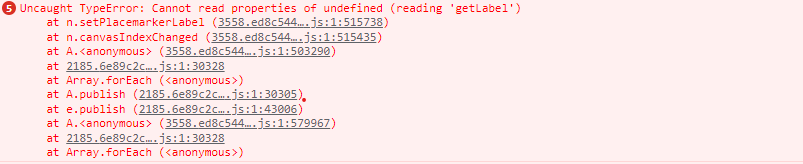
At the moment, a keyboard user can use the previous button in the header panel even if it's disabled via CSS. When the button is clicked, it will produce an error:
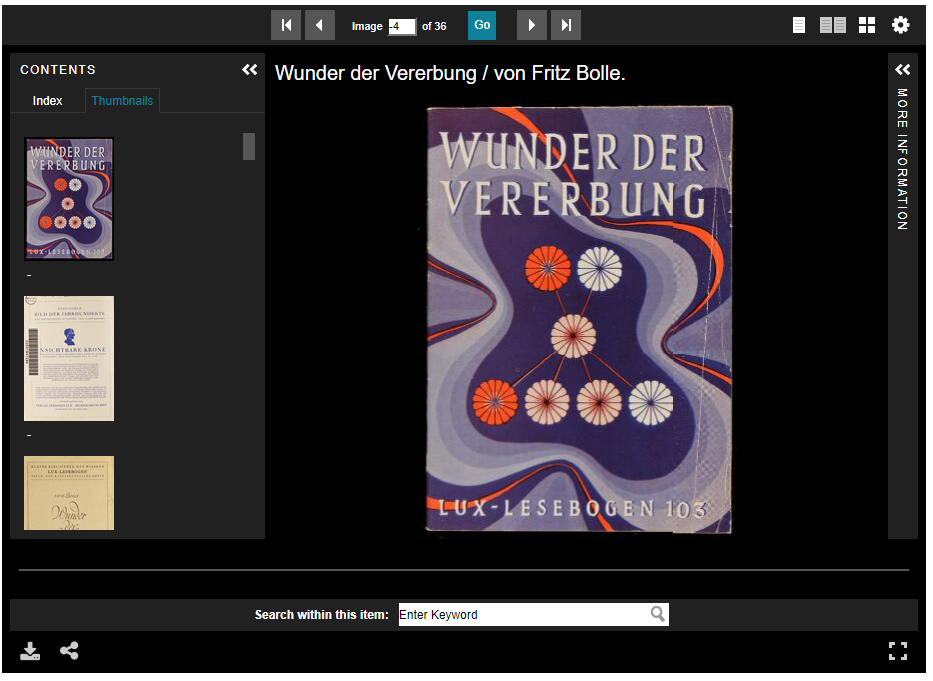
The position placemaker will also go off the screen when the previous button is clicked enough times:
Expected behavior:
The button should be disabled for all users.
Steps to reproduce:
Use the tab key to get to the previous button in the header panel, and when the page no is 1 or less, press the enter key. The error will then appear.
Other information:
It might be better to use Javascript to disable the button, adding something like below into PagingHeaderPanel.ts would do the trick.
In the disablePrevButton method, add:
this.$prevButton.attr("disabled","disabled");
and in enablePrevButtion, remove the attribute:
this.$prevButton.removeAttr("disabled");


UV version:
universalviewer@4.0.9I'm submitting a:
[ x]bug reportCurrent behaviour:
At the moment, a keyboard user can use the previous button in the header panel even if it's disabled via CSS. When the button is clicked, it will produce an error:
The position placemaker will also go off the screen when the previous button is clicked enough times:
Expected behavior:
The button should be disabled for all users.
Steps to reproduce:
Use the tab key to get to the previous button in the header panel, and when the page no is 1 or less, press the enter key. The error will then appear.
Other information:
It might be better to use Javascript to disable the button, adding something like below into PagingHeaderPanel.ts would do the trick.
In the disablePrevButton method, add:
this.$prevButton.attr("disabled","disabled");and in enablePrevButtion, remove the attribute:
this.$prevButton.removeAttr("disabled");