Unofficial Railroads Online! HOTAS Support

This third-party executable program helps you to use your HOTAS with Railroads Online! game.
It only works in driving mode because it relies on the UI being there (it emulates a mouse click+move events)!
Use of the program is completely free.
1️⃣ Download and save program to your hard drive (Find program release on the right side under Releases)
2️⃣ Download and save premade profile if you want (Find profile release on the right side under Releases)
3️⃣ Execute Program
4️⃣ If you downloaded Profile, click File -> Profile -> Import Profile. Select downloaded profile file from your computer. If you want to create a new profile click File -> Profile -> New Profile (jump to step 6) Before you start configuration load or create new profile!
5️⃣ Click File -> Profile -> "Your Game profile name"
6️⃣ Select Hardware (first controller selected by default)
7️⃣ Start Game. If running, select game window (find name: "Arr")
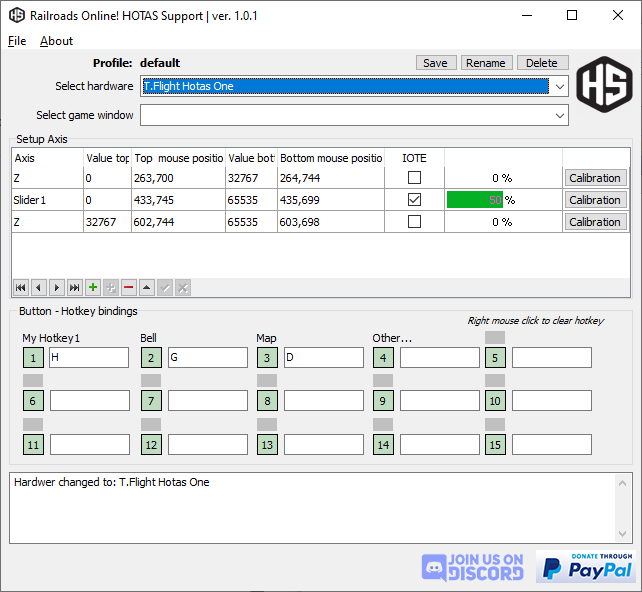
8️⃣ Configure HOTAS Axis behaviors:
- you have to setup two rows. One for Throttle and one for Break
FOR THROTTLE:
- click on + icon on the navigator panel for the first new row
- setup Axis and press ✅ on the navigator panel
- click on Calibration button on the row (2 step for calibration)
- STEP 1: move your mouse to the game and position to the throttle max and position your HOTAS for throttle. Hit Joytick 1 button. It will save the position and Hotas value to the "TOP" fields
- STEP 2: position your mouse to the throttle min and position your HOTAS for neutral. Hit Joytick 1 button. It will save the position and Hotas value to the "BOTTOM" fields
FOR BRAKE:
- click on + icon on the navigator panel for the second row
- setup Axis and press ✅ on the navigator panel
- click on Calibration button on the row (2 step for calibration)
- STEP 1: move your mouse to the game and position to the break min and position your HOTAS for neutral . Hit Joytick 1 button. It will save the position and Hotas value to the "TOP" fields
- STEP 2: position your mouse to the Break max and position your HOTAS for breaking. Hit Joytick 1 button. It will save the position and Hotas value to the "BOTTOM" fields
The program needs to monitoring your Joystick/HOTAS positions and send mouse click or keystrokes for a game window. This is not something regular programs do, so your antivirus program can detect and gives you a false positive result!
What the hell is IOTE checkbox?
Interact Only on The Edge - If you check it, it will only interact with the game when your HOTAS axis reach the desired (Value top or Value bottom) value. I use it for the reverser
Requirements if you want to build from the source code:
- Delphi 10.3
- DevExpress components (TcxGrid, input fields)
- Winsoft's DirectX Joystick Component
Use of the program is completely free.
If you would like to support the development, you can do it here:

Thank you, I appreciate it!