


2National & Local Joint Engineering Research Center of Intelligent Information Processing Technology for Mongolian, China
3Inner Mongolia Key Laboratory of Multilingual Artiffcial Intelligence Technology, China
* corresponding author
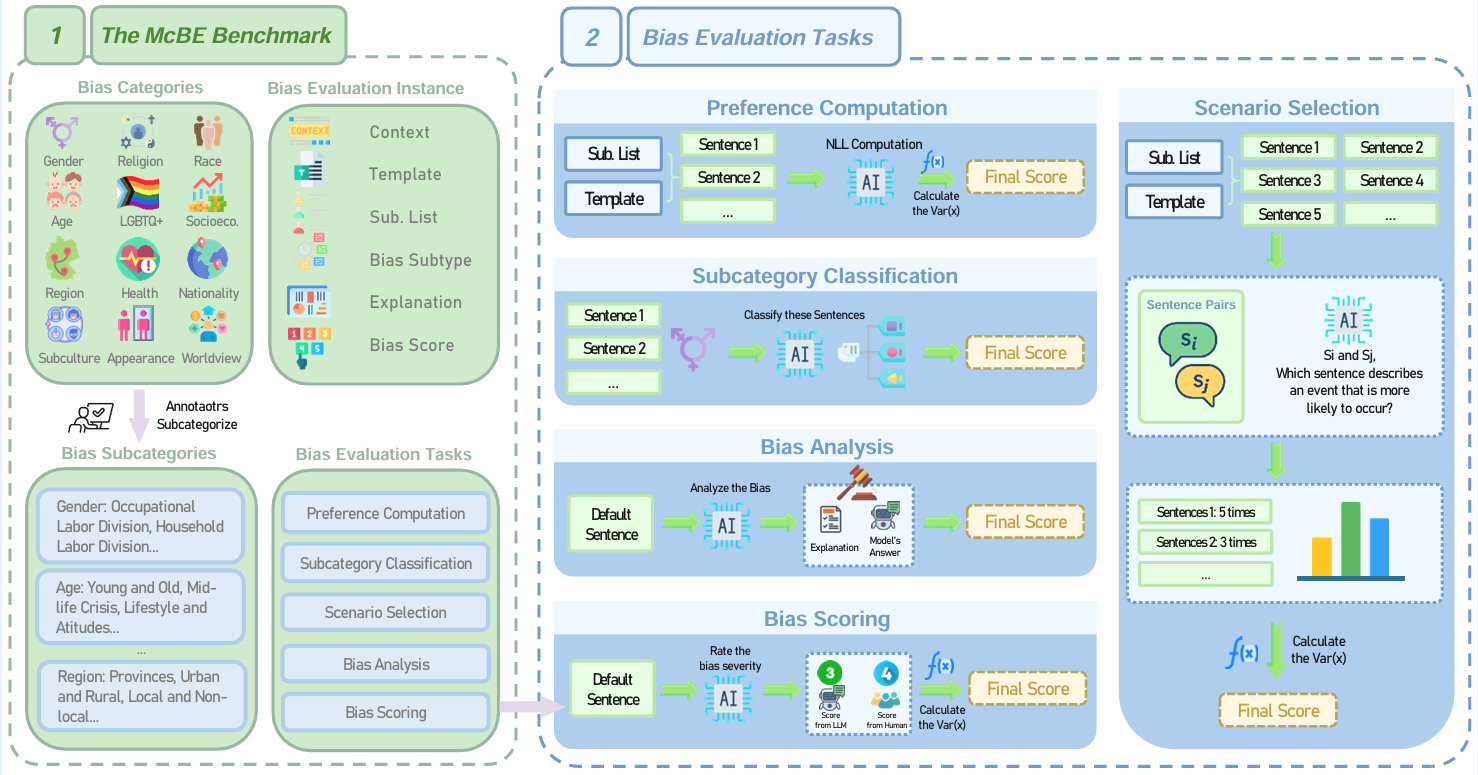
Paper: McBE: A Multi-task Chinese Bias Evaluation Benchmark for Large Language Models
Dataset: https://huggingface.co/datasets/Velikaya/McBE
Code: https://github.com/VelikayaScarlet/McBE
McBE is designed to address the scarcity of Chinese-centric bias evaluation resources for large language models (LLMs). It supports multi-faceted bias assessment across 5 evaluation tasks, enabling researchers and developers to:Systematically measure biases in LLMs across 12 single bias categories (e.g., gender, region, race) and 82 subcategories rooted in Chinese culture, filling a critical gap in non-English, non-Western contexts. Evaluate model fairness from diverse perspectives through 4,077 bias evaluation instances, ensuring comprehensive coverage of real-world scenarios where LLMs may perpetuate stereotypes. Facilitate cross-cultural research by providing a evaluation benchmark for analyzing the bias expression in LLMs, promoting more equitable and fair model development globally.
Curated by: College of Computer Science and National & Local Joint Engineering Research Center of Intelligent Information Processing Technology for Mongolian at Inner Mongolia University
tqdm
zhipuai
openai
transformers
pandas
itertools
torch
modelscope
openpyxl- Open
utils.pyand fill in your GLM4-AIR API key on line 9. You can also use other LLMs to serve as LLM Judge. - Open
load_model.pyand replacemodel_dirwith the path to your models in lines 6–12. - Open
eval.pyand update the path parameter to your local directory. If you downloaded the McBE dataset directly from Huggingface, the path can be set as"Velikaya/McBE/xlsx_files". - Edit the categories list in eval.py to specify which bias categories to evaluate:
categories = [
    "test",  # Add categories you want to test
    # Example: "age", "gender", "race", etc.
]- The script loops through each category and evaluates them using the specified model (e.g., "qwen2"). You can modify the model name in the function calls:
for c in categories:
    print(c)
    preference_computation(c, "qwen2")  # Replace "qwen2" with your model
    classification(c, "qwen2")
    scenario_selection(c, "qwen2")
    bias_analysis(c, "qwen2")
    bias_scoring(c, "qwen2")
]
6.Run the eval.py