Default sample_time < clock resolution on Windows, leading to very noisy results #775

Description

When running asv on Windows, it's quite common to see very noisy results like the following:
$ asv dev -b cut_timedelta
· Discovering benchmarks
· Running 4 total benchmarks (1 commits * 1 environments * 4 benchmarks)
[  0.00%] ·· Benchmarking existing-py_home_chris_anaconda3_bin_python
[ 12.50%] ··· reshape.Cut.time_cut_datetime                                                                                                                               ok
[ 12.50%] ··· ====== ==========
               bins
              ------ ----------
                4     15.6±0ms
                10     0±0ns
               1000   46.9±0ms
              ====== ==========
It's obvious from the above that we're using time.time() on Windows, which has a resolution of 15.6 ms. This could be fine if sample_time were large enough, but the default of 10 ms is only ~2/3 the clock resolution, leading to the time quantization to be especially pronounced.
Here's a log-log plot of the error ratio (std/mean) on the pandas asv benchmark suite when run on Windows:
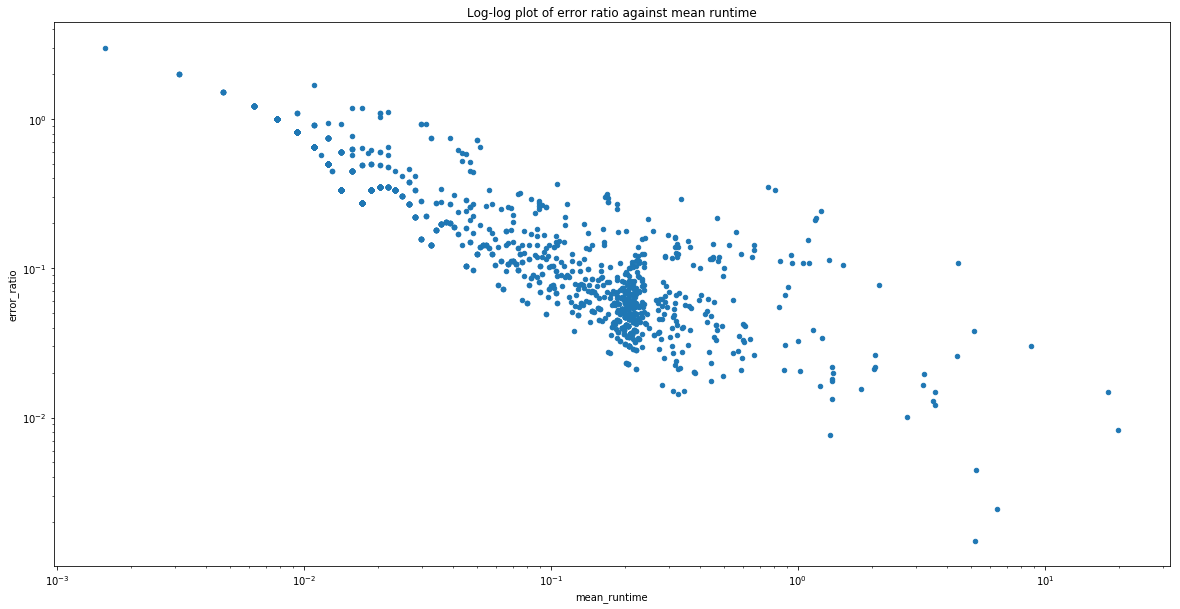
You can see that the first benchmark with an error better than 1% has to run for ~4s, or 400x the default sample_time!
The avenues I see for fixing asv on Windows are:
- Switch to
timeit.default_timer() - Increase
sample_timeby a couple orders of magnitude - Dynamically switch between
time.time()andtime.clock()based on expected runtime
I believe option 1 is by far the best option, but it's not clear to me whether there were wall vs cpu timing issues on Windows in the past that lead to the current selection of timer.
cc @topper-123