







A jurisdiction-agnostic payroll calculation engine developed by BMO Soluciones, S.A.
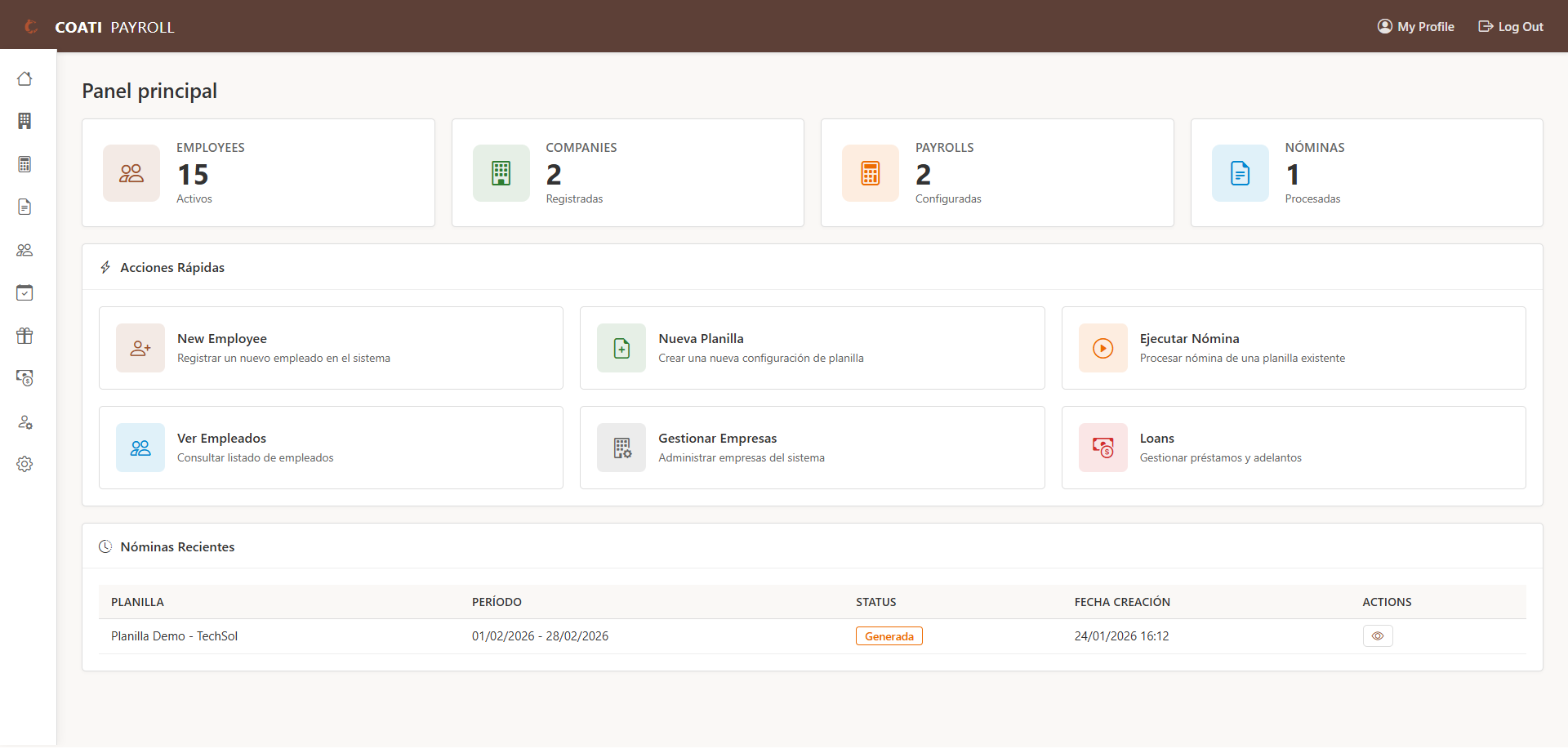


Coati Payroll is a flexible and extensible payroll calculation engine, completely jurisdiction-agnostic. The system is designed so that organizations and implementers can define their own payroll rules through configuration, without the need to modify the source code.
The engine does not incorporate hardcoded legal rules. All earnings, deductions, benefits, taxes, and other payroll concepts exist only if the implementer configures them.
Important: This project is governed by a Social Contract that clearly defines its scope, purpose, and limitations. Please read it before using the system in production.
The calculation engine may not be suitable for all possible use cases. The development team
is happy to collaborate with interested parties to expand the engine's capabilities so it can
cover as many use cases as possible. This project is offered under an open-source license,
as-is, without warranties of fitness for any particular purpose.
- Jurisdiction-Agnostic: No hardcoded legal rules; all payroll logic is defined through configuration
- Configurable Calculation Engine: Payroll processing with fully configurable formulas and schemas
- Flexible Calculation Rules: Rule system that allows implementing any payroll logic through configuration
- Multi-company: Manage payrolls for multiple companies or entities from a single system
- Employee Management: Complete registration of personal, work, and salary information
- Custom Fields: Extend employee information with custom fields
- Configurable Earnings: Define any type of additional income (bonuses, commissions, overtime, etc.)
- Priority-Based Deductions: Configure deductions in priority order according to your needs
- Employer Benefits: Configure benefits and employer contributions as required
- Planilla Cloning (Web UI): Duplicate an existing payroll template from the planilla list, including perceptions, deductions, and benefits
- Loans and Advances: Loan control with automatic installment deduction
- Multi-currency: Support for multiple currencies with exchange rates
- Background Processing: Queue system for large payrolls with Dramatiq/Huey
- Vacation Management: Complete module for vacation accrual, usage, and audit with configurable policies
- Role-Based Access Control (RBAC): Permission system with Admin, HR, and Audit roles
- Reporting System: Custom reports with role-based permissions and execution audit
- Internationalization: Multi-language support with interface and content translation
- Periodicidad Compatibility: Salary calculation accepts both Spanish and English periodicity terms (
mensual/monthly,quincenal/biweekly)
- Python 3.11 or higher
- pip (Python package manager)
- Clone the repository
git clone https://github.com/williamjmorenor/coati-payroll.git
cd coati-payroll- Create and activate virtual environment
python -m venv venv
source venv/bin/activate  # Linux/macOS
# or
venv\Scripts\activate # Windows- Install dependencies
pip install -r requirements.txt- Run the application
python app.py- Access the system
Open your browser at http://localhost:5000
Default credentials:
- User:
coati-admin - Password:
coati-admin
Important: Change the default credentials in production environments.
You can also run Coati Payroll using Docker:
- Build the Docker image
docker build -t coati-payroll:latest .- Run with development settings (SQLite)
docker run -d -p 5000:5000 \
  -e FLASK_ENV=development \
  --name coati-payroll \
coati-payroll:latest- Run with production settings (requires database)
docker run -d -p 5000:5000 \
  -e FLASK_ENV=production \
  -e DATABASE_URL="postgresql://user:password@host:5432/coati_payroll" \
  -e SECRET_KEY="your-secret-key-here" \
  -e ADMIN_USER="admin" \
  -e ADMIN_PASSWORD="secure-password" \
  --name coati-payroll \
coati-payroll:latest- Access the system
Open your browser at http://localhost:5000
Complete documentation is available in the docs/ directory and can be generated with MkDocs:
# Install documentation dependencies
pip install -r docs.txt

# Serve documentation locally
mkdocs serve

# Generate static documentation
mkdocs build- Quick Start Guide: 15 minutes from installation to your first payroll - ideal for evaluating the system
- Installation Guide: Requirements, installation, and initial configuration
- User Guide: Users, companies, currencies, employees, custom fields, payroll concepts, calculation rules, loans, vacations, accounting configuration
- Complete Tutorial: Step by step to configure and run a payroll with all components
- Advanced Features:
- Queue system and background processing
- Database compatibility (SQLite, PostgreSQL, MySQL/MariaDB)
- Role-based access control (RBAC)
- Vacation management with configurable policies
- Custom reporting system
- Internationalization and translation
- Reference: Glossary, frequently asked questions, exchange rate import
coati/
├── app.py                 # Application entry point
├── coati_payroll/         # Main module
│   ├── __init__.py        # Flask application factory
│   ├── model.py           # Database models (SQLAlchemy)
│   ├── nomina_engine/     # Payroll calculation engine (refactored)
│   │   ├── __init__.py
│   │   ├── engine.py      # Main orchestrator
│   │   ├── domain/        # Domain models
│   │   │   ├── payroll_context.py
│   │   │   ├── employee_calculation.py
│   │   │   └── calculation_items.py
│   │   ├── validators/    # Validations
│   │   │   ├── base_validator.py
│   │   │   ├── planilla_validator.py
│   │   │   ├── employee_validator.py
│   │   │   ├── period_validator.py
│   │   │   └── currency_validator.py
│   │   ├── calculators/   # Calculations
│   │   │   ├── salary_calculator.py
│   │   │   ├── concept_calculator.py
│   │   │   ├── perception_calculator.py
│   │   │   ├── deduction_calculator.py
│   │   │   ├── benefit_calculator.py
│   │   │   └── exchange_rate_calculator.py
│   │   ├── processors/    # Specific processors
│   │   │   ├── loan_processor.py
│   │   │   ├── accumulation_processor.py
│   │   │   ├── vacation_processor.py
│   │   │   ├── novelty_processor.py
│   │   │   └── accounting_processor.py
│   │   ├── repositories/  # Data access
│   │   │   ├── base_repository.py
│   │   │   ├── planilla_repository.py
│   │   │   ├── employee_repository.py
│   │   │   ├── acumulado_repository.py
│   │   │   ├── novelty_repository.py
│   │   │   ├── exchange_rate_repository.py
│   │   │   └── config_repository.py
│   │   ├── services/      # Business services
│   │   │   ├── payroll_execution_service.py
│   │   │   └── employee_processing_service.py
│   │   └── results/       # Results and DTOs
│   │       ├── payroll_result.py
│   │       ├── validation_result.py
│   │       └── error_result.py
│   ├── formula_engine/    # Formula engine (refactored)
│   │   ├── __init__.py
│   │   ├── engine.py      # Main orchestrator
│   │   ├── exceptions.py  # Custom exceptions
│   │   ├── data_sources.py # Available data sources
│   │   ├── novelty_codes.py # Novelty codes
│   │   ├── ast/           # Expression evaluation (Visitor pattern)
│   │   │   ├── ast_visitor.py
│   │   │   ├── expression_evaluator.py
│   │   │   ├── safe_operators.py
│   │   │   └── type_converter.py
│   │   ├── validation/    # Validations
│   │   │   ├── schema_validator.py
│   │   │   ├── tax_table_validator.py
│   │   │   └── security_validator.py
│   │   ├── steps/         # Step types (Strategy pattern)
│   │   │   ├── base_step.py
│   │   │   ├── calculation_step.py
│   │   │   ├── conditional_step.py
│   │   │   ├── tax_lookup_step.py
│   │   │   ├── assignment_step.py
│   │   │   └── step_factory.py
│   │   ├── tables/        # Tax tables
│   │   │   ├── tax_table.py
│   │   │   ├── bracket_calculator.py
│   │   │   └── table_lookup.py
│   │   ├── execution/     # Execution context
│   │   │   ├── execution_context.py
│   │   │   ├── step_executor.py
│   │   │   └── variable_store.py
│   │   └── results/       # Results
│   │       └── execution_result.py
│   ├── formula_engine_examples.py # Schema examples
│   ├── vacation_service.py # Vacation management service
│   ├── rbac.py            # Role-based access control
│   ├── report_engine.py   # Reporting engine
│   ├── forms.py           # WTForms forms
│   ├── cli.py             # Command-line interface (payrollctl)
│   ├── queue/             # Queue system (Dramatiq/Huey)
│   │   ├── driver.py
│   │   ├── selector.py
│   │   ├── tasks.py
│   │   └── drivers/
│   ├── vistas/            # Views/Controllers (Blueprints)
│   │   ├── planilla/      # Payroll module
│   │   └── [other modules]
│   ├── templates/         # HTML templates (Jinja2)
│   ├── translations/      # Translation files (i18n)
│   └── static/            # Static files
├── docs/                  # MkDocs documentation
├── requirements.txt       # Production dependencies
├── development.txt        # Development dependencies
└── docs.txt               # Documentation dependencies
The system includes the payrollctl tool for common administrative tasks. You can also use flask for built-in commands.
System Operations:
# View system status
payrollctl system status

# Run system checks
payrollctl system check

# View system information
payrollctl system info

# View environment variables
payrollctl system env
Database Management:
# View database status
payrollctl database status

# Initialize database and create admin user
payrollctl database init

# Load initial data (currencies, concepts, etc.)
payrollctl database seed

# Create database backup using native tools
# SQLite: Copy file | PostgreSQL: pg_dump | MySQL: mysqldump
payrollctl database backup -o backup_$(date +%Y%m%d).sql

# Restore database from backup
payrollctl database restore backup.db

# Database migration (requires flask-migrate)
payrollctl database migrate
payrollctl database upgrade

# Drop all tables (CAUTION!)
payrollctl database drop
User Management:
# List all users
payrollctl users list

# Create a new user
payrollctl users create

# Disable a user
payrollctl users disable username

# Reset password
payrollctl users reset-password username

# Create or update admin user (disables other admins)
payrollctl users set-admin
Cache Management:
# Clear application caches
payrollctl cache clear

# Warm up caches
payrollctl cache warm

# View cache status
payrollctl cache status
Maintenance Tasks:
# Clean up expired sessions
payrollctl maintenance cleanup-sessions

# Clean up temporary files
payrollctl maintenance cleanup-temp

# Run pending background jobs
payrollctl maintenance run-jobs
Diagnostics and Debugging:
# View application configuration
payrollctl debug config

# List all application routes
payrollctl debug routesNote: All commands also work with flask (e.g., flask system status).
Automated Backups: To configure automatic daily backups with systemd timers, see Automated Backups Guide.
| Variable | Description | Default Value |
|---|---|---|
DATABASE_URL |
Database connection URI | Local SQLite |
SECRET_KEY |
Secret key for sessions | Auto-generated |
ADMIN_USER |
Initial admin user | coati-admin |
ADMIN_PASSWORD |
Admin password | coati-admin |
PORT |
Application port | 5000 |
SESSION_REDIS_URL |
Redis URL for sessions | None (uses SQLAlchemy) |
REDIS_URL |
Redis URL for queue system | None (uses Huey) |
QUEUE_ENABLED |
Enable queue system | 1 |
COATI_QUEUE_PATH |
Path for Huey storage | Auto-detected |
BACKGROUND_PAYROLL_THRESHOLD |
Employee threshold for background processing | 100 |
The system supports:
- SQLite: For development and testing (default)
- PostgreSQL: Recommended for production
- MySQL/MariaDB: Production alternative
The system is designed to be database engine agnostic. For more details on compatibility and configuration, see the Database Compatibility Guide.
For long-running operations, the system includes a background process queue system:
- Dramatiq + Redis: For production environments with high scale
- Huey + Filesystem: For development or as automatic fallback
- Automatic selection: The system chooses the best available backend
- Parallel processing: Large payrolls are automatically processed in the background
- Real-time feedback: Task progress tracking
For more information, see the Queue System Documentation and Background Payroll Processing.
graph LR
    A[Configure Currencies] --> B[Create Earnings/Deductions/Benefits]
    B --> C[Register Employees]
    C --> D[Create Payroll]
    D --> E[Assign Components]
    E --> F[Execute Payroll]
    F --> G[Review and Approve]
    G --> H[Apply Payroll]
The payroll engine processes in this order:
- Base Salary: Salary defined for the employee according to the payroll period
- Earnings: Added to base salary → Gross Salary
- Deductions: Subtracted in priority order → Net Salary
- Benefits: Calculated as employer costs (do not affect net salary)
Important Note: This is an illustrative example with generic values and concepts. Concept names, percentages, and specific calculations must be configured by the implementer according to the laws and policies of their jurisdiction. The engine does not include predefined legal rules.
Base Salary:               $ 10,000.00
+ Earning A:               $    500.00
+ Earning B:               $    300.00
= GROSS SALARY:            $ 10,800.00

- Deduction A (X%):        $    756.00
- Deduction B (Y%):        $    540.00
- Deduction C:             $    200.00
= NET SALARY:              $  9,304.00

Employer Benefits (Company Costs):
+ Benefit A (W%):          $  2,160.00
+ Benefit B (Z%):          $    216.00
+ Benefit C (P%):          $    899.64
+ Benefit D (P%):          $    899.64
+ Benefit E (P%):          $    899.64
= TOTAL COMPANY COST:      $ 15,178.92
How to configure these concepts?
All concepts, percentages, and calculation rules are defined through:
- Configurable earnings: Define any type of additional income
- Priority-based deductions: Configure the order and formula for each deduction
- Employer benefits: Configure contributions according to your jurisdiction
- Calculation rules: Use the rule engine to implement complex logic (brackets, caps, exemptions, etc.)
See the complete documentation to learn how to configure your payroll system.
pip install -r development.txtThe main models are:
System Configuration:
Usuario: System users with roles (Admin, HR, Audit)Empresa: Companies or entities that hire employeesMoneda: System currenciesTipoCambio: Exchange rates between currenciesConfiguracionGlobal: Global system configuration
Personnel Management:
Empleado: Employee master recordCampoPersonalizado: Custom fields for employeesHistorialSalario: Salary change history
Payroll:
Percepcion: Income conceptsDeduccion: Deduction conceptsPrestacion: Employer contributionsReglaCalculo: Calculation rules with configurable schemasTipoPlanilla: Payroll types (monthly, biweekly, etc.)Planilla: Payroll configurationNomina: Payroll executionNominaEmpleado: Payroll detail per employeeNominaDetalle: Detail lines (earnings, deductions)NominaNovedad: Payroll noveltiesComprobanteContable: Accounting vouchers
Loans:
Adelanto: Employee loans and advancesAdelantoAbono: Loan payments
Vacations:
VacationPolicy: Configurable vacation policiesVacationAccount: Vacation accounts per employeeVacationLedger: Vacation ledger (audit)VacationNovelty: Vacation requests and noveltiesConfiguracionVacaciones: Vacation configuration (legacy)VacacionEmpleado: Employee vacations (legacy)PrestacionAcumulada: Accumulated benefitsCargaInicialPrestacion: Initial benefit load
Reports:
Report: Custom report definitionsReportRole: Report permissions by roleReportExecution: Report execution historyReportAudit: Report audit
This project is governed by a Social Contract that clearly establishes:
- Jurisdiction-agnostic engine: Does not include and will not include hardcoded legal rules
- Strict separation: Between calculation engine, rule configuration, and payroll orchestration
- Predictable and reproducible calculation: Calculations are deterministic and auditable
- Extensible by configuration: Any legal change is implemented through configuration, not code
The engine, by default, only calculates:
- Employee base salary according to the defined period
- Salary advance installments when they exist
All other concepts (earnings, deductions, benefits, taxes, caps, brackets, exemptions) exist only if the implementer configures them.
Correct use of the engine requires that the implementer:
- Has knowledge of how payroll is calculated in their jurisdiction
- Understands the applicable legal framework
- Is capable of manually calculating a complete payroll
- Compares manual results with system results
- Identifies and corrects configuration errors
This software is distributed under the Apache 2.0 License "AS IS":
- ✅ Promises: Predictable, reproducible, and auditable calculations
- ✅ Promises: Remain jurisdiction-agnostic
- ✅ Promises: Separation between engine and configuration
- ❌ Does not guarantee: Regulatory compliance in any jurisdiction
- ❌ Does not guarantee: Correct results without appropriate configuration
- ❌ Does not replace: Professional knowledge or legal advice
For more details, read the complete Social Contract before using this system in production.
To report issues or request features, please open an Issue on GitHub.
SPDX-License-Identifier: Apache-2.0
Copyright 2025 - 2026 BMO Soluciones, S.A.
This project is licensed under the Apache License 2.0 - a permissive open-source license that allows free use, modification, and distribution (including for commercial purposes), as long as copyright and license notices are preserved. It also includes a patent grant to protect users from patent claims but terminates rights if you file such claims. You may combine Apache-licensed code with proprietary software, but you cannot use Apache trademarks or logos without permission, and you must provide proper attribution to the original authors.
For more details, see the LICENSE file.
Contributions are welcome. Please:
- Fork the repository
- Create a branch for your feature (
git checkout -b feature/new-feature) - Commit your changes (
git commit -am 'Add new feature') - Push to the branch (
git push origin feature/new-feature) - Open a Pull Request
Made with ❤️ by BMO Soluciones, S.A.