


Homebridge plugin to control Denon/Marantz AV Receivers series X in HomeKit as TV service. Tested with AVR-X6300H.
- Power ON/OFF short press tile in HomeKit app.
- RC/Media control is possible after You go to the RC app on iPhone/iPad.
- Speaker control is possible after You go to RC app on iPhone/iPad
Speaker Service. - Legacy volume and mute control is possible throught extra
lightbulb(slider) or using SiriVolume Service. - Inputs can be changed after loong press tile in HomeKit app and select from the list.
- Surround Modes control from the inputs list.
- Digital Input Modes control from the inputs list.
- Siri control.
- Zones control.
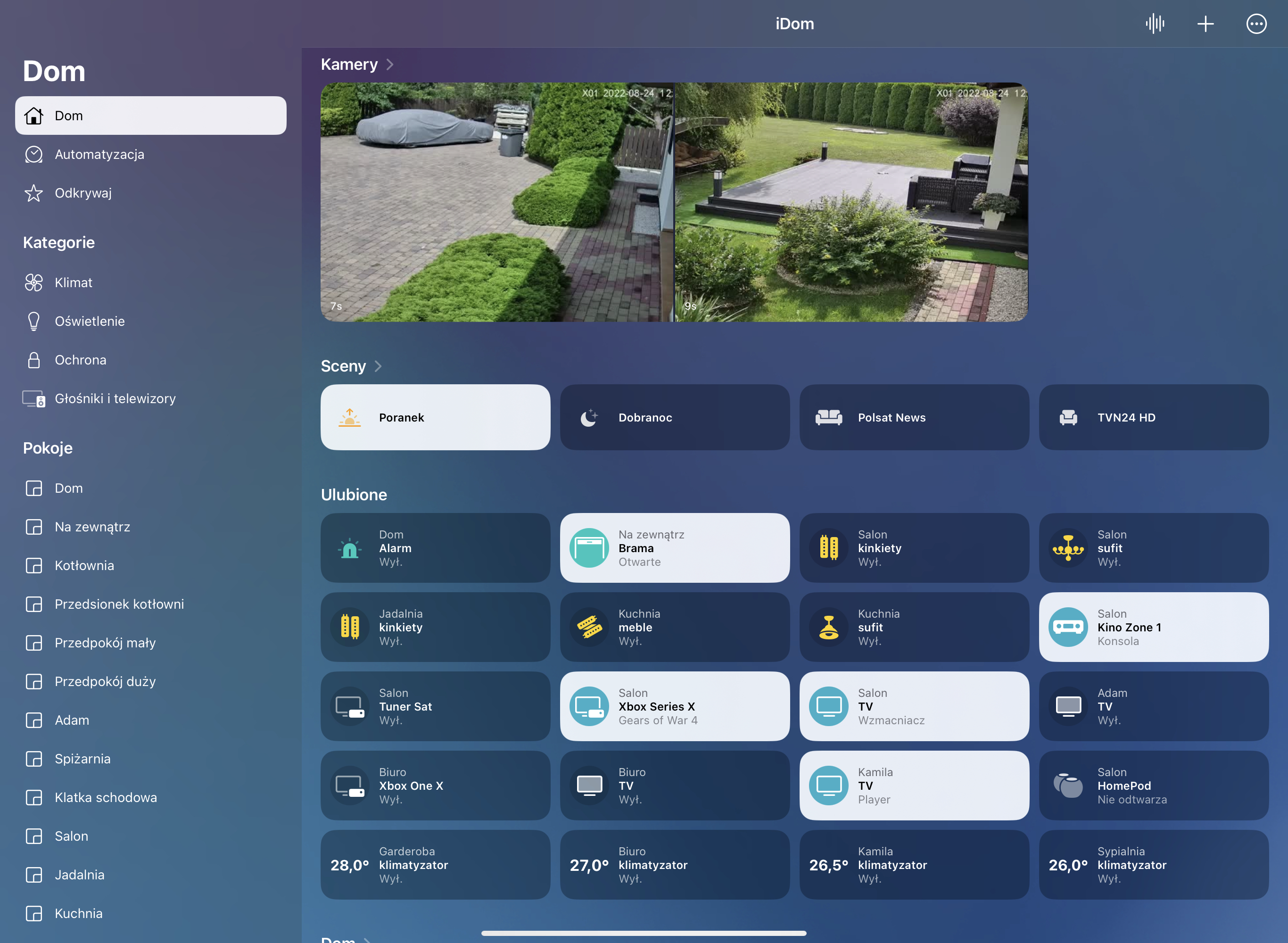
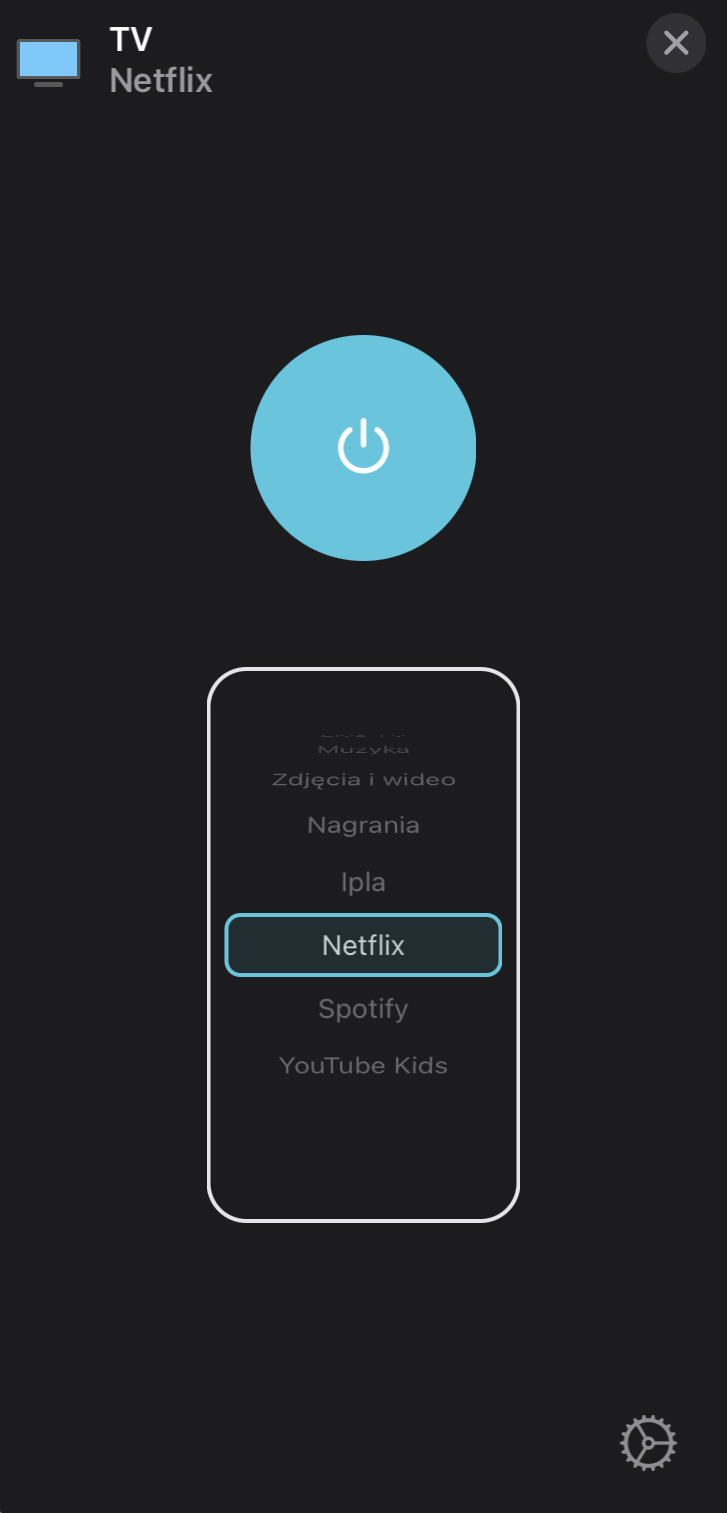
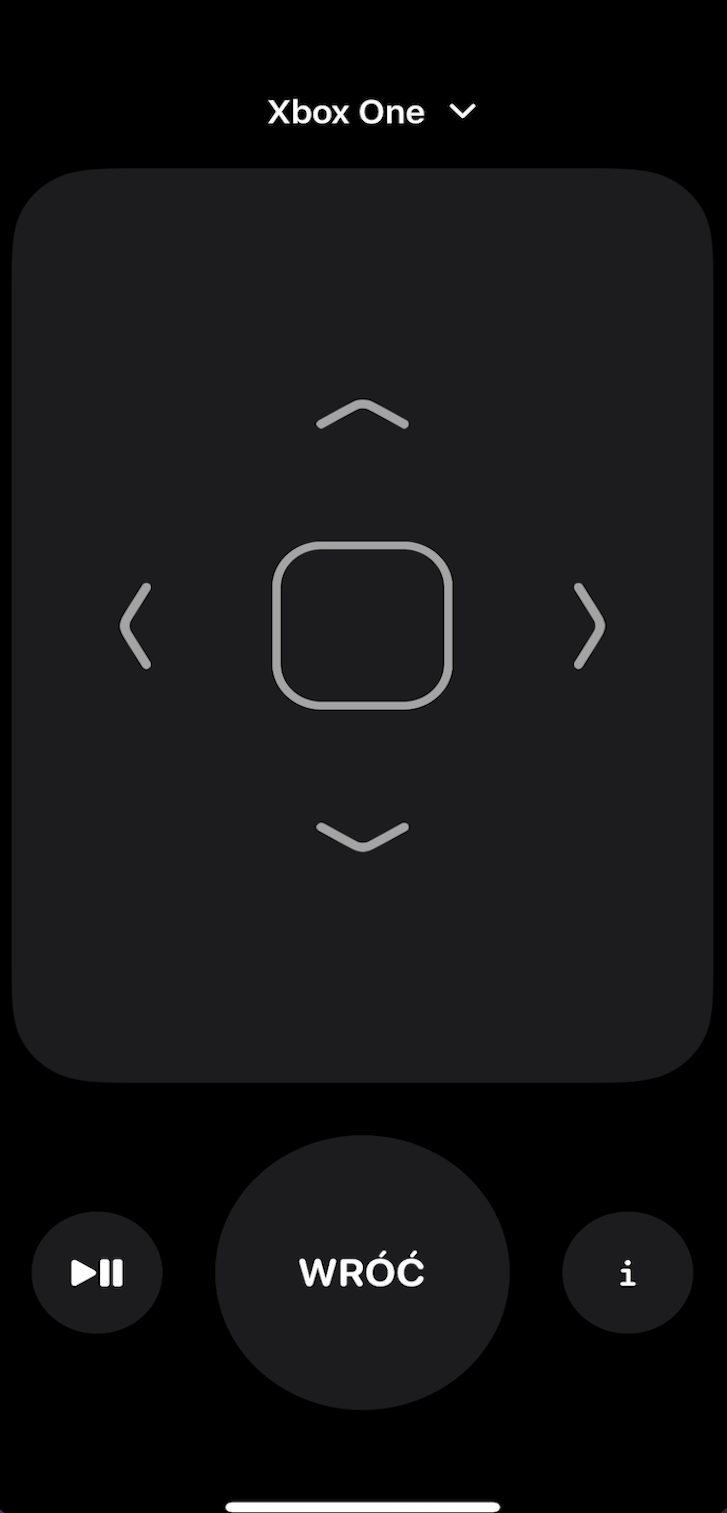
Due to HomeKit app limitation max. services for 1 accessory is 100. Over this value HomeKit app will no response. As services in this accessory are, (1.information service, 2.speaker service, 3.lightbulb service, 4.television service and inputs service 5-100(where every input = 1 service)). If all services are enabled possible inputs to use is 96.
- Follow the step-by-step instructions on the Homebridge Wiki for how to install Homebridge.
- Follow the step-by-step instructions on the Homebridge Config UI X for how to install Homebridge Config UI X.
- Install homebridge-denon-tv using:
npm install -g homebridge-denon-tvor search forDenon Tvin Config UI X.
- If port
8080not working check with port80, different receivers uses different ports, You need to check which one is correct for you. - Use Homebridge Config UI X to configure the plugin (strongly recomended), or update your configuration file manually. See
sample-config.jsonin this repository for a sample or add the bottom example to Your config.json file. - Different model of AV Receiver uses different
Inputs,SIreference:PHONO, CD, TUNER, DVD, BD, TV, SAT/CBL, MPLAY, GAME, HDRADIO, NET, PANDORA, SIRIUSXM, SPOTIFY, LASTFM, FLICKR, IRADIO, SERVER, FAVORITES, AUX1, AUX2, AUX3, AUX4, AUX5, AUX6, AUX7, BT, USB/IPOD, USB, IPD, IRP, FVP, HDP, VCR, DVR, SAT, XM - Different model of AV Receiver uses different
Digital Inputs,DCreference:AUTO- set DIGITAL INPUT AUTO mode,PCM- set DIGITAL INPUT force PCM,DTS- set DIGITAL INPUT force DTS. - Different model of AV Receiver uses different
Surrounds Modes,MSreference:DIRECT, PURE DIRECT, STEREO, STANDARD, DOLBY DIGITAL, DTS SUROUND, 7CH STEREO, MCH STEREO, ROCK ARENA, JAZZ CLUB, MONO MOVIE, MATRIX, GAME, VIRTUAL, AURO3D, AURO2DSURR, WIDE SCREEN, SUPER STADIUM, CLASSIC CONCERT, LEFT, RIGHT, AUX3, AUX4, AUX5, AUX6, AUX7, BT, USB/IPOD, USB, QUICK1, QUICK2, QUICK3, QUICK4, QUICK1 MEMORY, QUICK2 MEMORY, QUICK3 MEMORY, QUICK4 MEMORY - Different model of AV Receiver uses different
Surrounds Modes,MNto controll all zones stereo reference:ZST ON, ZST OFF - In
zoneControlYou can select which zone U want to control. - In
volumeControlYou can select what a additional volume control mode You want to use (None, Slider, Fan). - If
switchInfoMenuis enabled,Ibutton toggle its behaviour in RC app andPowerModeSelectionin settings. - All possible commands can be found in Denon Control Protocol 2020
{
    "platform": "DenonTv",
    "devices": [
        {
            "name": "AV Receiver",
            "host": "192.168.1.5",
            "port": 8080,
            "zoneControl" : 0,
            "volumeControl": 0,
            "switchInfoMenu": false,
            "inputs": [
                        {
                            "name": "Xbox One",
                            "reference": "GAME",
                            "type": "HDMI",
                            "mode": "SI"
                        },
                        {
                            "name": "Television",
                            "reference": "TV",
                            "type": "HDMI",
                            "mode": "SI"
                        },
                        {
                            "name": "Sat Receiver",
                            "reference": "SAT/CBL",
                            "type": "HDMI",
                            "mode": "SI"
                        },
                        {
                            "name": "Stereo",
                            "reference": "STEREO",
                            "type": "OTHER",
                            "mode": "MS"
                        },
                        {
                            "name": "Multi Channel Stereo",
                            "reference": "MCH STEREO",
                            "type": "OTHER",
                            "mode": "MS"
                        },
                        {
                            "name": "Digital Input AUTO",
                            "reference": "AUTO",
                            "type": "OTHER",
                            "mode": "DC"
                        }
            ]
        }
    ]
}- If U want control all zones seperat at the same time U can use config as present bottom.
- Select
zoneControl(0 - Main Zone, 1 - Zone 2, 2 - Zone 3, 3 - All Zones) or choice from the configurations GUI. - The
volumeControlwill working seperat for every zone. - The
switchInfoMenuwill working for all zones seperat but have same end effect for every zone. - All
inputsname,reference,typecan be used for every zone. - Surrounds
modecan be only used for Main Zone and All Zones, do not set this for Zone 2 and 3. - After correct settings and save restart Homebridge, every zone need to be added separat in HomeKit app using same PIN CODE.
{
    "platform": "DenonTv",
    "devices": [
        {
            "name": "AV Main Zone",
            "host": "192.168.1.5",
            "port": 8080,
            "zoneControl" : 0,
            "volumeControl": 0,
            "switchInfoMenu": false,
            "inputs": [
                {
                    "name": "Xbox One",
                    "reference": "GAME",
                    "type": "HDMI",
                    "mode": "SI"
                },
                {
                    "name": "Television",
                    "reference": "TV",
                    "type": "HDMI",
                    "mode": "SI"
                },
                {
                    "name": "Sat Receiver",
                    "reference": "SAT/CBL",
                    "type": "HDMI",
                    "mode": "SI"
                },
                {
                    "name": "Digital Input AUTO",
                    "reference": "AUTO",
                    "type": "OTHER",
                    "mode": "DC"
                },
                {
                    "name": "Multi Channel Stereo",
                    "reference": "MCH STEREO",
                    "type": "OTHER",
                    "mode": "MS"
                },
                {
                    "name": "All zones stereo ON",
                    "reference": "ZST ON",
                    "type": "OTHER",
                    "mode": "MN"
                },
                {
                    "name": "All zones stereo OFF",
                    "reference": "ZST OFF",
                    "type": "OTHER",
                    "mode": "MN"
                },
            ]
        },
        {
            "name": "AV Zone 1",
            "host": "192.168.1.5",
            "port": 8080,
            "zoneControl" : 1,
            "volumeControl": 0,
            "switchInfoMenu": false,
            "inputs": [
                {
                    "name": "Xbox One",
                    "reference": "GAME",
                    "type": "HDMI",
                    "mode": "SI"
                },
                {
                    "name": "Television",
                    "reference": "TV",
                    "type": "HDMI",
                    "mode": "SI"
                },
                {
                    "name": "Sat Receiver",
                    "reference": "SAT/CBL",
                    "type": "HDMI",
                    "mode": "SI"
                },
                {
                    "name": "Digital Input AUTO",
                    "reference": "AUTO",
                    "type": "OTHER",
                    "mode": "DC"
                }
            ]
        },
        {
            "name": "AV Zone 2",
            "host": "192.168.1.5",
            "port": 8080,
            "zoneControl" : 2,
            "volumeControl": 0,
            "switchInfoMenu": false,
            "inputs": [
                {
                    "name": "Xbox One",
                    "reference": "GAME",
                    "type": "HDMI",
                    "mode": "SI"
                },
                {
                    "name": "Television",
                    "reference": "TV",
                    "type": "HDMI",
                    "mode": "SI"
                },
                {
                    "name": "Sat Receiver",
                    "reference": "SAT/CBL",
                    "type": "HDMI",
                    "mode": "SI"
                },
                {
                    "name": "Digital Input AUTO",
                    "reference": "AUTO",
                    "type": "OTHER",
                    "mode": "DC"
                }
            ]
        }
    ]
}https://github.com/grzegorz914/homebridge-denon-tv/blob/master/CHANGELOG.md