update console app templating#1632
update console app templating#1632adamsitnik merged 3 commits intodotnet:masterfrom ExceptionCaught:template_console_app
Conversation


|
@adamsitnik and @am11, can you also verify the finding regard to upgrading the referenced version to 0.12.1? |

|
Thanks. Yes it needs 0.12.1 for net5.0 support, as 0.12.0 lacks it. |
|
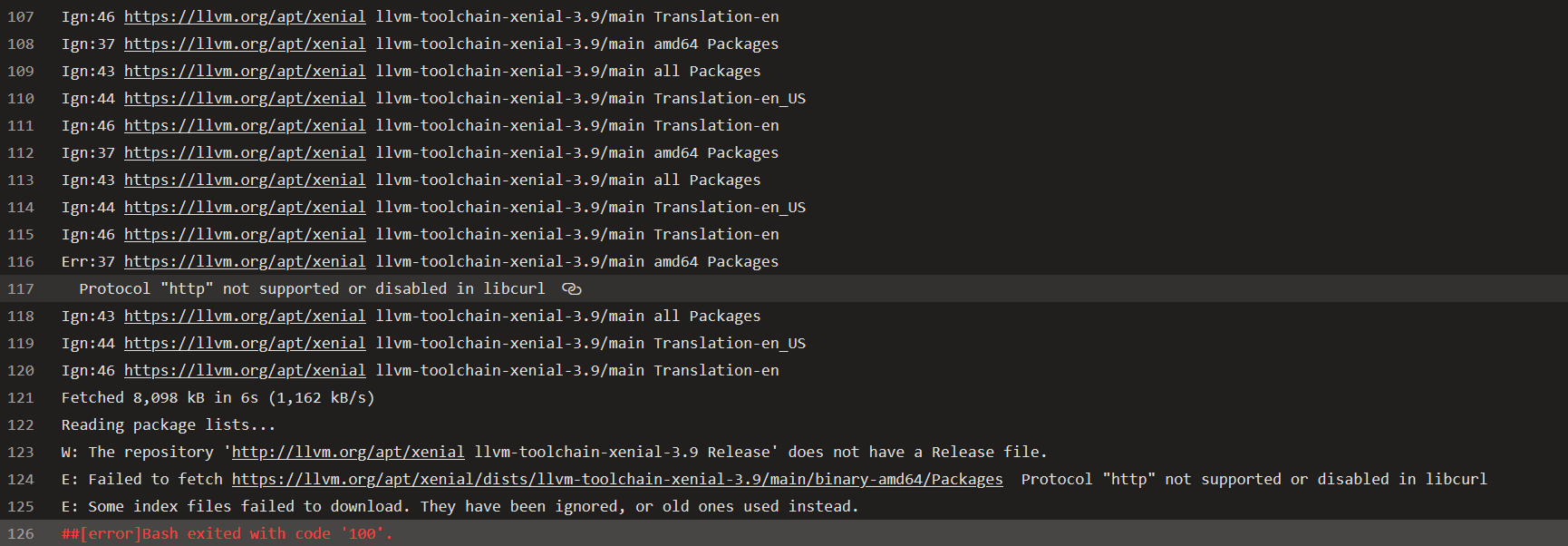
I had a look a the error of Ubuntu build. Not sure the exact root cause, but this is the log. It has been failing consistently for the last four builds. |

| <PropertyGroup Condition="'$(consoleApp)' == 'true'"> | ||
| <TargetFramework>$(Frameworks)</TargetFramework> | ||
| <OutputType>Exe</OutputType> | ||
| </PropertyGroup> | ||
| <PropertyGroup Condition="'$(consoleApp)' == 'false'"> | ||
| <TargetFrameworks>$(Frameworks)</TargetFrameworks> | ||
| </PropertyGroup> | ||
| <PropertyGroup> | ||
| <PlatformTarget>AnyCPU</PlatformTarget> |
There was a problem hiding this comment.
Should we always have a single target framework?
| <PropertyGroup Condition="'$(consoleApp)' == 'true'"> | |
| <TargetFramework>$(Frameworks)</TargetFramework> | |
| <OutputType>Exe</OutputType> | |
| </PropertyGroup> | |
| <PropertyGroup Condition="'$(consoleApp)' == 'false'"> | |
| <TargetFrameworks>$(Frameworks)</TargetFrameworks> | |
| </PropertyGroup> | |
| <PropertyGroup> | |
| <PlatformTarget>AnyCPU</PlatformTarget> | |
| <PropertyGroup Condition="'$(consoleApp)' == 'true'"> | |
| <OutputType>Exe</OutputType> | |
| </PropertyGroup> | |
| <PropertyGroup> | |
| <TargetFramework>$(Frameworks)</TargetFramework> | |
| <PlatformTarget>AnyCPU</PlatformTarget> |
There was a problem hiding this comment.
hi @adamsitnik , it could be multiple target frameworks.
However, dotnet run will throw error without the framework option if there were multiple target frameworks, which may not be ideal for user experience.
Plus, I guess it will be rare that developers want to have multiple target frameworks when building a console app to run benchmark. unless I was wrong?
There was a problem hiding this comment.
Can user specify multiple target frameworks when creating a new project from template? If not, we should simplify it and users can always modify it later.

There was a problem hiding this comment.
I agree with @adamsitnik. Templates like dotnet new console or dotnet new classlib (and the projects created by VS templates) just offer <TargetFramework> (singular). Users can choose to modify project files based on their own requirement.
ps: on the topic of keeping things simple, it would be very intuitive for dotnet cli users if dotnet new benchmark.console and dotnet new benchmark.classlib are separated, rather than expecting --console-app true with classlib variant as default. At the very least, we should prefer --console flag (presence means yes, absence means no) instead of two-worded option with mandatory boolean value. (we are still in version 0.x, so breaking changes will not be frowned upon by end users)
There was a problem hiding this comment.
Hi @adamsitnik, I think for the classlib, it supports multiple templates, and it is been implemented initially, so I just bring it back in this pull request.
but as @am11 mentioned, the console and classlib ones from Microsoft generates TargetFramework.
I will made the change, all with single TargetFramework only.
And I think it would be better to address the address the suggestion from @am11 on separate templates in different pull request.
There was a problem hiding this comment.
hi @adamsitnik and @am11 , template are updated with single TargetFramework for both console and classlib per discussion.
 adamsitnik
left a comment
adamsitnik
left a comment
adamsitnik
left a comment
There was a problem hiding this comment.
LGTM, thank you @ExceptionCaught !


* Fix batch file

* Update Program.cs

* Fix type of framework parameter

* Fix docs

* Set consoleApp=true by default

* Remove outdated info. The parameter was changed in #1632

* Update docs
3 participants


This is to address the missing output type as mentioned here.
Based on the test on my local. the original issue #1512 is actually fixed by bumping up the referenced version to
0.12.1.