This is a fork of the fork of the fork of the popular chrome extension.
It is available on firefox and chrome It is not yet available on extension stores but you can run it from the source code if you know how to.
The major differences:
- You can slow down all the way to 0.00x
- Soon: No speed limit on Firefox
A website doesn't work!
Open an issue here with a link to a URL that has some odd behavior.
Websites known to have problems:
- Soundcloud
- Regular
mp4s opened withfile:///links
HTML5 provides a native API to accelerate playback of any media, but many players either hide, or limit this functionality.

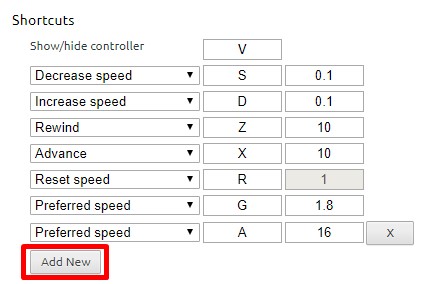
Once the extension is installed simply navigate to any page that offers HTML5 video (example), and you'll see a speed indicator in top left corner. Hover over the indicator to reveal the controls to accelerate, slowdown, and quickly rewind or advance the video. Or, even better, simply use your keyboard:
- S - decrease playback speed.
- D - increase playback speed.
- R - reset playback speed to 1.0x.
- Z - rewind video by 10 seconds.
- X - advance video by 10 seconds.
- G - toggle between current and user configurable preferred speed.
- V - show/hide the controller.
You can customize and reassign the default shortcut keys in the extensions settings page, as well as add additional shortcut keys to match your preferences. For example, you can assign multiple different "preferred speed" shortcuts with different values, which will allow you to quickly toggle between your most commonly used speeds. To add a new shortcut, open extension settings and click "Add New".
Some sites may assign other functionality to one of the assigned shortcut keys — these collisions are inevitable, unfortunately. As a workaround, the extension listens both for lower and upper case values (i.e. you can use Shift-<shortcut>) if there is other functionality assigned to the lowercase key. This is not a perfect solution, as some sites may listen to both, but works most of the time.
(MIT License) - Copyright (c) 2014 Ilya Grigorik