A modern chat-with-documents application that uses the HYDE (Hypothetical Document Embeddings) RAG technique to provide intelligent document search and question-answering capabilities.
This project was developed as an experiment to evaluate how effectively a modern AI-powered IDE (Cursor) can translate high-level instructions into a fully functional application. The result is a robust implementation of the HYDE (Hypothetical Document Embeddings) Retrieval-Augmented Generation (RAG) technique, which significantly enhances document search and question-answering capabilities.
What is HYDE?
HYDE (Hypothetical Document Embeddings) is a retrieval technique that improves search relevance by generating a hypothetical answer to a user's query, embedding that answer, and then using the embedding to find the most relevant real documents. This approach bridges the gap between user intent and document retrieval, making it especially effective for open-ended or complex questions.
How HYDE Works (Visual Overview):
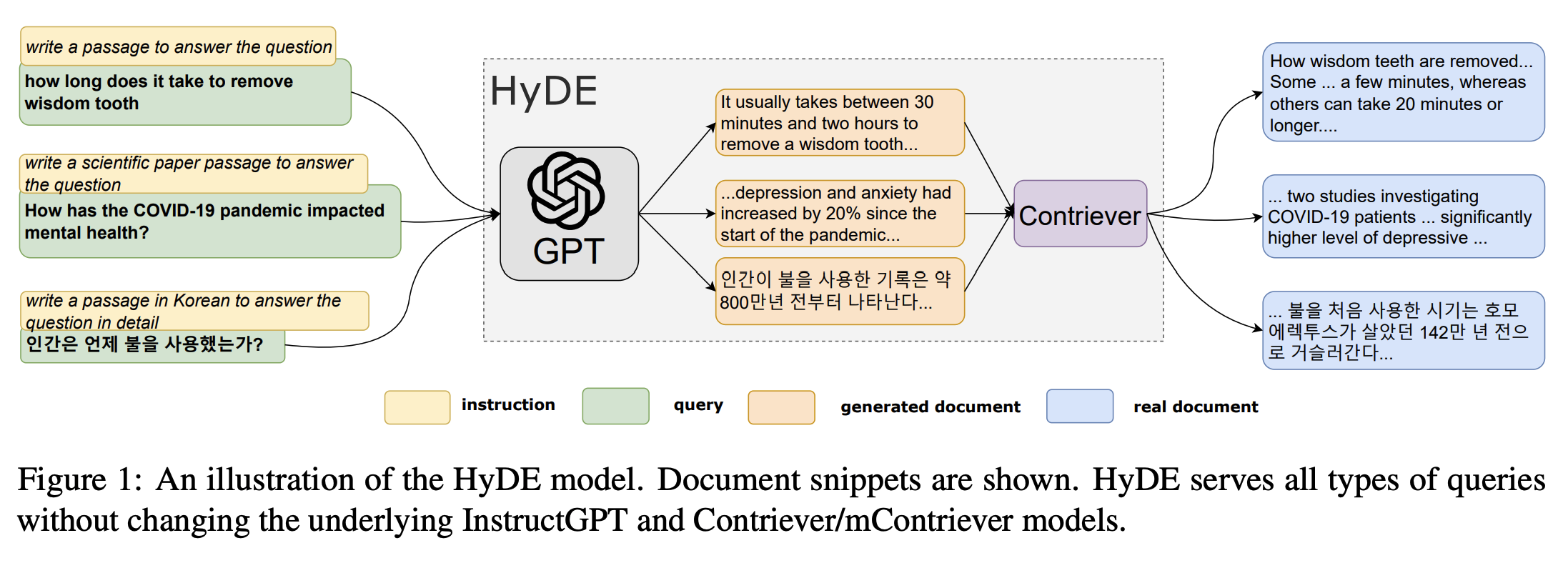
The diagram above illustrates the HYDE process:
- User Query: The user submits a question.
- Hypothetical Answer Generation: The system generates a hypothetical document that would answer the question.
- Embedding: The hypothetical answer is embedded using a language model.
- Vector Search: The embedding is used to search for similar real documents in the vector database.
- Context Retrieval: Relevant document chunks are retrieved and used to generate the final answer.
- HYDE RAG Technique: Advanced retrieval method that generates hypothetical documents to improve search relevance
- Multiple Document Formats: Support for PDF, DOCX, DOC, and TXT files
- Real-time Chat Interface: Modern chat UI with streaming responses
- Document Collections: Organize documents into different collections
- Source Citations: View the source documents and excerpts used to generate answers
- Responsive Design: Beautiful UI that works on desktop and mobile
- Development-Ready: Easy setup with tmux for local development
- FastAPI web framework with async support
- LangChain for HYDE RAG implementation
- Azure OpenAI for LLM and embeddings
- ChromaDB for vector storage
- UV for fast Python package management
- Next.js 14 with App Router
- Tailwind CSS for styling
- React Hook Form for form handling
- Bun for fast package management
- TypeScript for type safety
Before you begin, ensure you have installed:
- Python 3.10+
- Node.js 18+
- UV (Python package manager):
curl -LsSf https://astral.sh/uv/install.sh | sh - Bun (JavaScript runtime):
curl -fsSL https://bun.sh/install | bash - tmux (Terminal multiplexer):
brew install tmux(macOS) orapt install tmux(Ubuntu)
git clone <your-repo-url>
cd hyderagCreate a .env file in the backend directory:
cp backend/.env.example backend/.envEdit backend/.env and add your Azure OpenAI configuration:
AZURE_OPENAI_API_KEY=your_azure_openai_api_key_here
AZURE_OPENAI_ENDPOINT=https://your-resource-name.openai.azure.com/
AZURE_OPENAI_API_VERSION=2024-02-15-preview
AZURE_OPENAI_CHAT_DEPLOYMENT_NAME=gpt-4
AZURE_OPENAI_EMBEDDING_DEPLOYMENT_NAME=text-embedding-ada-002Make the scripts executable and start the development environment:
chmod +x scripts/start-dev.sh
chmod +x scripts/stop-dev.sh
./scripts/start-dev.sh
This will:
- Install all dependencies for both frontend and backend
- Start the FastAPI backend on
http://localhost:8000 - Start the Next.js frontend on
http://localhost:3000 - Create a tmux session with multiple windows for easy development
- Frontend: http://localhost:3000
- Backend API: http://localhost:8000
- API Documentation: http://localhost:8000/docs
- Health Check: http://localhost:8000/api/health/
- Use the sidebar or upload area to add PDF, DOCX, DOC, or TXT files
- Documents are automatically processed and vectorized
- Organize documents into collections
- Ask questions about your uploaded documents
- The system uses HYDE RAG to find the most relevant information
- View source citations to see which documents were used
- Your Question → System generates a hypothetical document that would answer the question
- Hypothetical Document → Gets embedded using OpenAI embeddings
- Vector Search → Finds similar real documents using the hypothetical embedding
- Context Retrieval → Retrieves relevant document chunks
- Answer Generation → Uses retrieved context to generate the final answer
cd backend

# Install dependencies
uv sync

# Run development server
uv run uvicorn app.main:app --reload --host 0.0.0.0 --port 8000

# Run tests
uv run pytest

# Format code
uv run black .
uv run isort .cd frontend
# Install dependencies
bun install
# Run development server
bun dev
# Build for production
bun run build
# Type checking
bun run type-check# Attach to existing session
tmux attach-session -t hyderag
# Detach from session (while inside tmux)
Ctrl+B then d
# Switch between windows (while inside tmux)
Ctrl+B then 0 # Backend
Ctrl+B then 1 # Frontend
Ctrl+B then 2 # Logs
# Stop all services
./scripts/stop-dev.shhyderag/
├── backend/ # Python FastAPI backend
│ ├── app/
│ │ ├── api/routes/ # API endpoints
│ │ ├── core/ # Core configuration and HYDE RAG logic
│ │ ├── services/ # Business logic services
│ │ └── main.py # FastAPI application
│ ├── pyproject.toml # Python dependencies and config
│ └── .env.example # Environment variables template
├── frontend/ # Next.js frontend
│ ├── src/
│ │ ├── app/ # Next.js app router pages
│ │ ├── components/ # React components
│ │ ├── lib/ # Utilities and API client
│ │ └── types/ # TypeScript type definitions
│ ├── package.json # Node.js dependencies
│ └── tailwind.config.js # Tailwind CSS configuration
├── scripts/ # Development scripts
│ ├── start-dev.sh # Start development environment
│ └── stop-dev.sh # Stop development environment
└── README.md # This file
| Variable | Description | Default |
|---|---|---|
AZURE_OPENAI_API_KEY |
Azure OpenAI API key | Required |
AZURE_OPENAI_ENDPOINT |
Azure OpenAI endpoint URL | Required |
AZURE_OPENAI_API_VERSION |
Azure OpenAI API version | 2024-02-15-preview |
AZURE_OPENAI_CHAT_DEPLOYMENT_NAME |
Chat model deployment name | Required |
AZURE_OPENAI_EMBEDDING_DEPLOYMENT_NAME |
Embedding model deployment name | Required |
DEBUG |
Enable debug mode | true |
HOST |
Backend host | 0.0.0.0 |
PORT |
Backend port | 8000 |
CORS_ORIGINS |
Allowed CORS origins | ["http://localhost:3000"] |
VECTOR_DB_PATH |
ChromaDB storage path | ./vector_db |
UPLOAD_DIR |
Document upload directory | ./documents |
The frontend automatically connects to the backend at http://localhost:8000. For production, set NEXT_PUBLIC_API_URL environment variable.
GET /api/health/- Basic health checkGET /api/health/detailed- Detailed health check with configuration
POST /api/documents/upload- Upload and process a documentGET /api/documents/collections- List all collectionsGET /api/documents/supported-types- Get supported file typesDELETE /api/documents/{file_path}- Delete a document
POST /api/chat/message- Send a chat message (HYDE RAG)POST /api/chat/hypothetical-document- Generate hypothetical document (debugging)GET /api/chat/sessions- List active chat sessionsDELETE /api/chat/sessions/{session_id}- Clear a chat session
-
Azure OpenAI Configuration Error
- Make sure you've set all required Azure OpenAI variables in
backend/.env - Verify your API key, endpoint, and deployment names are correct
- Check that your Azure OpenAI resource has the required model deployments
- Make sure you've set all required Azure OpenAI variables in
-
Port Already in Use
- Run
./scripts/stop-dev.shto stop existing processes - Check for other applications using ports 3000 or 8000
- Run
-
Dependencies Installation Failed
- Ensure UV and Bun are properly installed
- Try deleting
node_modulesand reinstalling
-
tmux Session Issues
- Install tmux:
brew install tmux(macOS) orapt install tmux(Ubuntu) - Kill existing session:
tmux kill-session -t hyderag
- Install tmux:
- Backend logs are visible in the tmux backend window
- Frontend logs are visible in the tmux frontend window
- Switch between windows with
Ctrl+B then [0-2]
- Fork the repository
- Create a feature branch (
git checkout -b feature/amazing-feature) - Commit your changes (
git commit -m 'Add some amazing feature') - Push to the branch (
git push origin feature/amazing-feature) - Open a Pull Request
This project is licensed under the MIT License - see the LICENSE file for details.
- LangChain for the excellent RAG framework
- Azure OpenAI for enterprise-grade LLM and embedding models
- ChromaDB for vector storage
- FastAPI for the modern web framework
- Next.js for the React framework
- Tailwind CSS for styling
Built with ❤️ using HYDE RAG technique for enhanced document search and retrieval.