Godot v3.2.3:
OS/device including version:
Linux 5.9.16-1-MANJARO
Tested with GLES2 and 3, same problem.
Issue description:
I want a sprites in billboard mode to cast shadows in a 3D environment. I've enabled billboard mode, check "Transparent", "Shaded" and "Double sided" flags and set "Alpha Cut" to "Opaque Pre-Pass". It casts shadows as expected, but there is some ugly shadow artifacts in front of my sprite, like this :
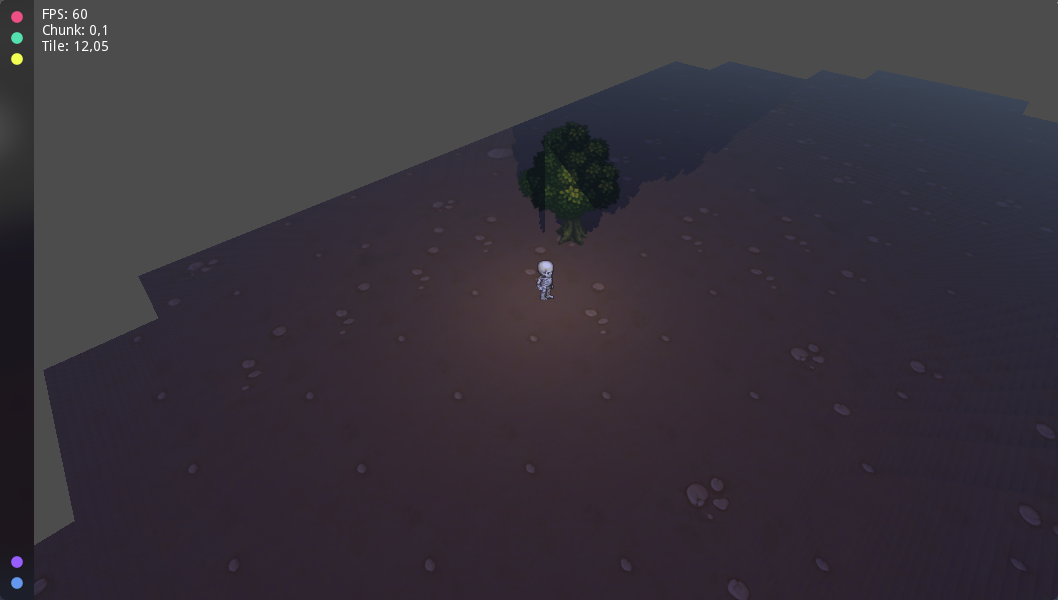
This problem only occurs when I enable the "Shaded" flag. It work just fine when I disable it, like this :

Steps to reproduce:
I tried on different computers, with both Linux and Windows, I ran it with GLES 2 & 3, I tried with the Sprite node and the MeshInstance one, with Spot, Directional Omni Lights, still the same... It really seems to be the Shaded flag fault.
To reproduce you just have to instantiate a Ground, a Sprite, and a OmniLight with Shadow enabled, set options described above on the sprite and watch.
Minimal reproduction project:
BugReport.zip

Godot v3.2.3:
OS/device including version:
Linux 5.9.16-1-MANJARO
Tested with GLES2 and 3, same problem.
Issue description:
I want a sprites in billboard mode to cast shadows in a 3D environment. I've enabled billboard mode, check "Transparent", "Shaded" and "Double sided" flags and set "Alpha Cut" to "Opaque Pre-Pass". It casts shadows as expected, but there is some ugly shadow artifacts in front of my sprite, like this :
This problem only occurs when I enable the "Shaded" flag. It work just fine when I disable it, like this :
Steps to reproduce:
I tried on different computers, with both Linux and Windows, I ran it with GLES 2 & 3, I tried with the Sprite node and the MeshInstance one, with Spot, Directional Omni Lights, still the same... It really seems to be the Shaded flag fault.
To reproduce you just have to instantiate a Ground, a Sprite, and a OmniLight with Shadow enabled, set options described above on the sprite and watch.
Minimal reproduction project:
BugReport.zip