This experimental project demonstrates
- How to use Python in browser, working with ReactApp.
- Use Python to parse DICOM files and pass data to JS, then draw it on Canvas.
Tested on macOS (intel/Apple Silicon).
Its usage is simple. Just drag a DICOM file into the panel to view.
Download DICOM files from DICOM sample file sites
- View online DICOM files by clicking DICOM urls
- View offline DICOM by dragging files onto Chrome, or use built-in file browser to select files
- In terminal, use CLI tool cli-open-dicom-with-chrome to open DICOM files via this extension
- Shortcut (ctrl+u/cmd+u) to open extension viewer page. Or click extension icon.
- Support adjustable window center mode (mouse/touch drag to adjust, preset modes like Brain/Lungs)
- Support multi-frame, RGB DICOM files
- Support different plane views mode (axial, sagittal, coronal)
- Scale (resize to viewer size)
- Show basic DICOM info and transfer syntax on UI
- Support (0028,3000) Modality LUT Sequence and PALETTE COLOR
After installation, to enable dragging offline files onto Chrome, please:
- Navigate to
chrome://extensions - Locate DICOM Image Viewer and click DETAILS
- Turn "Allow access to file URLs" on
The Chrome extension is published, click here to install.
See CHANGELOG.md for version history.
Besides it is an interesting thing to use Python in browser, using Python DICOM parser has some advantages.
- Although my other Chrome extension/Web project, https://github.com/grimmer0125/dicom-web-viewer uses a 3rd-party JavaScript DICOM parser library, it seems unmaintained. Other JavaScript/TypeScript DICOM parser libraries might be too heavy to use.
- Scientists usually use Python DICOM parser library, and using the same language/library is a good thing.
OT-MONO2-8-hip.dcm from https://barre.dev/medical/samples/
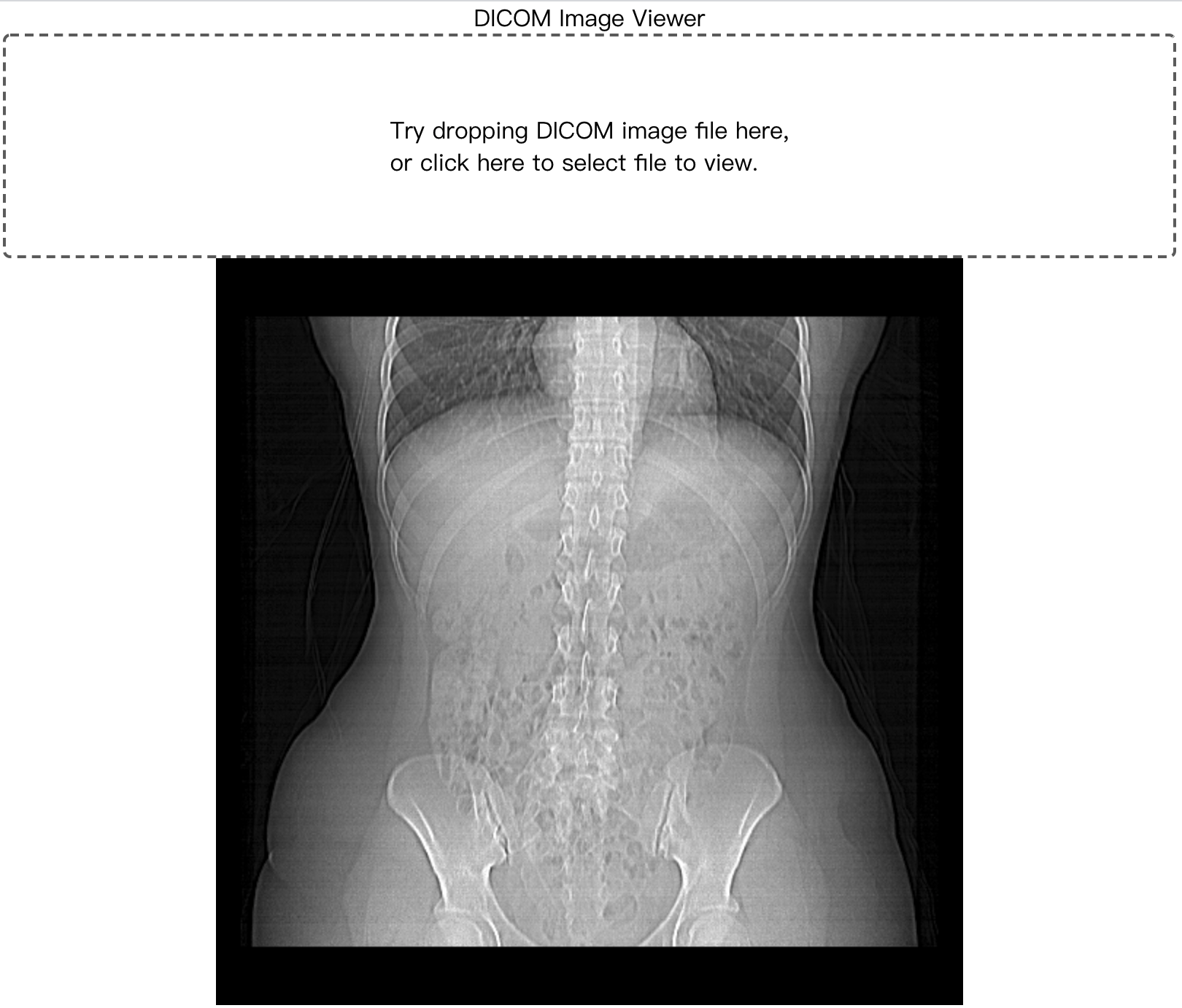
Uses Pyodide to run Python (CPython compiled to WebAssembly) in the browser.
| Component | Version |
|---|---|
| Pyodide | 0.29.3 (Python 3.13) |
| pydicom | 2.4.4 |
| Chrome extension manifest | V3 |
Ref: https://pyodide.org/en/stable/
- https://github.com/Fincap/onko-pyodide, draw canvas in Pyodide runtime
- https://github.com/pymedphys/pymedphys, mainly for DICOM-RT
Please use VS Code and built-in TypeScript/Python formatter setting. Please install Python autopep8 outside of this project environment and make sure the VS Code setting is configured. You can also enable "format on save".
The project bundles Pyodide 0.29.3 locally in public/pyodide/ for faster loading. Run once to download:
sh download_pyodide.shThis downloads core Pyodide files + numpy/micropip/pydicom wheels from CDN to public/pyodide/.
Alternatively, you can load Pyodide from CDN directly by modifying public/index.html and pyodide_init.py:
// index.html: replace local script with CDN
<script src="https://cdn.jsdelivr.net/pyodide/v0.29.3/full/pyodide.js"></script>

// pyodideHelper.ts: use CDN indexURL
await loadPyodide({ indexURL: "https://cdn.jsdelivr.net/pyodide/v0.29.3/full/" });

// pyodide_init.py: install from PyPI instead of local wheel
await micropip.install('pydicom')Make sure you have Node.js and Yarn installed. nvm is recommended for managing Node.js versions.
(Optional) Install Python and Poetry for static code analysis and type completion in VS Code. pyenv is recommended for managing Python versions.
git submodule update --init --recursive
npm install --global yarn
yarn install
# (optional) poetry installyarn start (first load may take a while due to WebAssembly initialization)
yarn buildThe NODE_OPTIONS=--openssl-legacy-provider flag is already set in the npm script for Node.js 18+ compatibility.
poetry shell
uvicorn main:app
# or: poetry run uvicorn main:appyarn build- Open
chrome://extensions/, enable Developer mode - Click "Load unpacked" and select the
build/folder
docker build --progress=plain -t pyodide-react-dicom-viewer .docker run -p 8000:8000 -d pyodide-react-dicom-viewer- open http://localhost:8000/ and drag a DICOM file to view.
Cross compilation for intel/M1 takes much more time than normal docker build. Building + pushing to Docker Hub takes 20~30 min.
docker buildx create --use --name m1_builderdocker buildx use m1_builderdocker buildx inspect --bootstrapdocker buildx build --platform linux/amd64,linux/arm64 --push -t grimmer0125/pyodide-react-dicom-viewer:0.5 .
Image: https://hub.docker.com/repository/docker/grimmer0125/pyodide-react-dicom-viewer
docker run -p 8000:8000 grimmer0125/pyodide-react-dicom-viewer:0.5- open http://localhost:8000/ and drag a DICOM file to view.
- https://barre.dev/medical/samples/ contains jpeg 57, 70 (MR-MONO2-12-shoulder, CT-MONO2-16-chest)
- pydicom lib
- https://github.com/pydicom/pydicom-data/tree/master/data_store/data JPGLosslessP14SV1_1s_1f_8b.dcm 1.2.840.10008.1.2.4.70 JPEG Lossless
- https://github.com/pydicom/pydicom/tree/master/pydicom/data/test_files jpeg 51
- http://www.rubomedical.com/dicom_files/, some (multi-frame)
DICOM jpeg 1.2.840.10008.1.2.4.50 - https://medistim.com/dicom/
- http://medistim.com/wp-content/uploads/2016/07/ttfm.dcm 1.2.840.10008.1.2.4.70
- http://medistim.com/wp-content/uploads/2016/07/bmode.dcm ultra sound, 70, multi frame
- gdcm data
git clone git://git.code.sf.net/p/gdcm/gdcmdata Daikon lib https://github.com/rii-mango/Daikon/tree/master/tests/data (these DICOM files miss transfersynax
Most of them are archived on https://github.com/grimmer0125/embedded-pydicom-react-viewer/releases/download/v0.2/dicom_samples.zip. All jpeg compressed DICOM files need a extra JPEG decoder (except 50 baseline) to render on browser and currently it is parsed but not visible on browser. Daikon has done this, and https://github.com/cornerstonejs/dicomParser seems too. The project already borrows the decoder from Daikon.
https://barre.dev/medical/samples/:
- CT-MONO2-16-ort: 1.2.840.10008.1.2, MONOCHROME2
- CR-MONO1-10-chest: 1.2.840.10008.1.2 (raw, need specified transfersyntax), MONOCHROME1
- US-RGB-8-esopecho: 1.2.840.10008.1.2.1, RGB, planar:0
- US-RGB-8-epicard: 1.2.840.10008.1.2.2, RRB, planar = 1
- JPEG57-MR-MONO2-12-shoulder: 1.2.840.10008.1.2.4.57 MONOCHROME2
- US-PAL-8-10x-echo: 1.2.840.10008.1.2.5 (RLE Lossless), PALETTE COLOR, multi-frame
https://github.com/pydicom/pydicom-data/tree/master/data_store/data
- color3d_jpeg_baseline: 1.2.840.10008.1.2.4.50, YBR_FULL_422 (not handled YBR part, so final contrast may be wrong), multi-frame
- JPGLosslessP14SV1_1s_1f_8b: 1.2.840.10008.1.2.4.70, MONOCHROME2
https://github.com/pydicom/pydicom/tree/master/pydicom/data/test_files
- JPEG-lossy: 1.2.840.10008.1.2.4.51, MONOCHROME2
- contrast of saved jpeg is not obvious
- JPEG2000: 1.2.840.10008.1.2.4.91, MONOCHROME2
- contrast of saved jpeg is not obvious
GDCM data, use git://git.code.sf.net/p/gdcm/gdcmdata to download
- D_CLUNIE_CT1_JLSL: 1.2.840.10008.1.2.4.80, MONOCHROME2 (saved jpeg-ls is not viewable on https://products.groupdocs.app/viewer/jpg, not sure it is normal or not)
- D_CLUNIE_CT1_JLSN: 1.2.840.10008.1.2.4.81, MONOCHROME2 (saved jpeg-ls is not viewable on https://products.groupdocs.app/viewer/jpg, not sure it is normal or not)
- DX_J2K_0Padding: 1.2.840.10008.1.2.4.90, MONOCHROME2
https://www.dclunie.com/images/compressed/index.html
- image_dfl: 1.2.840.10008.1.2.1.99, MONOCHROME2
pydicom supported transfer syntax: https://pydicom.github.io/pydicom/dev/old/image_data_handlers.html
Below non handled items are done in another project https://github.com/grimmer0125/dicom-web-viewer (canvas operation is borrowed from this)
- DICOM FILE
- Main Transfer Syntax:
- [done] 51, 57, 70 JPEG DICOM.
- 1.2.840.10008.1.2.5 RLE Lossless (US-PAL-8-10x-echo.dcm is ok but not sure others)
- [done] 1.2.840.10008.1.2.4.80 JPEG LS Lossless
- [done] 1.2.840.10008.1.2.4.81 JPEG LS Lossy
- 1.2.840.10008.1.2.4.90 JPEG2000 Lossless
- [done] 1.2.840.10008.1.2.4.91 JPEG2000
- [done] 1.2.840.10008.1.2.1.99 Deflated Explicit VR Little Endian
- [done] Photometric: MONOCHROME1, inverted color
- [done] Photometric: RGB with planar 0, 1
- [done] Photometric: PALETTE
- [done] 1.2.840.10008.1.2.1 Explicit VR, Little Endian
- [done] 1.2.840.10008.1.2.2 Explicit VR, Big Endian
- Main Transfer Syntax:
Transfer Syntax for videos (1.2.840.10008.1.2.4.100 / 1.2.840.10008.1.2.4.102 / 1.2.840.10008.1.2.4.103) and some other not often seen syntax will not be handled. ref https://www.dicomlibrary.com/dicom/transfer-syntax/
[Solved][performance] Using Python numpy in browser is slow in some cases (see below Speed test), it takes 3~4s for 1 512*512 array operation. Using pure JavaScript takes less than 0.5s. Ref: pyodide/pyodide#112 (the author said WebAssembly may takes 3~5x slow). The solution might be
- (can rollback to git commit:
219299f9adec489134206faf0cfab79d8345a7df), using pydicom to parse DICOM files, sending pixel data to JS, then use JS to flatten 2D grey data to 1D RGBA canvas image data. - [Use this way, solved] Or is there any quick way in numpy for flattening a 2D grey array to 1D RGBA array with normalization? Such as https://stackoverflow.com/questions/59219210/extend-a-greyscale-image-to-fit-a-rgb-image? Also image2D.min()/max() is fast. Need more study/profiling.
Speed test (using above sample file to test, file: OT-MONO2-8-hip.dcm on https://barre.dev/medical/samples/):
- numpy array + manual iteration calculation in local python ~= numpy array + numpy array operation ~= JS ArrayBuffer/int8ClampedArray + manual iteration calculation (very fast) >>
- Python list + manual iteration calculation > (5s)
- numpy array + manual iteration calculation in pyodide. (7s)
p.s.
- I did not record JS accurate time cost but it is fast.
- Local Python is much faster than Pyodide Python in browser.
Besides adding back above medical file cases/features, there are some optional things we can do:
- [Done] Host Pyodide locally. Ref: https://pyodide.org/en/stable/usage/serving-pyodide-packages.html
- Core files:
pyodide.js,pyodide.asm.js,pyodide.asm.wasm,python_stdlib.zip,pyodide-lock.json - Packages distributed as wheels:
numpy-*.whl,micropip-*.whl,pydicom-2.4.4-py3-none-any.whl
- Core files:
- Move Python code to a browser web worker. Ref: https://pyodide.org/en/stable/usage/webworker.html
- [Done] Dockerization
- [Done] Bundle some testing DICOM files
- [Done] Introduction to medical files and Pyodide
- Make a Python package
- 3D visualization
- Help to improve Pyodide
- Refactor
- Add tests
- Fix DICOM medical files - not handled cases
This project is using my another TypeScript npm library, d4c-queue, and code is on https://github.com/grimmer0125/d4c-queue/. You can take a look.