
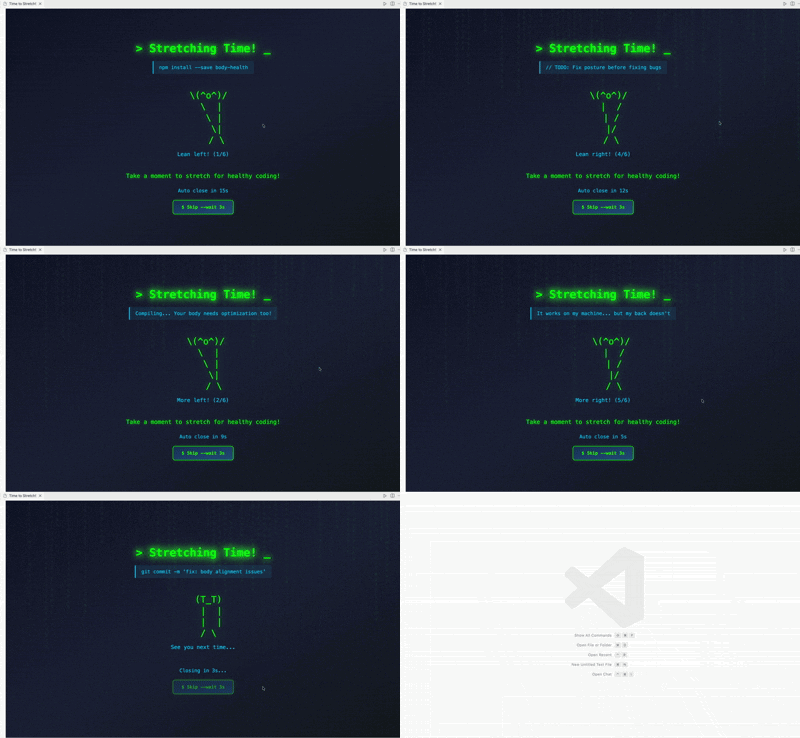
A VSCode extension that promotes healthy coding habits by reminding you to take stretch breaks at regular intervals with a fun ASCII terminal character!
- 🕐 Customizable Timer: Set your preferred break interval (1-480 minutes)
- 🤸 Interactive Stretch Animation: Follow along with a cute ASCII character doing left and right stretches
- ⏱️ Auto-Close: Stretch overlay automatically closes after 15 seconds
- ⏭️ Skip Option: Skip the stretch break (if you're really busy), but the character will be sad!
- 🌐 Multi-language Support: Works in Korean and English
- 🎨 Matrix-style UI: Retro terminal aesthetic with green glow effects
Use Cmd+Shift+P (Mac) or Ctrl+Shift+P (Windows/Linux) to open command palette:
- Start Stretch Timer - Starts the countdown timer
- Stop Stretch Timer - Stops the running timer
- Reset Stretch Timer - Resets timer to initial state and closes stretch overlay
- Set Timer Interval (Minutes) - Opens input box to change timer duration
- Valid range: 1-480 minutes
- If timer is running, it will restart with new interval
- Setting is saved globally across all VSCode workspaces
The extension shows timer status in VSCode status bar:
⏸️ Stretch Timer- Click to start timer⏱️ 25:30- Shows remaining time, click to stop🏃♂️ Time to Stretch!- Timer expired, click to reset
- Timer starts automatically when VSCode opens (default: 60 minutes)
- Countdown displays in status bar
- When timer reaches 0, a stretch overlay appears automatically
- Follow the ASCII character as it guides you through left and right stretches
- The overlay automatically closes after 15 seconds
- If you skip, the character becomes sad and closes after 3 seconds
- After the overlay closes, a new timer cycle begins
The character will guide you through:
- Left stretches (3 times): Lean your upper body to the left
- Right stretches (3 times): Lean your upper body to the right
Total stretch time: 15 seconds
- Press
Cmd+,(Mac) orCtrl+,(Windows/Linux) to open settings - Search for "jj-stretch" to find all extension settings
| Setting | Type | Default | Description |
|---|---|---|---|
jj-stretch.timerIntervalMinutes |
number | 60 |
Timer duration in minutes (1-480) |
jj-stretch.autoStart |
boolean | true |
Auto-start timer when VSCode opens |
jj-stretch.nyancatEnabled |
boolean | true |
Set Showing nyanCat |
Add to your VSCode settings.json:
{
  "jj-stretch.timerIntervalMinutes": 60,
  "jj-stretch.autoStart": true,
  "jj-stretch.nyancatEnabled": true
}- Global Settings: Changes apply to all VSCode workspaces
- Immediate Effect: Most settings take effect immediately
- Timer Restart: Changing interval while timer is running will restart with new duration
- Download the
.vsixfile - Open VSCode
- Press
Ctrl+Shift+Pand run "Extensions: Install from VSIX..." - Select the downloaded file
Regular stretching breaks can help:
- Reduce eye strain and fatigue
- Prevent muscle tension and back pain
- Improve circulation
- Boost focus and productivity
- Maintain better posture
Take care of your health while coding!
Made by jingjing2222