-
-
Notifications
You must be signed in to change notification settings - Fork 947
DataGridRow not highlighted when selected and hovered on #410

Description

Describe the bug
DataGridRow not highlighted when selected and hovered on.
To Reproduce
- Build the sample app.
- Go to the Data tab, scroll down until you see the "WPF UI DataGrid" sample.
Expected behavior
- The rows should be highlighed on hover and on click.
Screenshots
WPF.UI.2022-09-27.10-37-21.mp4
OS version
Windows 11 22H2
.NET version
.NET 6.0.401
WPF-UI NuGet version
Built from source, development branch commit 299a90e.
Additional context
This is due to the VisualStates for the WPFUI default DataGridRow style are not implemented:
wpfui/src/Wpf.Ui/Styles/Controls/DataGrid.xaml
Lines 226 to 371 in 299a90e
| <VisualState x:Name="Normal" /> | |
| <!-- Provide a different appearance for every other row. --> | |
| <VisualState x:Name="Normal_AlternatingRow"> | |
| <!-- | |
| <Storyboard> | |
| <ColorAnimationUsingKeyFrames Storyboard.TargetName="DGR_Border" Storyboard.TargetProperty="(Panel.Background).(GradientBrush.GradientStops)[0].(GradientStop.Color)"> | |
| <EasingColorKeyFrame KeyTime="0" Value="Red" /> | |
| </ColorAnimationUsingKeyFrames> | |
| <ColorAnimationUsingKeyFrames Storyboard.TargetName="DGR_Border" Storyboard.TargetProperty="(Panel.Background).(GradientBrush.GradientStops)[1].(GradientStop.Color)"> | |
| <EasingColorKeyFrame KeyTime="0" Value="Red" /> | |
| </ColorAnimationUsingKeyFrames> | |
| </Storyboard> | |
| --> | |
| </VisualState> | |
| <!-- | |
| In this example, a row in Editing or selected mode has an | |
| identical appearances. In other words, the states | |
| Normal_Selected, Unfocused_Selected, Normal_Editing, | |
| MouseOver_Editing, MouseOver_Unfocused_Editing, | |
| and Unfocused_Editing are identical. | |
| --> | |
| <VisualState x:Name="Normal_Selected"> | |
| <!-- | |
| <Storyboard> | |
| <ColorAnimationUsingKeyFrames Storyboard.TargetName="DGR_Border" Storyboard.TargetProperty="(Panel.Background).(GradientBrush.GradientStops)[0].(GradientStop.Color)"> | |
| <EasingColorKeyFrame KeyTime="0" Value="{StaticResource ControlMediumColor}" /> | |
| </ColorAnimationUsingKeyFrames> | |
| <ColorAnimationUsingKeyFrames Storyboard.TargetName="DGR_Border" Storyboard.TargetProperty="(Panel.Background). (GradientBrush.GradientStops)[1].(GradientStop.Color)"> | |
| <EasingColorKeyFrame KeyTime="0" Value="{StaticResource ControlDarkColor}" /> | |
| </ColorAnimationUsingKeyFrames> | |
| </Storyboard> | |
| --> | |
| </VisualState> | |
| <VisualState x:Name="Unfocused_Selected"> | |
| <!-- | |
| <Storyboard> | |
| <ColorAnimationUsingKeyFrames Storyboard.TargetName="DGR_Border" Storyboard.TargetProperty="(Panel.Background). (GradientBrush.GradientStops)[0].(GradientStop.Color)"> | |
| <EasingColorKeyFrame KeyTime="0" Value="{StaticResource ControlMediumColor}" /> | |
| </ColorAnimationUsingKeyFrames> | |
| <ColorAnimationUsingKeyFrames Storyboard.TargetName="DGR_Border" Storyboard.TargetProperty="(Panel.Background). (GradientBrush.GradientStops)[1].(GradientStop.Color)"> | |
| <EasingColorKeyFrame KeyTime="0" Value="{StaticResource ControlDarkColor}" /> | |
| </ColorAnimationUsingKeyFrames> | |
| </Storyboard> | |
| --> | |
| </VisualState> | |
| <VisualState x:Name="Normal_Editing"> | |
| <!-- | |
| <Storyboard> | |
| <ColorAnimationUsingKeyFrames Storyboard.TargetName="DGR_Border" Storyboard.TargetProperty="(Panel.Background). (GradientBrush.GradientStops)[0].(GradientStop.Color)"> | |
| <EasingColorKeyFrame KeyTime="0" Value="{StaticResource ControlMediumColor}" /> | |
| </ColorAnimationUsingKeyFrames> | |
| <ColorAnimationUsingKeyFrames Storyboard.TargetName="DGR_Border" Storyboard.TargetProperty="(Panel.Background). (GradientBrush.GradientStops)[1].(GradientStop.Color)"> | |
| <EasingColorKeyFrame KeyTime="0" Value="{StaticResource ControlDarkColor}" /> | |
| </ColorAnimationUsingKeyFrames> | |
| </Storyboard> | |
| --> | |
| </VisualState> | |
| <VisualState x:Name="MouseOver_Editing"> | |
| <!-- | |
| <Storyboard> | |
| <ColorAnimationUsingKeyFrames Storyboard.TargetName="DGR_Border" Storyboard.TargetProperty="(Panel.Background). (GradientBrush.GradientStops)[0].(GradientStop.Color)"> | |
| <EasingColorKeyFrame KeyTime="0" Value="{StaticResource ControlMediumColor}" /> | |
| </ColorAnimationUsingKeyFrames> | |
| <ColorAnimationUsingKeyFrames Storyboard.TargetName="DGR_Border" Storyboard.TargetProperty="(Panel.Background). (GradientBrush.GradientStops)[1].(GradientStop.Color)"> | |
| <EasingColorKeyFrame KeyTime="0" Value="{StaticResource ControlDarkColor}" /> | |
| </ColorAnimationUsingKeyFrames> | |
| </Storyboard> | |
| --> | |
| </VisualState> | |
| <VisualState x:Name="MouseOver_Unfocused_Editing"> | |
| <!-- | |
| <Storyboard> | |
| <ColorAnimationUsingKeyFrames Storyboard.TargetName="DGR_Border" Storyboard.TargetProperty="(Panel.Background). (GradientBrush.GradientStops)[0].(GradientStop.Color)"> | |
| <EasingColorKeyFrame KeyTime="0" Value="{StaticResource ControlMediumColor}" /> | |
| </ColorAnimationUsingKeyFrames> | |
| <ColorAnimationUsingKeyFrames Storyboard.TargetName="DGR_Border" Storyboard.TargetProperty="(Panel.Background). (GradientBrush.GradientStops)[1].(GradientStop.Color)"> | |
| <EasingColorKeyFrame KeyTime="0" Value="{StaticResource ControlDarkColor}" /> | |
| </ColorAnimationUsingKeyFrames> | |
| </Storyboard> | |
| --> | |
| </VisualState> | |
| <VisualState x:Name="Unfocused_Editing"> | |
| <!-- | |
| <Storyboard> | |
| <ColorAnimationUsingKeyFrames Storyboard.TargetName="DGR_Border" Storyboard.TargetProperty="(Panel.Background). (GradientBrush.GradientStops)[0].(GradientStop.Color)"> | |
| <EasingColorKeyFrame KeyTime="0" Value="{StaticResource ControlMediumColor}" /> | |
| </ColorAnimationUsingKeyFrames> | |
| <ColorAnimationUsingKeyFrames Storyboard.TargetName="DGR_Border" Storyboard.TargetProperty="(Panel.Background). (GradientBrush.GradientStops)[1].(GradientStop.Color)"> | |
| <EasingColorKeyFrame KeyTime="0" Value="{StaticResource ControlDarkColor}" /> | |
| </ColorAnimationUsingKeyFrames> | |
| </Storyboard> | |
| --> | |
| </VisualState> | |
| <VisualState x:Name="MouseOver"> | |
| <!-- | |
| <Storyboard> | |
| <ColorAnimationUsingKeyFrames Storyboard.TargetName="DGR_Border" Storyboard.TargetProperty="(Panel.Background). (GradientBrush.GradientStops)[0].(GradientStop.Color)"> | |
| <EasingColorKeyFrame KeyTime="0" Value="{StaticResource ControlMediumColor}" /> | |
| </ColorAnimationUsingKeyFrames> | |
| <ColorAnimationUsingKeyFrames Storyboard.TargetName="DGR_Border" Storyboard.TargetProperty="(Panel.Background). (GradientBrush.GradientStops)[1].(GradientStop.Color)"> | |
| <EasingColorKeyFrame KeyTime="0" Value="{StaticResource ControlMouseOverColor}" /> | |
| </ColorAnimationUsingKeyFrames> | |
| </Storyboard> | |
| --> | |
| </VisualState> | |
| <!-- | |
| In this example, the appearance of a selected row | |
| that has the mouse over it is the same regardless of | |
| whether the row is selected. In other words, the states | |
| MouseOver_Editing and MouseOver_Unfocused_Editing are identical. | |
| --> | |
| <VisualState x:Name="MouseOver_Selected"> | |
| <!-- | |
| <Storyboard> | |
| <ColorAnimationUsingKeyFrames Storyboard.TargetName="DGR_Border" Storyboard.TargetProperty="(Panel.Background). (GradientBrush.GradientStops)[0].(GradientStop.Color)"> | |
| <EasingColorKeyFrame KeyTime="0" Value="{StaticResource ControlMouseOverColor}" /> | |
| </ColorAnimationUsingKeyFrames> | |
| <ColorAnimationUsingKeyFrames Storyboard.TargetName="DGR_Border" Storyboard.TargetProperty="(Panel.Background). (GradientBrush.GradientStops)[1].(GradientStop.Color)"> | |
| <EasingColorKeyFrame KeyTime="0" Value="{StaticResource ControlMouseOverColor}" /> | |
| </ColorAnimationUsingKeyFrames> | |
| </Storyboard> | |
| --> | |
| </VisualState> | |
| <VisualState x:Name="MouseOver_Unfocused_Selected"> | |
| <!-- | |
| <Storyboard> | |
| <ColorAnimationUsingKeyFrames Storyboard.TargetName="DGR_Border" Storyboard.TargetProperty="(Panel.Background). (GradientBrush.GradientStops)[0].(GradientStop.Color)"> | |
| <EasingColorKeyFrame KeyTime="0" Value="{StaticResource ControlMouseOverColor}" /> | |
| </ColorAnimationUsingKeyFrames> | |
| <ColorAnimationUsingKeyFrames Storyboard.TargetName="DGR_Border" Storyboard.TargetProperty="(Panel.Background). (GradientBrush.GradientStops)[1].(GradientStop.Color)"> | |
| <EasingColorKeyFrame KeyTime="0" Value="{StaticResource ControlMouseOverColor}" /> | |
| </ColorAnimationUsingKeyFrames> | |
| </Storyboard> | |
| --> | |
| </VisualState> |
I have a sample implementation based on the WindowsCommunityToolkit's DataGrid for UWP:
which gives this result:
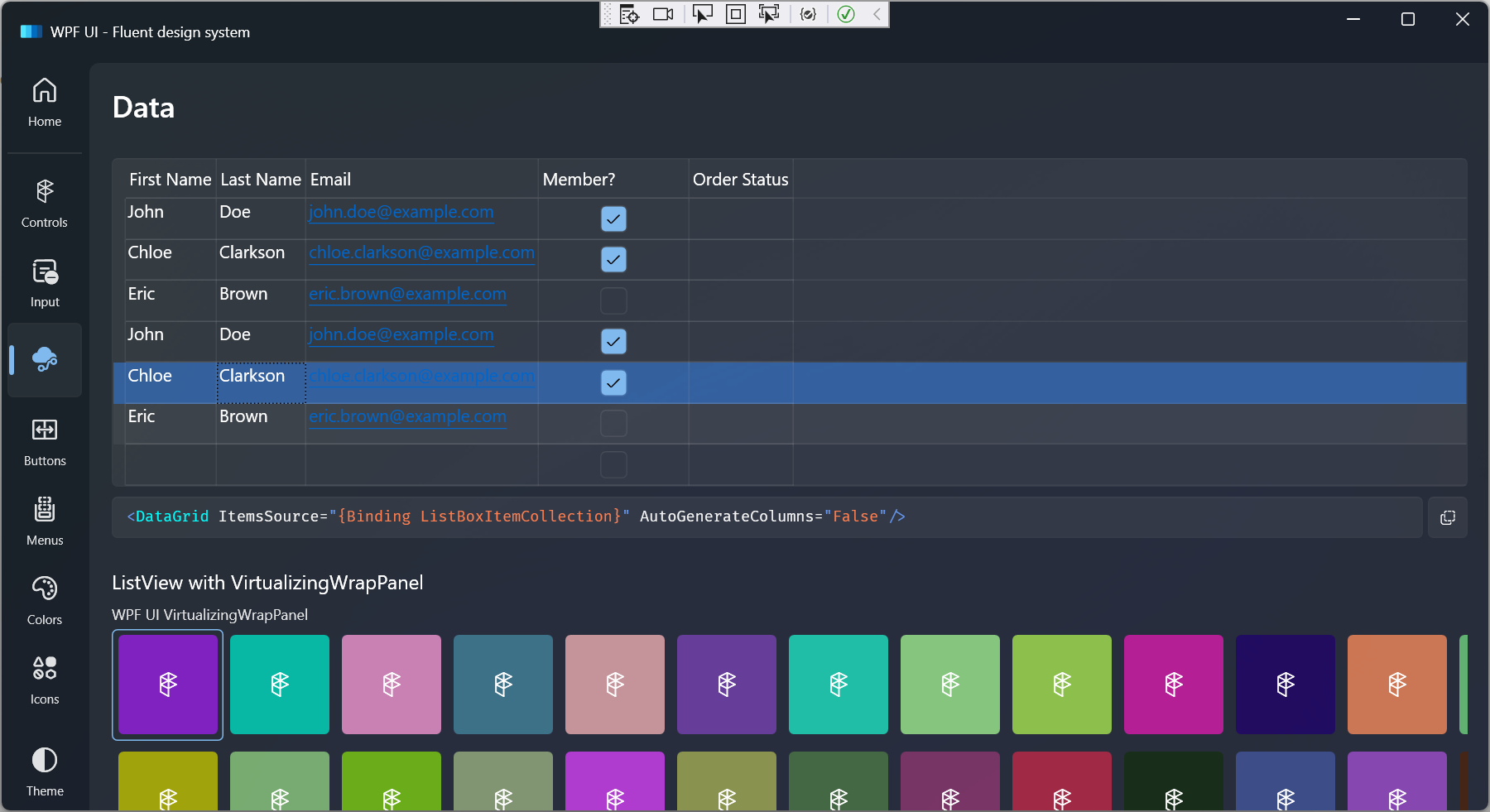
The Windows Community Toolkit implementation basically:
- Sets the opacity to 0.8 on mouse hover, 0.6 on selected, and 0 otherwise.
- Sets the color to the system accent color on selected.
Note that unlike other WPFUI controls such as TreeViewItem, the sample DataGridRow implementation does not have a 0:0:0.16 animation duration. Everything happens instantly similar to the WCT DataGrid.
If the code and screenshot above seem appropriate please let me know so I can open a pull request with it.