



Monitor your XGS-PON fiber ONU running 8311 community firmware directly in Home Assistant. Track optical power levels, temperatures, link status, and more.
- Real-time Fiber Monitoring - RX/TX optical power, voltage, laser bias current
- Fiber Traffic Counters - GEM port downstream/upstream bytes, key error tracking
- Temperature Tracking - Optic module and CPU temperatures
- Link Status - PON state with detailed status codes, PON alarm detection (LOS/LODS/LOF)
- Device Information - Vendor, part number, firmware bank, PON mode, OLT vendor
- System Monitoring - CPU load, memory usage, ONU uptime
- Health Monitoring - Rolling availability, error tracking, SSH reconnection counting, ONU reboot detection
- Two Deployment Options - Native HACS integration or Docker/MQTT bridge
This integration works with any XGS-PON ONU running 8311 community firmware, including:
- BFW Solutions WAS-110
- Potron Technology GP7001X
- Other devices supported by 8311 firmware
- Open HACS in Home Assistant
- Click the three dots menu → Custom repositories
- Add
https://github.com/pentafive/8311-ha-bridgeas an Integration - Search for "8311 ONU Monitor" and install
- Restart Home Assistant
- Go to Settings → Devices & Services → Add Integration
- Search for "8311 ONU Monitor" and configure
For users who prefer container deployment or need MQTT-based integration:
-
Clone the repository:
git clone https://github.com/pentafive/8311-ha-bridge.git cd 8311-ha-bridge -
Configure: Copy
.env.exampleto.envand edit:cp .env.example .env nano .env
-
Run with Docker Compose:
docker-compose up -d --build
See Alternative Deployments for systemd, Proxmox LXC, Synology, and Kubernetes options.
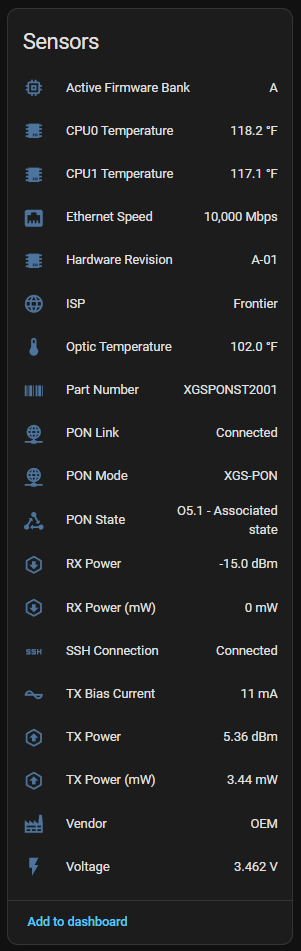
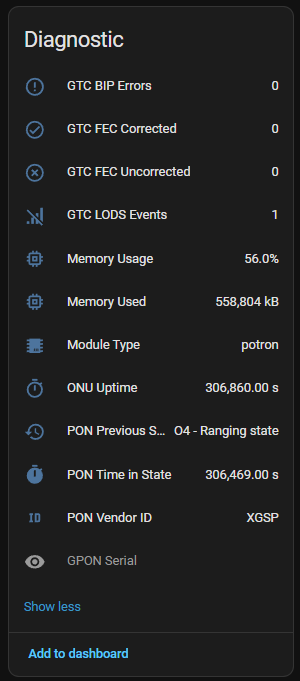
| Category | Sensors |
|---|---|
| Optical | RX Power (dBm/mW), TX Power (dBm/mW), Voltage, TX Bias Current |
| Temperature | Optic Temperature, CPU0 Temperature, CPU1 Temperature |
| Network | PON Link Status, SSH Connection, PON Alarms (LOS/LODS/LOF), Ethernet Speed, PON State |
| Fiber Traffic | GEM Downstream (bytes), GEM Upstream (bytes), GEM Key Errors |
| Device Info | Vendor, Part Number, Hardware Revision, PON Mode, Firmware Bank, ISP, Module Type, OLT Vendor |
| System | ONU Uptime, Memory Usage, Memory Used, CPU Load (1m/5m/15m) |
| Diagnostics | GPON Serial, PON Vendor ID, GTC BIP Errors, GTC FEC Corrected/Uncorrected, LODS Events |
| Health Monitoring | Consecutive Errors, SSH Reconnections, Error Rate, Total Updates, Availability %, ONU Reboot Count, Last Reboot Detected |
Configure via the UI - no YAML required:
- Host - IP address of your ONU (usually
192.168.11.1) - Username - SSH username (usually
root) - Password - SSH password (if required)
- Port - SSH port (usually
22) - Scan Interval - Update frequency (10-300 seconds)
All configuration via environment variables. See .env.example for the full list.
| Variable | Description | Default |
|---|---|---|
WAS_110_HOST |
ONU IP address | 192.168.11.1 |
WAS_110_PASS |
SSH password | "" |
HA_MQTT_BROKER |
MQTT broker host | homeassistant.local |
HA_MQTT_PASS |
MQTT password | required |
- Home - Overview and quick start
- UCG-Fiber Setup - UniFi gateway configuration
- Dashboard Examples - Lovelace configs with screenshots
- Troubleshooting - Common issues and solutions
- Alternative Deployments - systemd, Proxmox, Synology, k8s
- ONU Device - Any XGS-PON ONU with 8311 community firmware
- SSH Access - SSH enabled on the ONU (default:
root@192.168.11.1) - Home Assistant - 2024.1.0 or newer (for HACS integration)
- MQTT Broker - Mosquitto or compatible broker
- MQTT Integration - Home Assistant MQTT integration with discovery enabled
The integration reads from multiple sources on the ONU:
- EEPROM51 - Real-time optical diagnostics (power, temperature, voltage)
- EEPROM50 - Static device information (vendor, serial, part number)
- sysfs - CPU temperatures, ethernet speed
- 8311 shell - PON status, firmware bank, GTC counters
- UCI config - PON mode, GPON serial, vendor ID
- pontop - PON alarms, GEM port traffic counters
- OMCI - OLT vendor identification (ME 131)
- /proc - System uptime, memory usage, CPU load
See CHANGELOG.md for full release history.
| Version | Type | Description |
|---|---|---|
| 2.2.0 | HACS | SSH leak complete fix, PON alarms, GEM traffic, OLT vendor, CPU load |
| 2.1.0 | Both | Health monitoring sensors, SSH leak fix, MQTT LWT |
| 2.0.0 | HACS | Native Home Assistant integration |
| 1.0.x | Docker | MQTT bridge for container deployment |
If you find this integration useful:
- Buy Me a Coffee — Support development of this and other HA integrations
Apache License 2.0 - see LICENSE for details.
- 8311 Community - Firmware and documentation
- PON Wiki - Comprehensive XGS-PON resources
- Home Assistant - Home automation platform
- @Felaros - Docker improvements in v1.0.2
