A Blazor component that wraps QuillJS to enable WYSIWIG style HTML editing in Blazor apps.
Allows direct modification of CSS properties without requiring any additional CSS frameworks

You can link to the files from the QuillJS CDN or download them and reference them from your own project.
-
In your .cshtml (Blazor Server) or .html file (WASM), reference one (or both) of the QuillJS themes.
Porcupine supports the "Snow" and "Bubble" themes.

https://cdn.quilljs.com/1.3.6/quill.snow.css https://cdn.quilljs.com/1.3.6/quill.bubble.css -
At the end of the same file, reference the QuillJS library.

https://cdn.quilljs.com/1.3.6/quill.js
Download a .zip of the latest version from the Releases page.
-
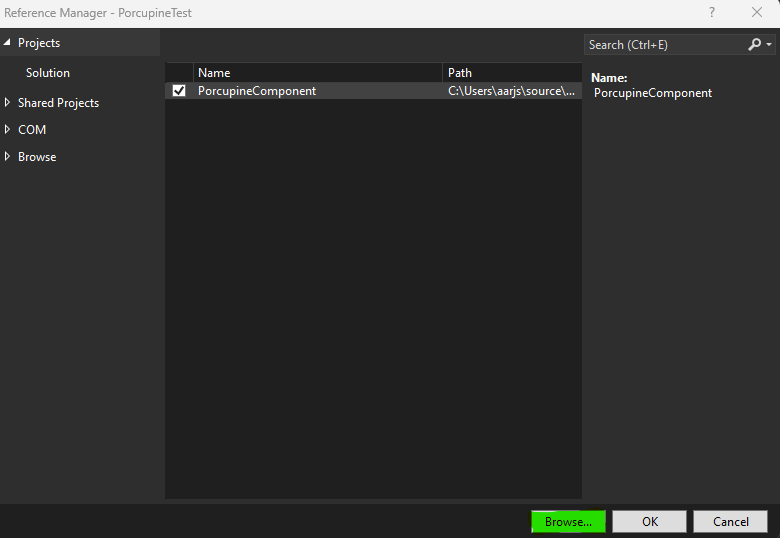
Add a reference to the assembly
-
Add a reference beneath the quill.js reference we created earlier

-

@using PorcupineHtmlEditor
@using Microsoft.JSInterop
-
Add the editor to your Blazor page with the PorcupineEditor tag
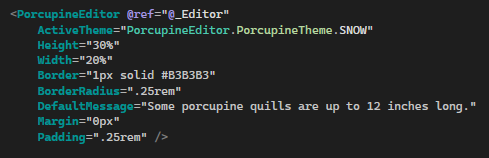
The control exposes a number of properties that can be overridden. Most use standard CSS strings
-
ActiveTheme - Enum
PorcupineTheme.SNOW or PorcupineTheme.BUBBLE
DEFAULT: PorcupineTheme.SNOW
-
Id - String
Overrides the editor's HTML id
DEFAULT - "porcupineEditor" + randomly generated GUID
-
Class - String
Overrides the main editor CSS class - MAY OVERRIDE OTHER DEFAULT STYLING, USE WITH CAUTION
-
Height - Accepts standard CSS strings
DEFAULT: 100%, editor will fill container that it is placed in
-
Width - Accepts standard CSS strings
DEFAULT: 100%, editor will fill container that it is placed in
-
Margin - Accepts standard CSS strings
DEFAULT: 0px
-
Padding - Accepts standard CSS strings
DEFAULT: 0px
-
Border - Accepts standard CSS strings
DEFAULT: 1px solid #B3B3B3
-
BorderRadius - Accepts standard CSS strings
DEFAULT: .25rem
-
DefaultMessage - Accepts a string - the same as html placeholder
DEFAULT: "Some porcupine quills are up to 12 inches long!";
-
ActiveTheme - Enum
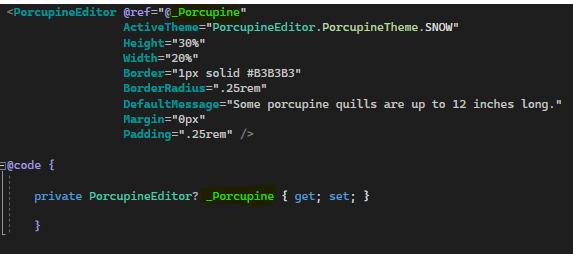
- Get a reference to the editor in your @code block or code-behind file
-
Get HTML Length
int htmlLength = await _Porcupine.GetLength(); -
Retrieve HTML
string html = await _Porcupine.GetHTML(); -
Set HTML
await _Porcupine.SetHTML(string htmlString); await _Porcupine.SetHTML(MarkupString markupString); -
Retrieve Text
string fullText = await _Porcupine.GetText(); string textToEnd = await _Porcupine.GetText(int startIndex); string partialText = await _Porcupine.GetText(int startIndex, int length); -
Set Text
await _Porcupine.SetText("SetPorcupineText"); -
Insert Text at Index
await _Porcupine.InsertText(int index, string text); -
Insert Image from URL
await _Porcupine.InsertImage(int index, string imageURL);
-
Show Porcupine
await _Porcupine.ShowPorcupine(); -
Hide Porcupine
await _Porcupine.HidePorcupine(); -
Clear Focus
await _Porcupine.ClearFocus; -
Grab Focus
await _Porcupine.GrabFocus(); -
Is Porcupine Focused?
bool isFocused = await _Porcupine.IsFocused(); -
Enable Porcupine
await _Porcupine.EnablePorcupine(); -
Disable Porcupine
await _Porcupine.DisablePorcupine();
-
Format Selection
await _Porcupine.FormatSelection(string property, string value); -
Format Text
await _Porcupine.Text(int index, int length, string property, string value); -
Clear Format
await _Porcupine.ClearFormat(int index, int length);
-
Get Bounds
JsonObject bounds = await _Porcupine.GetBounds(int index, int length); -
Get Selection
JsonObject selection = _Porcupine.GetSelection(); -
Set Selection
await _Porcupine.SetSelection(int index, int length);