Home

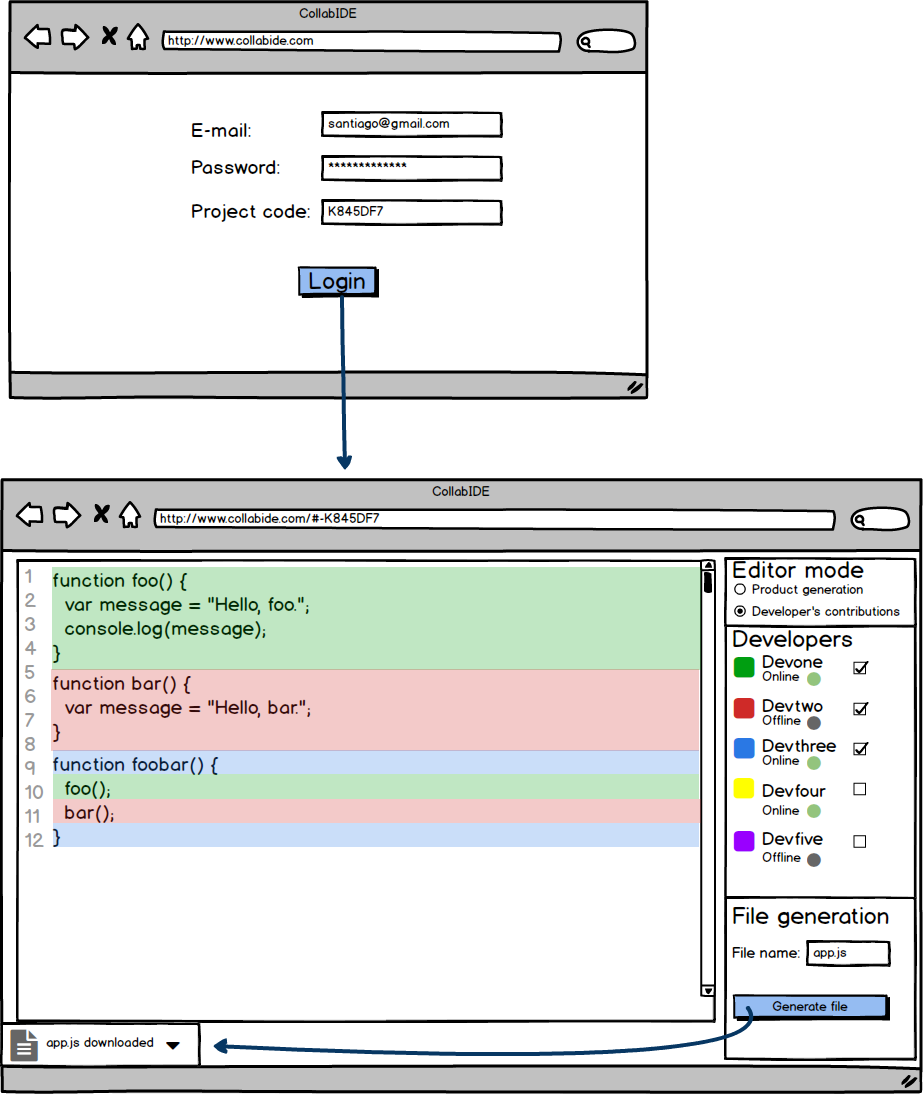
- Project login
Description: Describes how a developer can get access to a project using his credentials and the project's id.
Pre-conditions: None.
Flow of Events:
| Developer | System | |
|---|---|---|
| 1 | Enters CollabIDE main website | Shows the e-mail, password and project's id fields |
| 2 | Enters e-mail, password and the id of an existing project and then uses login option | Validates fields and fetches the project's data |
| 3 | Redirects to the project's page and assigns the developer a new color if the developer is new to the project, if not it assigns the previously defined color | |
| 4 | Sets the developer's status to online | |
| Alternative Flows: |
| Entering a new project's id | Developer | System |
|---|---|---|
| 2.2 | Enters e-mail, password and an id associated with no project, then uses the login option | Validates fields and tires to fetch the project's data |
| 3.2 | Creates a new project with the id provided | |
| 4.2 | Redirects to the project's page and assigns the developer a new color | |
| 5.2 | Sets the developer's status to online |
Post-conditions: The developer is now on the project's page with his corresponding color assigned.
- Print code
Description: Describes how a developer writes or edits code inside the IDE's editor.
Pre-conditions: The developer has successfully logged into the project.
Flow of Events:
| Developer | System | |
|---|---|---|
| 1 | Writes a fragment of code in a new line or in a previously unoccupied area of the editor | Saves the fragment of code written and highlights it with the developer's associated color |
Alternative Flows:
| Editing a fragment of code | Developer | System |
|---|---|---|
| 1.2 | Replaces a fragment of code written previously with a new fragment | Saves the fragment of code written and replaces the highlighting with the developer's associated color |
| Post-conditions: The character or characters are printed on the editor highlighted with the developer's associated color. |
- Choose contributions
Description: Describes how a developer chooses which fragments of code are active in the editor.
Pre-conditions: The developer has successfully logged into the project.
Flow of Events:
| Developer | System | |
|---|---|---|
| 1 | The developer selects a developer whose fragments of code he wishes to activate or deactivate | Finds all the fragments of code associated with the selected developer's code |
| 2 | Hides or shows the fragments of code depending if the fragments were deactivated or activated |
Alternative Flows:
None.
Post-conditions: The editor only shows the "Active" fragments of code.
- Generate file
Description: Describes how a developer can generate the product's file taking into the "Active" fragments of code in the IDE's editor.
Pre-conditions: The developer has successfully logged into the project and the file's name field is not empty.
Flow of Events:
| Developer | System | |
|---|---|---|
| 1 | The developer selects the option "Generate file" | Gets all the active fragments of code in the editor |
| 2 | Exports the code to a file without the color highlighthing present in the editor | |
| 3 | Downloads the file on the developer's browser |
Alternative Flows:
None.
Post-conditions: The product's file is downloaded on the developer's browser.
- Select editor's view mode
Description: Describes how a developer selects the editor's visualization mode, and how this impacts the way the code is shown.
Pre-conditions: The developer has successfully logged into the project.
Flow of Events:
| Developer | System | |
|---|---|---|
| 1 | The developer selects the "Product generation" or "Developer's contributions" visualization modes. | Changes how contribution choosing works depending on the mode selected. |
Alternative Flows:
None.
Post-conditions: The editor now uses the selected mode for contribution choosing.
The entities shown in the diagram are based on the firepad's documentation, firepad is the code editor which will be used in the application.

| Entity | Description |
|---|---|
| Project | Represents a project in which there is one editor and many developers. |
| User | Represents a developer of a project, a developer may have different credentials for each project. |
| Revision | Represent a revision made by a developer, a revision is made up of many operations. |
| Operation | Represents an edition or insertion of text. |
| Checkpoint | Represents the current checkpoint of the project, this is all of the revisions that have been made up to a certain point. |