Releases: slaakko/cmajorm
Cmajor 4.2.0 for Windows x64 and Linux

Cmajor 4.2.0 for Windows x64 and Linux
Release notes
-
Bug fix: Solution explorer tree view node collapse scrolling bug fixed.
-
Bug fix: Solution explorer node expand crash bug fixed when opening a new project/solution and there was previous solution open.
-
Bug fix: System.Windows.Component.LinkBefore and System.Windows.Component.LinkAfter fixed.
-
Bug fix: One context menu item crash bug fixed in System.Windows library and in cmcode.
-
Bug fix: Two bugs in the concept implementation fixed.
-
Error reporting of the XML parser improved. Now error line and column included in the parsing error message.
-
Now cmcode solution explorer tree view contains basic icons.
-
Interfaces reimplemented.
-
XML serialization reimplemented.
-
Assertions converted to exceptions in the system library. The exceptions are:
- NullPointerException: thrown when trying to call a member function or access a member variable through empty UniquePtr or SharedPtr,
or iterate or access using an empty iterator. - IndexOutOfBoundsException: thrown when trying to index a string using an invalid index.
- InvalidParameterException: thrown when a parameter is invalid in other than UniquePtr or SharedPtr or iterator classes.
- PreconditionViolationException: thrown when a precondition of a function or a class invariant is not satisfied at the beginning of a function.
- NullPointerException: thrown when trying to call a member function or access a member variable through empty UniquePtr or SharedPtr,
-
System.Windows control classes have now an extra constructor that usually takes only one parameter of type ControlNameCreateParams.
It provides more flexibility in changing control's creation parameters. The idea is taken from one of the books (D&E) of Bjarne Stroustrup. -
TreeView can show icons.
-
New System.Windows library components:
Cmajor for Windows x64 and Linux
Cmajor 4.1.0 for Windows x64 and Linux
Release notes
-
Code completion improved.
-
Installation document revised.
-
Using new installer and uninstaller programs on Windows.
-
The new installer and uninstaller require that Visual C++ Runtime Libraries are installed to the computer to which the Cmajor application is deployed.
You may already have them installed on to your computer, but if this is not the case they can be downloaded here:
https://support.microsoft.com/en-us/topic/the-latest-supported-visual-c-downloads-2647da03-1eea-4433-9aff-95f26a218cc0
Download and run the vc_redist.x64.exe package. -
The Windows installer of this version is broken. The source code version and the Linux versions should be fine.
There's a newer 4.2.0 version available that has working Windows installer.
Cmajor 4.0.0 for Windows x64 and Linux
Cmajor 3.10.0 for Windows x64 and Linux
Cmajor 3.10.0 for Windows x64 and Linux
Release notes
-
This version does not contain new major features. It contains many improvements and bug fixes to existing features.
-
Recent Cmajor Code IDE versions suffer from nasty behaviour: the Cmajor Code IDE gradually slows down,
and this is not enough, actually the entire machine slows down, until Cmajor Code is closed.
The reason for this behaviour is a mystery, but this problem has been fixed by rewriting the IDE in a language that works: C++. -
Bug fix (C++ backend compiler):
"String not bound" error fixed. -
Bug fix (compiler)
Linking error "symbol InitCompileUnit_ not defined" fixed. -
Bug fixes (Cmajor Code):
Scrolling. Copy/paste. Console. -
Bug fix (System.Xml.Serialization):
Reading empty list of a primitive type caused a crash. -
State of the Cmajor Code IDE (open files, breakpoints, expanded project tree view nodes, is locals view open, is call stack view open),
is saved to <solution>.cms.settings.xml file, and restored from there when the solution is opened. -
State of a project in Cmajor Code IDE (program arguments, breakpoints), is saved to <project>.cmp.settings.xml file and restored from there when a solution containing that project is opened.
-
Startup dialog (Cmajor Code). Startup dialog can be turned off by unchecking Edit | Options | Show startup dialog.
-
Reimplemented file I/O in the runtime library. System library file API's changed: support for old InputFileStream, OutputFileStream, etc... removed.
Use the static File class and
StreamWriter,
StreamReader,
StringWriter and
FileByteStream,
BufferedByteStream, etc...
New implementation allows parallel threads to write/read simultaneously to/from different files. -
The return value of File.Size
is now of type long (it was ulong before). -
ReadFile function removed. Use File.ReadAllText.
Cmajor 3.9.0 for Windows x64 and Linux
Cmajor 3.9.0 for Windows x64 and Linux
Release notes
-
Bug fix (Cmajor Code):
Context menu for a solution explorer tree view node was showing in the wrong position when solution explorer tree view was scrolled. -
Bug fix (Cmajor Code):
System.Windows.Console.Write
method did not update scroll info, so the contents of a console control could not be scrolled. -
Bug fix (compiler)
Arrays of arrays did not compile. -
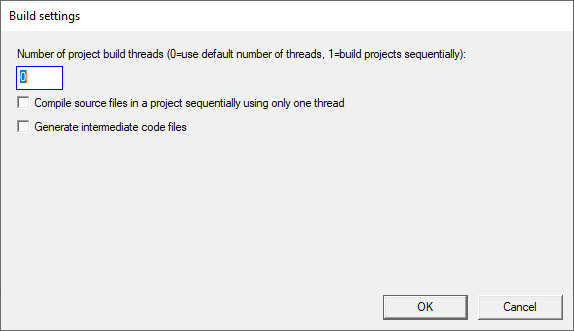
(Cmajor Code) Build settings:
-
(Cmajor Code) View intermediate code.
-
XML serialization. XML serialization support is implemented with the help of the xml attribute that is recognized by the compiler.
System.Xml.Serialization library contains the library part of the XML serialization support. -
The System.Windows library now supports double buffering.
The Control.SetDoubleBuffered
function enables double buffering for a control. Once double-buffered the control is directed to paint itself to a bitmap graphics context instead of normal window graphics context.
Once the control has painted itself to a bitmap, the bitmap is then painted to the window. Double buffering reduces flicker considerably. -
(Cmajor Code) Editor windows, the output window and the console window are now double-buffered to reduce flickering.
-
(tracing) Filter expressions.
Cmajor 3.8.0 for Windows x64 and Linux
Cmajor 3.8.0 for Windows x64 and Linux
Release notes
-
Bug fix (Cmajor Code editor)
Adding lines to the middle of a file that was longer than the screen did not update scroll bars and then you could not scroll to the end of the file. -
Bug fix (Cmajor Code editor):
Double clicking last word of text left last character out of selection. -
Bug fix (Cmajor Code editor):
Selection with mouse. -
Performance bug fix (Cmajor Code):
Tooltip window handling for the toolbar was done on OnMouseEnter and OnMouseLeave event handlers and done synchronously. It was causing a delay of about 70 ms for each toolbutton on my machine.
Tooltip handling is now moved to OnMouseHover event handler. -
(Cmajor Code editor) Ctrl-A now selects entire text.
-
(Cmajor Code editor) Go To Definition: right clicking an identifier in the editor and selecting 'Go To Definition' from the context menu
locates the editor to the definition location of that symbol. Not perfect.
This feature requires that you have successfully compiled the project containing the definition and the project in which the identifier resides.
Cmajor 3.7.1 for Windows x64 and Linux
Cmajor 3.7.1 for Windows x64 and Linux
Release notes
-
Bug fix: Fixed a bug in class template compilation causing access violation in compiler.
-
Bug fix: Removed flashing console window when building projects in CmDevEnv.
-
Bug fix: JSON parser did not accept empty array and empty object.
-
Bug fix: Consider the following program:
using System;

abstract class Component
{
    public Component()
    {
    }
    public default virtual ~Component();
    public string Addr()
    {
        return ToHexString(cast<ulong>(cast<void*>(this)));
    }
    public abstract void Boom();
}

class Container
{
    public nothrow Container(Component* parent_) : parent(parent_)
    {
    }
    public void Fail()
    {
        Console.Out() << ">Container.Fail()" << endl();
        parent->Fail();
        Console.Out() << "<Container.Fail()" << endl();
    }
    public Component* parent;
}

class ToFail : Component
{
    public ToFail(const string& text_) : base(), text(text_), container(this)
    {
    }
    public nothrow Container& GetContainer()
    {
        return container;
    }
    public ~ToFail()
    {
        Console.Out() << "destructor ~ToFail() " << Addr() << " called" << endl();
    }
    public override void Fail()
    {
        Console.Out() << ">ToFail.Fail: " << Addr() << endl();
        Console.Out() << "<ToFail.Fail: " << Addr() << endl();
    }
    public string text;
    public Container container;
}

void main()
{
    Console.Out() << "start" << endl();
    UniquePtr<ToFail> toFail(new ToFail(ToString(1)));
    Console.Out() << "toFail addr is " << toFail->Addr() << endl();
    Console.Out() << "toFail container parent addr is " << toFail->container.parent->Addr() << endl();
    toFail->GetContainer().Fail();
    Console.Out() << "end" << endl();
}
Because ToString(1) returns an rvalue, the compiler erroneously generated a move constructor for the ToFail class and called it after
converting the string to a ToFail object. This has been fixed now so that move constructor is not generated and called,
but ToFail.ToFail(const string&) constructor is just called with a string argument as expected.Before the fix, the program above printed the following lines and crashed:
D:\work\bug>bin\debug\bug
start
destructor ~ToFail() 00000038913FF888 called
toFail addr is 00000210D28CC780
toFail container parent addr is 00000038913FF888
>Container.Fail() // <--- access violation
Now the program prints:
D:\work\bug>bin\debug\bug start toFail addr is 0000024F7DE191E0 toFail container parent addr is 0000024F7DE191E0 >Container.Fail() >ToFail.Fail: 0000024F7DE191E0 <ToFail.Fail: 0000024F7DE191E0 <Container.Fail() end destructor ~ToFail() 0000024F7DE191E0 called -
Fixed a couple of IDE bugs
-
The debugger has now conditional breakpoints.
-
New tool: supd for synchronizing parallel source code directory trees.
-
Decided to drop TLS support on Windows.
-
Installation instructions updated.
-
Includes first version of Cmajor Code, a new IDE for Windows written in Cmajor.
-
Instructions for setting up compiler development environment on Windows and compiling the compiler and tools from sources.
-
Occasionally you may get the following internal error when compiling the system library with the compiler with the C++ backend: "Error: class 'String' not bound."
I think it has something to do with concurrency in the compiler. A workaround is to compile sequentally by adding the "-st" option (this is much slower).
That is: "cppcmc -st -u -v System.cms" for the debug mode and "cppcmc -st -u -v -c=release System.cms" for the release mode.
Cmajor 3.7.0 for Windows x64 and Linux
Cmajor 3.7.0 for Windows x64 and Linux
Release notes
-
Bug fix: Fixed a bug in class template compilation causing access violation in compiler.
-
Bug fix: Removed flashing console window when building projects in CmDevEnv.
-
Bug fix: JSON parser did not accept empty array and empty object.
-
Bug fix: Consider the following program:
using System;

abstract class Component
{
    public Component()
    {
    }
    public default virtual ~Component();
    public string Addr()
    {
        return ToHexString(cast<ulong>(cast<void*>(this)));
    }
    public abstract void Boom();
}

class Container
{
    public nothrow Container(Component* parent_) : parent(parent_)
    {
    }
    public void Fail()
    {
        Console.Out() << ">Container.Fail()" << endl();
        parent->Fail();
        Console.Out() << "<Container.Fail()" << endl();
    }
    public Component* parent;
}

class ToFail : Component
{
    public ToFail(const string& text_) : base(), text(text_), container(this)
    {
    }
    public nothrow Container& GetContainer()
    {
        return container;
    }
    public ~ToFail()
    {
        Console.Out() << "destructor ~ToFail() " << Addr() << " called" << endl();
    }
    public override void Fail()
    {
        Console.Out() << ">ToFail.Fail: " << Addr() << endl();
        Console.Out() << "<ToFail.Fail: " << Addr() << endl();
    }
    public string text;
    public Container container;
}

void main()
{
    Console.Out() << "start" << endl();
    UniquePtr<ToFail> toFail(new ToFail(ToString(1)));
    Console.Out() << "toFail addr is " << toFail->Addr() << endl();
    Console.Out() << "toFail container parent addr is " << toFail->container.parent->Addr() << endl();
    toFail->GetContainer().Fail();
    Console.Out() << "end" << endl();
}
Because ToString(1) returns an rvalue, the compiler erroneously generated a move constructor for the ToFail class and called it after
converting the string to a ToFail object. This has been fixed now so that move constructor is not generated and called,
but ToFail.ToFail(const string&) constructor is just called with a string argument as expected.Before the fix, the program above printed the following lines and crashed:
D:\work\bug>bin\debug\bug
start
destructor ~ToFail() 00000038913FF888 called
toFail addr is 00000210D28CC780
toFail container parent addr is 00000038913FF888
>Container.Fail() // <--- access violation
Now the program prints:
D:\work\bug>bin\debug\bug start toFail addr is 0000024F7DE191E0 toFail container parent addr is 0000024F7DE191E0 >Container.Fail() >ToFail.Fail: 0000024F7DE191E0 <ToFail.Fail: 0000024F7DE191E0 <Container.Fail() end destructor ~ToFail() 0000024F7DE191E0 called -
The debugger has now conditional breakpoints.
-
New tool: supd for synchronizing parallel source code directory trees.
-
Decided to drop TLS support on Windows.
-
Installation instructions updated.
-
Includes first version of Cmajor Code, a new IDE for Windows written in Cmajor.
-
Instructions for setting up compiler development environment on Windows and compiling the compiler and tools from sources.
-
Occasionally you may get the following internal error when compiling the system library with the compiler with the C++ backend: "Error: class 'String' not bound."
I think it has something to do with concurrency in the compiler. A workaround is to compile sequentally by adding the "-st" option (this is much slower).
That is: "cppcmc -st -u -v System.cms" for the debug mode and "cppcmc -st -u -v -c=release System.cms" for the release mode.
Cmajor 3.6.0 for Windows x64 and Linux
Cmajor 3.6.0 for Windows x64 and Linux
Release notes
-
Bug fix: a character literal that contained a single non-ASCII Unicode letter, for example 'ö', caused an error 'invalid UTF-8 sequence'. Fixed.
-
Faster function entry and exit code for functions that can throw or contain a cleanup block.
-
Support for fibers added to system library.
-
Process class
added to system library. -
Switched to clang++ on WSL / on Linux.
I have used LLVM 10.0.0 pre-built binaries for Ubuntu 18.04 available on the LLVM download page for building the compiler on Linux/WSL. -
Default TextWriter output operators for containers revisited.
The 3.5.0 version included default output operators, operator<<, for container types.
However it required the programmer to derive her own container type from the standard one, if she wanted to define her own output operator for that container type.
In this version this limitation has been removed.The default output operators are now declared with the new system_default attribute
and the overload resolution process has been changed to take that attribute into account.
It works as follows:
The overload resolution has been changed to be a two-phase process.
In the first phase the compiler ignores functions that have a system_default attribute, as if they did not exist at all.
Now if the user has defined her own ouput operator for a container, the compiler finds it and uses it without resorting to system_default functions.
Only if the set of viable functions is empty, the compiler does a phase two lookup.
This time the compiler considers also functions that have been declared with the system_default attribute and if there is now viable functions, the compiler will use the best match.
Thus the compiler will use a system-defined default output operator only if the programmer has not defined her own version. -
New tools:
- cppcmc is a command-line Cmajor compiler that generates primitive C++ that is then compiled to native code using the configured C++ compiler.
- cmdb is a command-line debugger.
- cmdb2xml converts a binary debug information file to XML for inspection.
-
Changed System.Numerics.Multiprecision library implementation to use C++ boost::multiprecision library.
-
ANSI escapes for coloring text output. Works on Linux and on Windows when using Windows Terminal (wt.exe) as console host:
using System; void main() { Console.Out() << TextColor.green << "green" << Color.reset << endl(); } -
Sometimes compilation of the system library from the command line may fail with the following error:
error opening mapped file 'D:/work/cmajorm/cmajor/system/System.Dom/lib/release/System.Dom.cmm'In this case you may turn off threaded compilation by using the -st and -bt=1 options, that is:
cmc -st -bt=1 -u -v -c=release System.cms
Cmajor 3.5.0 for Windows x64 and Linux
Cmajor 3.5.0 for Windows x64 and Linux
Release notes
-
The previous 3.4.0 version was broken.
It printed an error message about missing SOULNG_ROOT environment variable.
Sorry for the inconvenience for those who downloaded it and tried to use it.
In this version this has been fixed. -
Default TextWriter output operators for Pair<T, U> and for the following containers:
List<T>, Set<T, C>, Map<Key, Value, KeyCompare>, HashSet<T, H, C> and HashMap<K, T, H, C>.
The TextWriter output operator for Pair<T, U> is defined as follows:public TextWriter& operator<<<T, U>(TextWriter& writer, const Pair<T, U>& pair) { return writer << "(" << pair.first << ", " << pair.second << ")"; }- The default output operator for Pair<T, U> prints the first and second members of the pair inside parentheses separated by a comma.
- The default output operator for List<T> prints the elements of the list inside brackets "[" and "]" and separated by commas.
- The default output operator for Set<T> prints the elements of the set inside braces "{" and "}" and separated by commas.
- The default output operator for Map<Key, Value, KeyCompare> prints the elements (pairs) of the map inside braces "{" and "}" and separated by commas.
- The default output operator for HashSet<T, H, C> prints the elements of the hashset inside braces "{" and "}" and separated by commas.
- The default output operator for HashMap<K, T, H, C> prints the elements (pairs) of the hashmap inside braces "{" and "}" and separated by commas.
If you want to define your own output operator for one of those container types, you can do so by deriving
your own container type from that container type and define the output operator for that type.
For example, deriving a class template from List<T> called MyList<T> and defining an output operator for it:public class MyList<T> : List<T> { } public TextWriter& operator<<<T>(TextWriter& writer, const MyList<T>& myList) { // print myList return writer; }