Slowdown detection with many lines #975

Description

Information
- OS: Windows
- Version: [e.g. 0.45.0]
- Terminal: Visual Studio Console & Windows PowerShell
Describe the bug
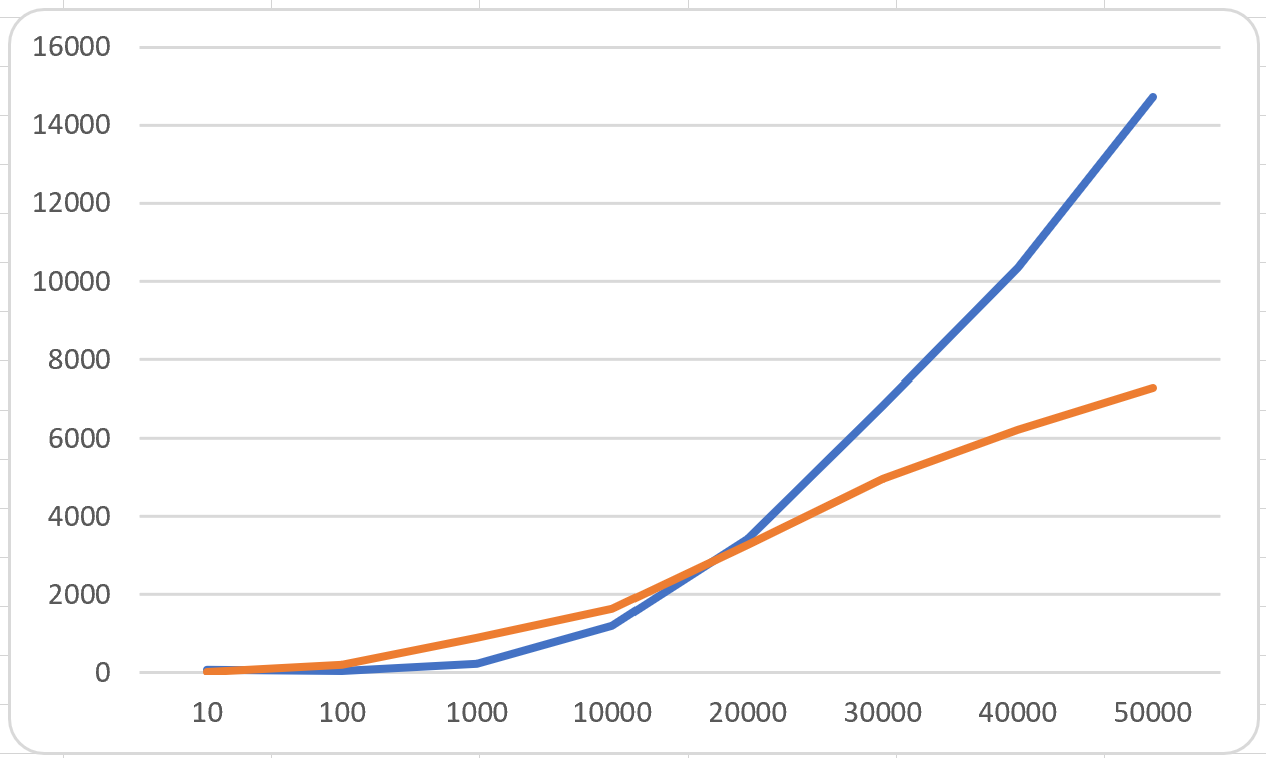
Detected that Spectre.Console is faster than Console.Writeline from 100 lines until 20K lines. Then, it's performance drops until taking twice the time to print 50K lines or even 10 times slower with 100K lines.
To Reproduce
I prepared a small program to do the testing, for your consideration:
namespace ReproduceSpectreConsoleSlowDown
{
    class Program
    {
        static void Main(string[] args)
        {
            const int reps = 5;
            int[] sizes = new int[] { /* 10, 100, 1000, 10000,*/ 50000 };
            float[] spectreMeans = new float[sizes.Length];
            float[] consoleMeans = new float[sizes.Length];

            for (int k = 0; k < sizes.Length; k++)
            {
                List<string> output = new List<string>(sizes[k]);
                for (int i = 0; i < sizes[k]; i++)
                    output.Add(string.Format("change{0}", i));

                int[] spectreResults = new int[reps];
                int[] consoleResults = new int[reps];
                int sumSpectreResults = 0;
                int sumConsoleResults = 0;

                for (int i = 0; i < reps; i++)
                {
                    consoleResults[i] = PrintChangesWithDefaultConsole(output);
                    spectreResults[i] = PrintChangesWithAnsiConsole(output);

                    sumSpectreResults += spectreResults[i];
                    sumConsoleResults += consoleResults[i];
                }

                spectreMeans[k] = (float)sumSpectreResults / reps;
                consoleMeans[k] = (float)sumConsoleResults / reps;
            }

            for (int i = 0; i < spectreMeans.Length; i++)
            {
                Console.WriteLine(string.Format("Spectre mean time for {0} elements: {1} ms", sizes[i], spectreMeans[i]));
                Console.WriteLine(string.Format("Console mean time for {0} elements: {1} ms", sizes[i], consoleMeans[i]));
            }
        }

        static public int PrintChangesWithAnsiConsole(List<string> output)
        {

            if (output == null || output.Count == 0)
                throw new Exception("output cannot be null or empty.");

            int ini = Environment.TickCount;

            const string consoleColor = "blue";
            //const string consoleColor = "#00FFFF";
            const string shortDescription = "Desc";

            var root = new Tree("");

            TreeNode changes = root.AddNode(
                string.Format("[{0}]{1}[/]", consoleColor, shortDescription));

            Table table = new Table().RoundedBorder();

            table.AddColumns(new string[] { "col1", "col2", "col3" });

            foreach (string str in output)
                table.AddRow(new string[] { str, str, str });

            changes.AddNode(table);

            AnsiConsole.Write(root);

            return Environment.TickCount - ini;
        }
        static public int PrintChangesWithDefaultConsole(List<string> output)
        {
            int ini = Environment.TickCount;

            if (output == null || output.Count == 0)
                throw new Exception("output cannot be null or empty.");

            string spacing = GetCharRep(' ', SPACING);

            PrintTableHeader(string.Format("{0}{1}{2}{3}{4}", "col1", spacing, "col2", spacing, "col3")) ;
            foreach (string str in output)
                PrintLine(string.Format("{0}  {1}  {2}", str, str, str));

            return Environment.TickCount - ini;
        }

        static void PrintTableHeader(string formatedHeader)
        {
            string separator = GetCharRep('-', formatedHeader.Length + MARGIN * 2);

            Console.WriteLine(separator);
            PrintLine(formatedHeader);
            Console.WriteLine(separator);

        }

        static void PrintLine(string line)
        {
            string space = GetCharRep();
            Console.WriteLine(string.Format("{0}{1}{2}{3}{4}", '|', space, line, space, '|'));
        }
        static string GetCharRep(char c = ' ', int times = MARGIN)
        {
            return new string(' ', times);
        }

        const int SPACING = 7;
        const int MARGIN = 2;
    }
}
Expected behavior
We have detected when printing 100K lines withing tables of 3 columns, that using Sprectre.Console takes up to 103 seconds in average while we are printing with Console.Writeline the same amouint of lines in 11 seconds. I'm not saying that it should take the same, just the difference seems too big and keeps on growing with the number of files.
Screenshots
Additional context
I'm not sure whether the preprocessing is lagging the overall times, maybe it is just a compromise solution, but JIC the might be a memory issue somewhere. We are working with Version Control and it is not rare that, when creating a new repo, there might be hundreds of thousands of new files to upload. If we do an status with that amount of private files, it gets frozen for almost 2 minutes.
Please upvote 👍 this issue if you are interested in it.