




A microservices-based architecture, following Domain-Driven Design (DDD) principles, Hexagonal Architecture (Ports & Adapters), Separation of Concerns (SoC), SOLID principles, Choreography pattern for service coordination, and the Saga pattern for distributed transactions.
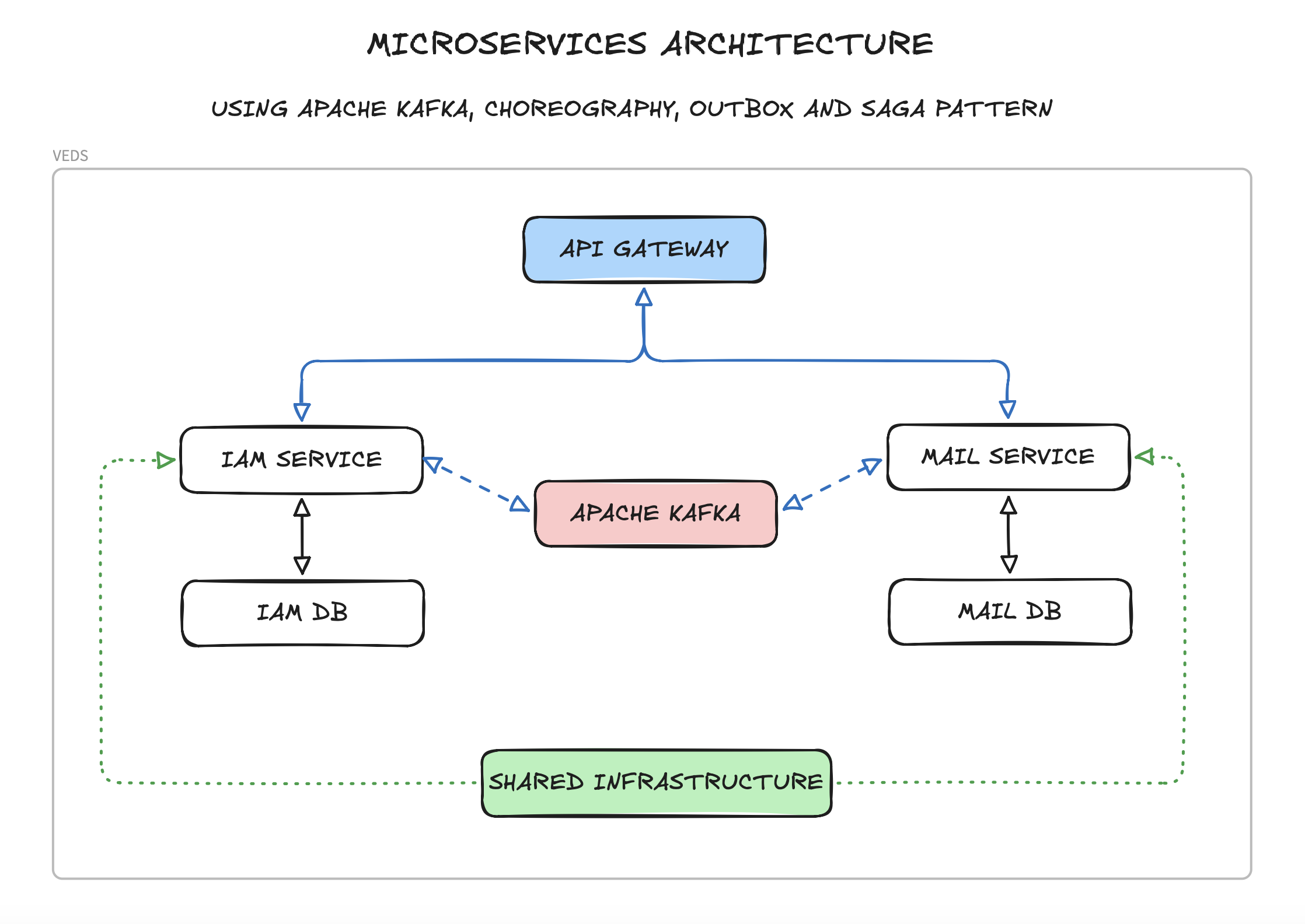
The project is split into the following components:
- API Gateway – Entry point for all client requests, handles routing to appropriate services, JWT validation, and BFF (Backend-For-Frontend) auth proxy to Keycloak.
- IAM Service – Consolidates user management, roles/permissions, and account operations. Authentication is delegated to Keycloak.
- Mail Service – Handles email sending operations and templates.
- Shared Infrastructure – Shared infrastructure, contracts, and utilities used across all microservices.
- Template Service – Baseline configuration for future microservices.
Each microservice follows Hexagonal Architecture principles with a three-layer structure and has its own PostgreSQL database. Services communicate with each other via Apache Kafka for event-driven architecture, primarily for notifying the Mail Service.
- The system uses Kafka in KRaft mode (Kafka Raft), eliminating the need for Zookeeper.
- Configuration is handled via
KAFKA_PROCESS_ROLES(broker, controller) andKAFKA_CONTROLLER_QUORUM_VOTERS. - A static
CLUSTER_IDis provided indocker-compose.ymlfor simplified setup.
- Provides shared code, DTOs, event definitions, and utilities for all microservices.
- Implements shared patterns like an Outbox pattern.
- Contains reusable components for Kafka integration, exception handling, and API responses.
- Ensures consistency in how services communicate and process events.
- Includes base classes for implementing event choreography.
- Provides shared ports and adapters interfaces for consistent hexagonal architecture implementation.
- Integration events definitions for inter-service communication.
- Responsible for user profile management, authorization (roles & permissions), and account operations (activation, password/email change).
- Authentication (credentials, tokens) is fully delegated to Keycloak.
- Uses Keycloak Admin API (via service account) for user provisioning and role sync.
- Database stores:
- User profile data (first name, last name, preferences) linked by
keycloakId. - Role definitions and user-role assignments.
- User-specific permissions.
- Verification tokens (activation, password/email change).
- User profile data (first name, last name, preferences) linked by
- Provides endpoints for registration, profile management, and role administration.
- Publishes mail request events to trigger email workflows.
- Implements an internal Saga pattern for multi-step operations like user registration.
- Responsible for sending emails based on templates.
- Database stores:
- Email logs.
- Delivery status.
- Consumes mail request events from other services.
- Supports various email templates (welcome, password reset, account activation, etc.).
- Acts as a reactive service in the choreography flow.
- Uses hexagonal architecture to decouple email sending logic from external mail providers.
- A template for implementing hexagonal architecture.
- Example domain models, repositories, and services.
- Sample event definitions and Kafka integration.
- Basic Saga pattern implementation.
- Back-end: Spring Boot, Kotlin, Gradle Kotlin DSL.
- Database: PostgreSQL (a separate instance for each service).
- Message Broker: Apache Kafka KRaft (Zookeeper-less).
- Identity Provider: Keycloak (OAuth2 / OpenID Connect).
- API Documentation: OpenAPI (Swagger).
- Containerization: Docker/Podman, Docker Compose/Podman Compose.
- Authentication: Keycloak JWT + refresh tokens (HttpOnly secure cookie via BFF pattern).
- Testing: JUnit, Testcontainers.
- Docker/Podman and Docker Compose/Podman Compose
- JDK 25 LTS
- Gradle
- Clone the repository:
git clone https://github.com/vertyll/veds.git
# and
cd veds- Start the infrastructure:
docker-compose up -d- Build and run microservices:
Building:
cd <service-name>
./gradlew build
Local Running:
cd <service-name>
./gradlew bootRun --args='--spring.profiles.active=dev'
Available Services:
api-gatewayiam-servicemail-serviceshared-infrastructure(library)
- Access the services:
- API Gateway: http://localhost:8080
- IAM Service: http://localhost:8082
- Mail Service: http://localhost:8083
- Keycloak: http://localhost:9000
- Kafka UI: http://localhost:8090
- MailDev: http://localhost:1080
Keycloak is the identity provider (IdP) for the application. It handles:
- User credentials storage (passwords, enabled/disabled state).
- Token issuance (access tokens + refresh tokens, JWT format).
- Role management (mirrored from the app's IAM service).
The realm JSON export (keycloak/realm-config/realm-export.json) is automatically imported on first startup via Docker Compose volume mount. You do not need to configure Keycloak manually.
| Resource | Name | Purpose |
|---|---|---|
| Realm | veds |
Application realm |
| Realm roles | USER, ADMIN |
Mapped to Spring Security ROLE_USER, ROLE_ADMIN |
| Client | veds-api-gateway |
Confidential client used by the Gateway BFF for login/refresh/logout |
| Client | veds-service-account |
Service account for IAM backend admin operations (user CRUD, role assignment) |
| Protocol mapper (predefined) | roles mapper |
Puts realm roles into realm_access.roles claim in access token |
| Protocol mapper (predefined) | email mapper |
Puts email claim in access token |
Frontend ──► API Gateway (BFF) ──► Keycloak
                │
                ├── POST /auth/token          → login, returns accessToken in body + refreshToken in HttpOnly cookie
                ├── POST /auth/refresh-token  → reads cookie, refreshes tokens
                └── POST /auth/logout         → invalidates token, clears cookie

Frontend ──► API Gateway ──► Microservices (Bearer token)
                │
                └── Authorization: Bearer <accessToken>
                    Each microservice validates JWT independently via Keycloak's JWKS endpoint
All Keycloak-related config is centralized in shared-infrastructure/src/main/resources/shared-config.yml:
spring:
  security:
    oauth2:
      resourceserver:
        jwt:
          issuer-uri: ${KEYCLOAK_ISSUER_URI:http://localhost:9000/realms/veds}
          jwk-set-uri: ${KEYCLOAK_JWK_SET_URI:http://localhost:9000/realms/veds/protocol/openid-connect/certs}

veds:
  shared:
    keycloak:
      server-url: ${KEYCLOAK_SERVER_URL:http://localhost:9000}
      realm: ${KEYCLOAK_REALM:veds}
      admin-client-id: ${KEYCLOAK_ADMIN_CLIENT_ID:veds-service-account}
      admin-client-secret: ${KEYCLOAK_ADMIN_CLIENT_SECRET:KEYCLOAK_ADMIN_CLIENT_SECRET_HERE}
      gateway-client-id: ${KEYCLOAK_GATEWAY_CLIENT_ID:veds-api-gateway}
      gateway-client-secret: ${KEYCLOAK_GATEWAY_CLIENT_SECRET:KEYCLOAK_GATEWAY_CLIENT_SECRET_HERE}
      roles-claim-path: realm_access.roles
      cookie:
        refresh-token-cookie-name: KEYCLOAK_REFRESH_TOKEN
        http-only: true
        secure: ${COOKIE_SECURE:false}
        same-site: Strict
path: "/"| URL | Description |
|---|---|
| http://localhost:9000 | Keycloak admin console |
| http://localhost:9000/realms/veds/.well-known/openid-configuration | OpenID Connect discovery |
| http://localhost:9000/realms/veds/protocol/openid-connect/certs | JWKS (public keys for JWT verification) |
| http://localhost:9000/realms/veds/protocol/openid-connect/token | Token endpoint |
# Get access token
curl -s -X POST http://localhost:9000/realms/veds/protocol/openid-connect/token \
  -H "Content-Type: application/x-www-form-urlencoded" \
  -d "grant_type=password" \
  -d "client_id=veds-api-gateway" \
  -d "client_secret=KEYCLOAK_GATEWAY_CLIENT_SECRET_HERE" \
  -d "username=test@example.com" \
-d "password=Test1234!" | jq .An Insomnia collection is provided at insomnia-collection.yaml in the project root.
For convenience, you can use the provided Makefile in the root directory:
- Build all services:
make build-all. - Run tests in all services:
make test-all. - Clean all services:
make clean-all.
Each microservice implements Hexagonal Architecture to achieve clean separation of concerns.
Benefits:
- Testability: Core business logic can be tested independently.
- Flexibility: Easy to swap external dependencies without affecting business logic.
- Maintainability: Clear separation between business rules and technical details.
- Technology Independence: Core domain is not coupled to specific frameworks or technologies.
Each microservice is designed around a specific business domain with:
- A clear bounded context.
- Domain models that represent business entities.
- A layered architecture within the hexagonal structure.
- Domain-specific language.
- Encapsulated business logic.
The project structure follows DDD principles within hexagonal architecture:
domain: Core business models, domain services, domain events, and business logic.application: Controllers, DTOs, use cases, application services, and port definitions (Primary Adapters).infrastructure: Adapters for external systems like databases, Kafka, email providers, etc. (Secondary Adapters).
The codebase adheres to:
- Single Responsibility Principle: Each class has a single responsibility.
- Open/Closed Principle: Classes are open for extension but closed for modification.
- Liskov Substitution Principle: Subtypes are substitutable for their base types.
- Interface Segregation Principle: Specific interfaces rather than general ones.
- Dependency Inversion Principle: Depends on abstractions (ports), not concretions (adapters).
The hexagonal architecture naturally enforces these principles by:
- Isolating business logic from external concerns.
- Using dependency inversion through ports and adapters.
- Maintaining clear boundaries between layers.
The system uses a choreography-based approach for service coordination:
- Services react to events published by other services without central coordination.
- Each service knows which events to listen for and what actions to take.
- No central orchestrator is needed, making the system more decentralized and resilient.
- Services maintain autonomy and can evolve independently.
Benefits of this approach:
- Reduced coupling between services.
- More flexible and scalable architecture.
- Easier to add new services or modify existing ones.
- Better resilience as there's no single point of failure.
- Aligns well with hexagonal architecture by treating event communication as external adapters.
For distributed transactions, we use the Saga pattern (currently internal to IAM Service but can be extended):
- A service or component initiates a multistep operation (e.g., registration).
- Each step is recorded in the Saga state machine.
- If a step fails, compensating transactions are triggered to maintain consistency.
Example: User Registration Saga (Internal to IAM Service)
- Create User: Creates the user record.
- Create Verification Token: Generates a token for account activation.
- Send Welcome Email: Publishes a
MailRequestedEventto Kafka for the Mail Service.
Each step is handled through hexagonal architecture, ensuring clean separation between the domain logic and persistence/event adapters.
Services communicate asynchronously through Kafka events:
- UserActivatedEvent: Triggered when a user activates their account.
- MailRequestedEvent: Triggered when an email needs to be sent (consumed by Mail Service).
- SagaCompensationEvent: Internal event for triggering compensation logic.
Event publishing and consuming are handled by dedicated adapters, keeping the domain core focused on business logic.
This project uses a combination of HTTP ETags (at API boundaries) and JPA Optimistic Locking (within services) to prevent lost updates and to ensure safe concurrency across microservices and asynchronous processing.
- API layer: ETag/If-Match for conditional updates from clients (front-end, API consumers).
- Persistence layer: JPA
@Versionon entities and the load → mutate → save a pattern inside a single transaction. - Sagas and Outbox: Internal consistency ensured by JPA Optimistic Locking and idempotency safeguards — no HTTP ETags here.
428 Precondition Required— missingIf-Matchon required endpoints.412 Precondition Failed— ETag/If-Match does not match the current version.409 Conflict— last-resort handler for JPAObjectOptimisticLockingFailureException(race detected at commit time).
- Entities use
@Versionto enable Optimistic Locking (e.g.,User,Role,KafkaOutbox, and Saga/SagaStep entities where applicable). - Services follow the pattern: load the entity → apply changes →
save(...)inside@Transactional. Hibernate includesWHERE version = ?and raises a conflict if data changed concurrently.
- Sagas are backend-internal processes (event-driven), not HTTP resources — therefore ETag/If-Match is not used in Sagas.
- Concurrency control:
@Versionon Saga and/or SagaStep where applicable, persisted via a load → mutate → save.- Idempotency for steps:
- Database-level unique constraint on
(sagaId, stepName)prevents duplicate step insertion. - Service-level soft check in
recordSagaStepreturns the existing step if already present (safe retries/duplicates).
- Database-level unique constraint on
- Compensation steps are recorded and published through Outbox when needed.
KafkaOutboxhas@Version.- The
KafkaOutboxProcessorupdates message status by mutating the loaded entity and callingsave(...)(no bulk JPQL updates). This leverages Optimistic Locking to avoid races between processor instances. - On failure, the processor increments
retryCount, stores the error, and persists viasave(...)again.
Each service provides its own Swagger UI for API documentation:
- IAM Service: http://localhost:8082/swagger-ui.html
- Mail Service: http://localhost:8083/swagger-ui.html
- Each service exposes health and metrics endpoints through Spring Boot Actuator
- Health checks can be accessed at
/actuator/healthon each service - Metrics can be collected for observability and monitoring service health
The project uses ktlint for code formatting and style checks. Go to the service directory and run:
./gradlew ktlintFormatTo check the code style, run:
./gradlew ktlintCheckYou can also use make format-all and make check-style-all from the root directory.