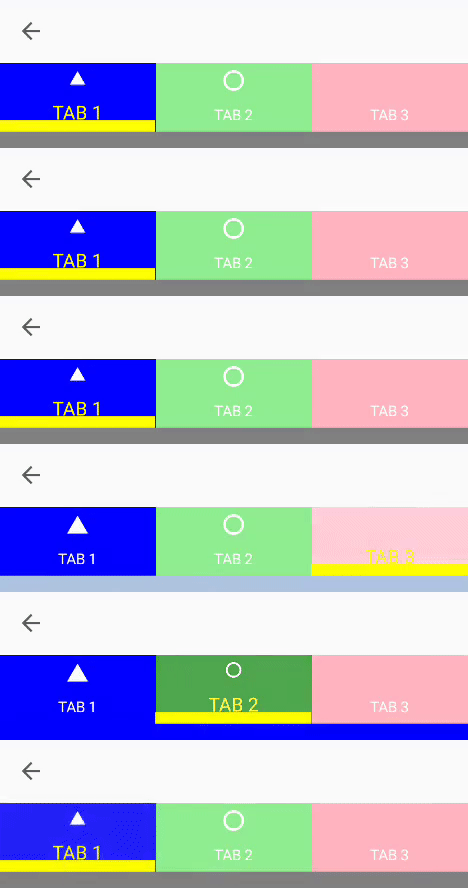
[Bug] TabView - TabIndicator is Hidden Behind Content when setting Background using Visual State Manager #1925

Description

Description
TabView - TabIndicator is Hidden Behind Content when setting Background using Visual State Manager
Stack Trace
N/A
Link to Reproduction Sample
Steps to Reproduce
- Run Xamarin Community Toolkit Sample Project
- Try and Set the TabIndicator within the xct: TabView:
i.e
TabIndicatorColor="Yellow"
TabIndicatorHeight="10"
TabIndicatorPlacement="Bottom" - Note: That the Indicator is not displayed when the Visual State Manager uses "BackgroundColor" Setter:
Expected Behavior
I would expect the Indicator to show
Actual Behavior
It is not shown.
If however we set the Opacity in the Visual State Manager aswell as the Background Color we can see the indicator view is behind the Content.
<VisualState.Setters>
</VisualState.Setters>
Basic Information
- Version with issue:
- Last known good version: Never Worked
- IDE:
- Platform Target Frameworks:
- iOS:
- Android: 12
- UWP:
- Android Support Library Version:
- Nuget Packages:
- Affected Devices:
Workaround
Workaround is Either Set the Opacity but then you are limited to an Opacity affect backgroudn color and could never, for example, have White as the indicator color.
Other Option is to fork the XCT and swap Line 70 of The TasbView.shared.cs so that tabStripIndicator is second in the Children array to ensure it is over the top of the tabStripContent.
From:
tabStripContentContainer = new Grid
{
BackgroundColor = Color.Transparent,
Children = { tabStripIndicator, tabStripContent },
HorizontalOptions = LayoutOptions.FillAndExpand,
VerticalOptions = LayoutOptions.Start
};
		To:
		tabStripContentContainer = new Grid
		{
			BackgroundColor = Color.Transparent,
			Children = { tabStripContent, tabStripIndicator },
			HorizontalOptions = LayoutOptions.FillAndExpand,
			VerticalOptions = LayoutOptions.Start
		};
Reproduction imagery
Current:

Should Be: