Music
Displays currently playing song from your music player. This module supports both MPRIS players and MPD servers. Clicking on the widget opens a popout displaying info about the current song, album art and playback controls.
in MPRIS mode, the widget will listen to all players and automatically detect/display the active one.
Use truncate or marquee options to control how long titles are shown on the bar and popup.
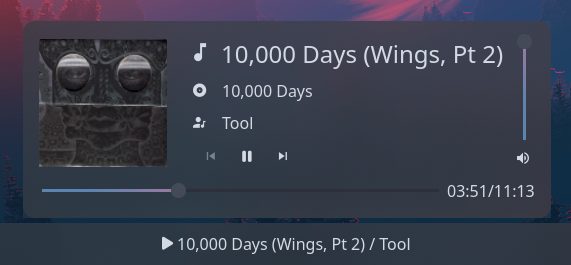
Type:
music
| Type | Default | Description | |
|---|---|---|---|
player_type |
'mpris' or 'mpd'
|
mpris |
Whether to connect to MPRIS players or an MPD server. |
format |
string |
{title} / {artist} |
Format string for the widget. More info below. |
truncate |
'start' or 'middle' or 'end' or off or Map
|
off |
The location of the ellipses and where to truncate text from. Leave null to avoid truncating. Use the long-hand Map version if specifying a length. Takes precedence over marquee. |
truncate.mode |
'start' or 'middle' or 'end' or off
|
off |
The location of the ellipses and where to truncate text from. Leave null to avoid truncating. |
truncate.length |
integer |
null |
The fixed width (in chars) of the widget. Leave blank to let GTK automatically handle. |
truncate.max_length |
integer |
null |
The maximum number of characters before truncating. Leave blank to let GTK automatically handle. |
marquee |
Map |
false |
Options for enabling and configuring a marquee (scrolling) effect for the bar label. Ignored if truncate is configured. |
marquee.enable |
bool |
false |
Whether to enable a marquee effect. |
marquee.max_length |
integer |
null |
The maximum length of text (roughly, in characters) before it gets truncated and starts scrolling. |
marquee.scroll_speed |
float |
0.5 |
Scroll speed in pixels per frame. Higher values scroll faster. |
marquee.pause_duration |
integer |
5000 |
Duration in milliseconds to pause at each loop point. |
marquee.separator |
string |
" " |
String displayed between the end and beginning of text as it loops. |
marquee.on_hover |
'none' or 'pause' or 'play'
|
'none' |
Controls marquee behavior on hover: 'none' (always scroll), 'pause' (pause on hover), or 'play' (only scroll on hover). |
truncate_popup_artist |
'start' or 'middle' or 'end' or off or Map
|
off |
The location of the ellipses and where to truncate text from. Leave null to avoid truncating. Use the long-hand Map version if specifying a length. |
truncate_popup_artist.mode |
'start' or 'middle' or 'end' or off
|
off |
The location of the ellipses and where to truncate text from. Leave null to avoid truncating. |
truncate_popup_artist.length |
integer |
null |
The fixed width (in chars) of the widget. Leave blank to let GTK automatically handle. |
truncate_popup_artist.max_length |
integer |
null |
The maximum number of characters before truncating. Leave blank to let GTK automatically handle. |
truncate_popup_album |
'start' or 'middle' or 'end' or off or Map
|
off |
The location of the ellipses and where to truncate text from. Leave null to avoid truncating. Use the long-hand Map version if specifying a length. |
truncate_popup_album.mode |
'start' or 'middle' or 'end' or off
|
off |
The location of the ellipses and where to truncate text from. Leave null to avoid truncating. |
truncate_popup_album.length |
integer |
null |
The fixed width (in chars) of the widget. Leave blank to let GTK automatically handle. |
truncate_popup_album.max_length |
integer |
null |
The maximum number of characters before truncating. Leave blank to let GTK automatically handle. |
truncate_popup_title |
'start' or 'middle' or 'end' or off or Map
|
off |
The location of the ellipses and where to truncate text from. Leave null to avoid truncating. Use the long-hand Map version if specifying a length. |
truncate_popup_title.mode |
'start' or 'middle' or 'end' or off
|
off |
The location of the ellipses and where to truncate text from. Leave null to avoid truncating. |
truncate_popup_title.length |
integer |
null |
The fixed width (in chars) of the widget. Leave blank to let GTK automatically handle. |
truncate_popup_title.max_length |
integer |
null |
The maximum number of characters before truncating. Leave blank to let GTK automatically handle. |
marquee_popup_artist |
Map |
false |
Options for enabling and configuring a marquee effect on the popup artist text. Ignored if truncate_popup_artist is configured. |
marquee_popup_artist.enable |
bool |
false |
Whether to enable a marquee effect. |
marquee_popup_artist.max_length |
integer |
null |
The maximum length of text (roughly, in characters) before it gets truncated and starts scrolling. |
marquee_popup_artist.scroll_speed |
float |
0.5 |
Scroll speed in pixels per frame. Higher values scroll faster. |
marquee_popup_artist.pause_duration |
integer |
5000 |
Duration in milliseconds to pause at each loop point. |
marquee_popup_artist.separator |
string |
" " |
String displayed between the end and beginning of text as it loops. |
marquee_popup_artist.on_hover |
'none' or 'pause' or 'play'
|
'none' |
Controls marquee behavior on hover: 'none' (always scroll), 'pause' (pause on hover), or 'play' (only scroll on hover). |
marquee_popup_album |
Map |
false |
Options for enabling and configuring a marquee effect on the popup album text. Ignored if truncate_popup_album is configured. |
marquee_popup_album.enable |
bool |
false |
Whether to enable a marquee effect. |
marquee_popup_album.max_length |
integer |
null |
The maximum length of text (roughly, in characters) before it gets truncated and starts scrolling. |
marquee_popup_album.scroll_speed |
float |
0.5 |
Scroll speed in pixels per frame. Higher values scroll faster. |
marquee_popup_album.pause_duration |
integer |
5000 |
Duration in milliseconds to pause at each loop point. |
marquee_popup_album.separator |
string |
" " |
String displayed between the end and beginning of text as it loops. |
marquee_popup_album.on_hover |
'none' or 'pause' or 'play'
|
'none' |
Controls marquee behavior on hover: 'none' (always scroll), 'pause' (pause on hover), or 'play' (only scroll on hover). |
marquee_popup_title |
Map |
false |
Options for enabling and configuring a marquee effect on the popup title. Ignored if truncate_popup_title is configured. |
marquee_popup_title.enable |
bool |
false |
Whether to enable a marquee effect. |
marquee_popup_title.max_length |
integer |
null |
The maximum length of text (roughly, in characters) before it gets truncated and starts scrolling. |
marquee_popup_title.scroll_speed |
float |
0.5 |
Scroll speed in pixels per frame. Higher values scroll faster. |
marquee_popup_title.pause_duration |
integer |
5000 |
Duration in milliseconds to pause at each loop point. |
marquee_popup_title.separator |
string |
" " |
String displayed between the end and beginning of text as it loops. |
marquee_popup_title.on_hover |
'none' or 'pause' or 'play'
|
'none' |
Controls marquee behavior on hover: 'none' (always scroll), 'pause' (pause on hover), or 'play' (only scroll on hover). |
icons.play |
string or image
|
|
Icon to show when playing. |
icons.pause |
string or image
|
|
Icon to show when paused. |
icons.prev |
string or image
|
|
Icon to show on previous button. |
icons.next |
string or image
|
|
Icon to show on next button. |
icons.volume |
string or image
|
|
Icon to show under popup volume slider. |
icons.track |
string or image
|
|
Icon to show next to track title. |
icons.album |
string or image
|
|
Icon to show next to album name. |
icons.artist |
string or image
|
|
Icon to show next to artist name. |
show_status_icon |
boolean |
true |
Whether to show the play/pause icon on the widget. |
icon_size |
integer |
32 |
Size to render icon at (image icons only). |
cover_image_size |
integer |
128 |
Size to render album art image at inside popup. |
host |
string |
localhost:6600 |
[MPD Only] TCP or Unix socket for the MPD server. |
music_dir |
string |
$HOME/Music |
[MPD Only] Path to MPD server's music directory on disc. Required for album art. |
JSON
{
"start": [
{
"type": "music",
"player_type": "mpd",
"format": "{title} / {artist}",
"truncate": "end",
"icons": {
"play": "",
"pause": ""
},
"music_dir": "/home/jake/Music"
}
]
}TOML
[[start]]
type = "music"
player_type = "mpd"
format = "{title} / {artist}"
music_dir = "/home/jake/Music"
truncate = "end"
[start.icons]
play = ""
pause = ""YAML
start:
- type: "music"
player_type: "mpd"
format: "{title} / {artist}"
truncate: "end"
icons:
play: ""
pause: ""
music_dir: "/home/jake/Music"Corn
{
start = [
{
type = "music"
player_type = "mpd"
format = "{title} / {artist}"
truncate = "end"
icons.play = ""
icons.pause = ""
music_dir = "/home/jake/Music"
}
]
}
The following tokens can be used in the format config option,
and will be replaced with values from the currently playing track:
| Token | Description |
|---|---|
{title} |
Title |
{album} |
Album name |
{artist} |
Artist name |
{date} |
Release date |
{track} |
Track number |
{disc} |
Disc number |
{genre} |
Genre |
| Selector | Description |
|---|---|
.music |
Tray widget button |
.music .contents |
Tray widget button contents box |
.music .contents .icon |
Tray widget button icon (any type) |
.music .contents .text-icon |
Tray widget button icon (textual only) |
.music .contents .image |
Tray widget button icon (image only) |
.popup-music |
Popup box |
.popup-music .album-art |
Album art image inside popup box |
.popup-music .title |
Track title container inside popup box |
.popup-music .title .icon-box |
Track title icon container inside popup box |
.popup-music .title .icon-box .icon |
Track title icon inside its container (any type) |
.popup-music .title .icon-box .text-icon |
Track title icon inside its container (textual only) |
.popup-music .title .icon-box .image |
Track title icon inside its container (image only) |
.popup-music .title .label |
Track title label inside popup box |
.popup-music .album |
Track album container inside popup box |
.popup-music .album .icon-box |
Track album icon container inside popup box |
.popup-music .album .icon-box .icon |
Track album icon inside its container (any type) |
.popup-music .album .icon-box .text-icon |
Track album icon inside its container (textual only) |
.popup-music .album .icon-box .image |
Track album icon inside its container (image only) |
.popup-music .album .label |
Track album label inside popup box |
.popup-music .artist |
Track artist container inside popup box |
.popup-music .artist .icon-box |
Track artist icon container inside popup box |
.popup-music .artist .icon-box .icon |
Track artist icon inside its container (any type) |
.popup-music .artist .icon-box .text-icon |
Track artist icon inside its container (textual only) |
.popup-music .artist .icon-box .image |
Track artist icon inside its container (image only) |
.popup-music .artist .label |
Track artist label inside popup box |
.popup-music .controls |
Controls container inside popup box |
.popup-music .controls .btn-prev |
Previous button inside popup box |
.popup-music .controls .btn-play |
Play button inside popup box |
.popup-music .controls .btn-pause |
Pause button inside popup box |
.popup-music .controls .btn-next |
Next button inside popup box |
.popup-music .volume |
Volume container inside popup box |
.popup-music .volume .slider |
Slider inside volume container |
.popup-music .volume .icon |
Icon inside volume container |
.popup-music .progress |
Progress (seek) bar container |
.popup-music .progress .slider |
Slider inside progress container |
.popup-music .progress .label |
Duration label inside progress container |
For more information on styling, please see the styling guide.