Tray
Displays a fully interactive icon tray using the KDE libappindicator and com.canonical.dbusmenu protocols.
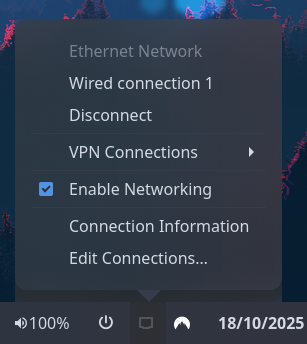
Type:
tray
| Name | Type | Default | Description |
|---|---|---|---|
direction |
'horizontal' or 'vertical' (shorthand: 'h' or 'v') |
Matches bar orientation | The direction in which to pack tray icons. |
icon_size |
integer |
16 |
Size in pixels to display tray icons as. |
prefer_theme_icons |
bool |
true |
Requests that icons from the theme be used over the item-provided item. Most items only provide one or the other so this will have no effect in most circumstances. |
on_click_left |
string |
'default' |
Action to perform on left-click. See Click Actions below. |
on_click_right |
string |
'menu' |
Action to perform on right-click. See Click Actions below. |
on_click_middle |
string |
'none' |
Action to perform on middle-click. See Click Actions below. |
on_click_left_double |
string |
'none' |
Action to perform on double-left-click. See Click Actions below. |
on_click_right_double |
string |
'none' |
Action to perform on double-right-click. See Click Actions below. |
on_click_middle_double |
string |
'none' |
Action to perform on double-middle-click. See Click Actions below. |
Click actions can be one of the following built-in actions, or any custom shell command:
Built-in actions:
-
menu- Opens the tray icon's popup menu -
default- Triggers the tray icon's default (primary) action -
secondary- Triggers the tray icon's secondary action -
none- Do nothing
Custom commands:
Any other string is treated as a custom shell command. Custom commands support the following placeholders:
-
{name}- The tray item's identifier/name -
{title}- The tray item's title (if available) -
{icon}- The tray item's icon name (if available) -
{address}- The tray item's internal address
Examples:
{
  type = "tray"
  on_click_left = "menu"
  on_click_left_double = "default"
}
To run custom commands based on which tray item was clicked:
{
  type = "tray"
  on_click_left = "notify-send 'Clicked {name}'"
  on_click_middle = "if [ '{name}' = 'copyq' ]; then copyq toggle; fi"
}
JSON
{
  "end": [
    {
      "type": "tray",
      "direction": "top_to_bottom"
    }
  ]
}
TOML
[[end]]
type = "tray"
direction = "top_to_bottom"
YAML
end:
  - type: "tray"
    direction: "top_to_bottom"
Corn
{
  end = [{
    type = "tray"
    direction = "top_to_bottom"
  }]
}
| Selector | Description |
|---|---|
.tray |
Tray widget box |
.tray .item |
Tray icon button |
.tray .item.urgent |
Tray icon button (needs attention) |
For more information on styling, please see the styling guide.