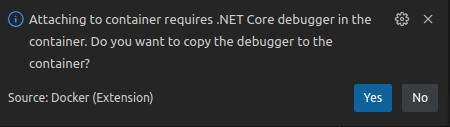
The "copy debugger" notification still pops up when running 'Docker .Net Core Attach (Preview)' configuration again #3758

Description

OS: All
Build Version: 20221206.1
Regression: Previous Release
Repro Steps:
- Create a .NET Core MVC project by "dotnet new mvc --no-https".
- Open the project in VS Code -->
F1 --> Type and select "Docker: Add Docker Files to Workspace" --> ASP.NET Core --> Linux --> Include optional Docker Compose files. - Right click the docker-compose.yml --> Select "Compose Up".
- Open launch.json and click 'Add Configration…', and choose 'Docker .NET Core Attach (Preview)'.
- Run the above configuration, select the running container from step4 and click yes in the below notification to copy the debugger on the container.

- Stop debugging.
- Debug again and select the running container.
- Check there shouldn't be any "copy debugger" notification.
Expect:
There shouldn't be any "copy debugger" notification.
Actual:
The "copy debugger" notification pops up again.
More Info:
This issue does not reproduce on the previous released Docker extension 1.23.1.